
Known Participant
April 16, 2019
Answered

Ultra key changing color balance

  • April 16, 2019
  • 3 replies
  • 3969 views

This has been an unanswered question for a few months now. I'm sorry to re-post the issue but I'm really hoping someone will have some useful suggestions for me as this is killing me on a time-sensitive job.

Ultra key is changing the color balance on my footage. Here is one example. The same footage with Ultra Key turned off (left half) and turned on (right half). Any ideas what's going on here and what, if anything, I can do to avoid it?
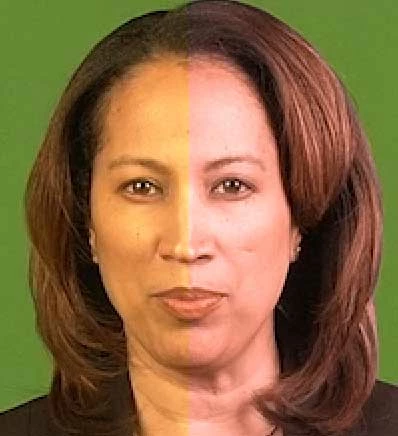
Here's someone else with the same problem from months ago:

Why Does Ultra Key Keep Changing The Color Of My Video

    This topic has been closed for replies.
    Correct answer

    Answered in another topic, but in case thats same issue will repost.

    Found solution, don't know about you guys, but what is fixed this for me is:

    Effects panel > Ultra key > Spill Suppression > Range

    Range value is 50 by default, I'm just put it on 0 and boom no more color problems

    3 replies

    Participant
    March 28, 2020

    I guess your green screen lighting was not proper.
    So the solution is: 
    1) Add Ultra Key to the video.
    2) Change the setting to Aggressive
    (Your video color tone might change now)
    3) Go to Matte Generation
    4) Go to Tolerance and reduce the Value. 
    (This will get back your original video color.)

    HAVE FUN

    Correct answer
    September 30, 2019

    Answered in another topic, but in case thats same issue will repost.

    Found solution, don't know about you guys, but what is fixed this for me is:

    Effects panel > Ultra key > Spill Suppression > Range

    Range value is 50 by default, I'm just put it on 0 and boom no more color problems

    R Neil Haugen
    Legend
    April 16, 2019

    Does your system have the sequence setting set to "Composite in linear color" on? If so, turn it off, and see what happens.

    What GPU and GPU settings do you have?

    Neil

    Everyone's mileage always varies ...
    Known Participant
    April 18, 2019

    Neil,

    Thanks for your response.

    Yes, the sequences are set to "Composite in Linear Color." Turning this on and off has no visible effect on the way UltraKey is changing color balance.

    GPU Preferences are set to "Mercury Playback Engine (CUDA)." I am running an NVIDIA Quadro K2000.

    Mark

    R Neil Haugen
    Legend
    April 18, 2019

    I wish I had something more ... what other effects are in use?

    Neil

    Everyone's mileage always varies ...