Known Participant
May 15, 2019
Question

Ultra Key not removing all the green

  • May 15, 2019
  • 1 reply
  • 836 views

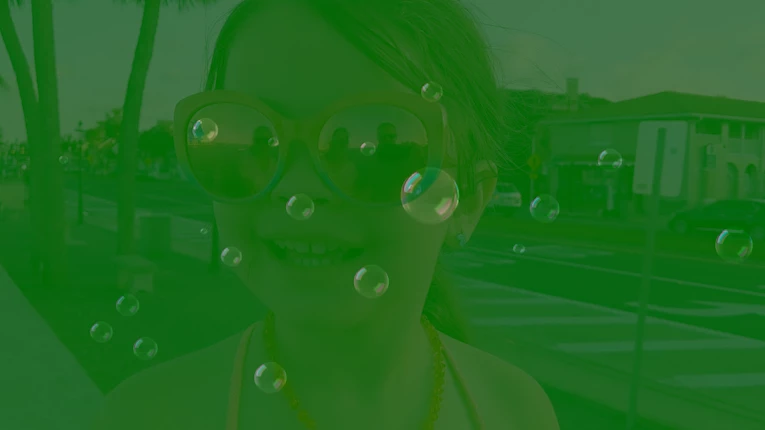
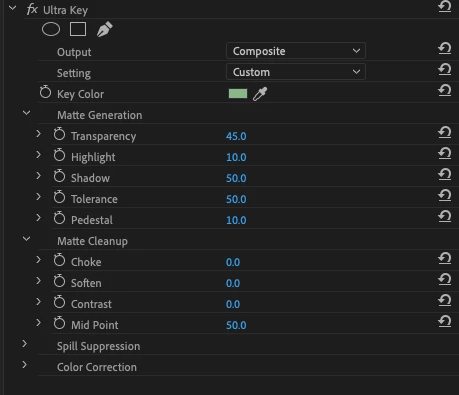
Hi everyone, I just started noticing an issue with Ultra Key. I first thought it was the source because I was working with elements I hadn't used before but now I see it is an issue with Ultra Key. I'm not sure if my settings got changed inadvertently or what. But what is happening is it is only dimming the green and not removing it. I can play with Transparency, shadow, Tolerance, pedestal and Mid Point to get rid of it but it still leaves a slight tint to the video. I used to not have to do that and I shouldn't have to. I understand when I record a subject in front of a green screen but these elements shouldn't need it. They are evenly lit.

I did try changing the Output and Setting options with no luck.

Any ideas of what may have happened?

Pictures to illustrate what I'm getting and the generic settings in place.

Computer                                   Premiere Pro CC

macOS Mojave                          13.0.2 (Build 38)

Version 10.14.4

Thanks in advance,

Steve
This topic has been closed for replies.

1 reply

Kevin J. Monahan Jr.
Legend
May 15, 2019

Hi Steve N,

Not having any issues here. Can you just try using the eyedropper on the green area? Can you show us a shot of the green screen elements on their own?

Thanks,

Kevin

Kevin Monahan - Sr. Community and Engagement Strategist – Adobe Pro Video and Audio
Known Participant
May 16, 2019

Hi Kevin,

The eyedropper is the only way I know how to remove the green, so yes I have used it. I used to have an issue with a Windows computer where I would have to move my work from the external screen back to the computer monitor to get the eyedropper to work. So I even tried that with no avail. Same results. I use green screen elements in every video and have not had an issue until this video. This element is one I have used many times in the past with no issues.

I have included two screen shots.

1. A screen shot of just the element, as requested, over no clips.

2. A screen shot of that element after using the eyedropper. No adjustments made.

Thanks,

Steve

Kevin J. Monahan Jr.
Legend
May 16, 2019

Hi Steve N,

If the basic functionality is not working, I would try trashing preferences first.

Thanks,
Kevin

Kevin Monahan - Sr. Community and Engagement Strategist – Adobe Pro Video and Audio