Irene Au
Participant
May 25, 2021
Answered

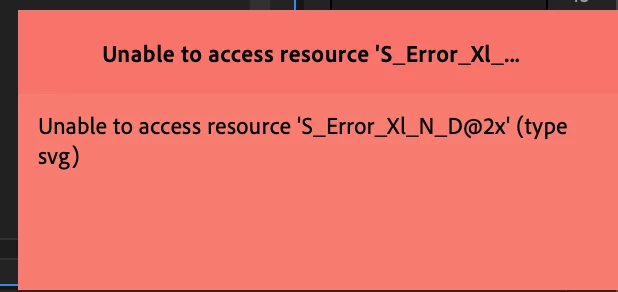
Unable to access resource 'S_Error_XI_N_D@2x' (type svg)

  • May 25, 2021
  • 20 replies
  • 21713 views

Hi everyone,


I'm using iMac Pro. When I using Premiere Pro, sometimes it will show that error, I don't know what is it, anyone can help!



This topic has been closed for replies.
Correct answer darktale

Update - In addition to downgrading Premiere, I also had to downgrade Media Encoder as well. Version 15.2 Media Encoder had failed encodes when working with 15.1 Premiere.  I am hoping this is only a temporary downgrade until the next software update.


I'm working on an iMac Pro running OS Mojave.


Finally, I also downgrade Premiere Pro and Media Encoder to 15.1 as well. It's seem back to normal and no error.

Thank you for your suggestion.

20 replies

Known Participant
May 21, 2023

I just had this error come up from a freelancer working in our office. I believe it is related to improper procedure around importing. In his case he drag and dropped his files direct to Premiere rather than using the media browser. I've had similar errors in the past when I've imported media in other ways rather than using the media browser, which made me ask him the question. 

Adobe Employee
May 9, 2022

Update-

We were able to narrow down the cause of the issue to an excessive number of file handles being used, which would result in the application’s inability to open any additional files. The issue impacted Mac models with Intel XEON W CPUs while using 4K MXF XAVC files. This could result in users seeing any of the following errors during playback or exporting:

- “Unable to access resource….”

- “Unable to load frame….”

- “Unable to produce frame….”

- White frames displayed during playback

- Application slowdowns, inability to save project and application crash


Premiere Pro 22.5.0.17 (Beta) was tested internally and none of the above errors were seen during our tests with the fix in place. If you would like to try out this fix, you can download the latest Premiere Pro 22.5 beta build using the Creative Cloud desktop app and selecting it in the Beta apps listings.  

https://helpx.adobe.com/x-productkb/global/creative-cloud-public-beta.html


If you were experiencing this issue before, please let us know if this fix corrects the problem for you or if the issue is still present in your environment.

- Martie

Inspiring
May 9, 2022

While this problem as not gone away, I have found a small work around and I can deal with until the next released version of PP comes out.   --- I click on the desktop and click back to Premiere and hit save. So far...seems to work. It at leas allos me to save the project and not have the app crash.


It remains a reliability issue in tems of playback, but thanks to Covid it's just me at my desk. 


But thank you for the Beta option. If it becomes a chonic issue, I will give it a try.

Participating Frequently
May 24, 2022

Curious if anyone has had any luck testing out the Beta version 22.5 that Martie mentioned above?


May need to give it a shot - be great to stop working in version 15.1!!!

Inspiring
April 28, 2022

As of April 28th...having this problem also (MacPro209-96gig ram, plenty of storage space, created a new project as well - still crashes). I think I should blame the latest software upgrade. So I'm going to downgrade as well.


I did notice that sometimes the error preceeded a warning from Accusonus that I needed to upgrade to the latest installers. Ironic given I have and I can get no support from them anymore. I have since removed the plugins...but now I get warnings that other older sequences are looking for the plugins. I have craeted a new version of the project that does not refer to those sequences. But still crashes.

Inspiring
April 28, 2022

I'm, going to add that I did downgrade, plus stripped out extensions, and removed plugins that I was suspicious of. I'm still crashing every 3-4 mins of use. This has forced me to save with every single operation I perform as the alternative is huge amounts of basic editing opperations are repeated over and over and over. It is quite maddening. Now I'm getting this error too:  unable to access resource 'CursrDataID-10' (type xml) What is the heck is going on here?

Inspiring
May 3, 2022

I have decided to return to the latest upgrade. It was actually LESS buggy that way. On other older project's I've worked on I'm not getting this error issue. But then again I have not reinstalled some 3rd party plugs (e.g. Digital Anarchy & ERA). That may have been part of the issue. Will update if this reemerges.

Participating Frequently
April 2, 2022

What can we do as a collective of angry editors to make adobe step up & fix this?


I'm at the point of considering flying to the US & campaigning outside their HQ with a loudspeaker & sign saying 'please fix access resource s error'


Adobe Employee
April 6, 2022

We have been actively trying to repro and investigate this bug over the past several months. Since it is intermittent in nature, getting it to repro in-house has been challenging, so apologies for the extended time to address this. Today, we might have finally gotten a repeatable reproduction of it using Sony 4K (UHD) XAVC mxf clips on a MacPro (11.6) running Premiere Pro 22.1.2.
Steps as follows:
1) Import a lot of MXF clips (in my test - two bins with 500 in each)
2) Load a single MXF clip in source monitor and play for several seconds
3) Repeat load and play operation with additional clips
Results: When loading the sixth clip, a white frame appeared in source monitor and no playback was possible. After several seconds it displayed a black video frame, then showed the actual video frame content. When the export panel was opened the "Unable to access resource" error showed and the application crashed. Note: the large number of file imports was done to accelerate the reproduction, since time to trigger issue can be somewhat lengthy.

Afer reading over the many comments, this seems to be close to errors that most users are experiencing. There are more tests to be done and work to correct the issue, but I wanted to post a note here to let you know of the progress today.
If you have any additional comments or feedback please continue to post. They are being read and investigated. Kevin also does a great job of elevating the issues and comments to Engineering for visibility.
-Martie

Participant
April 6, 2022

Hi Martie

Really appreciate you looking into this and glad you've managed to replicate it - here's to you successfully fixing the bug!  

Not sure if it's related but I've also been experiencing an export issue with similar clips, where the sequence part exports and then throws up the attached message.  my only workaround is to export and reimport a TGA sequence and wav... then combine them for a second export... rather lengthy!

Thanks again.

Participating Frequently
April 1, 2022

Adobe, I'm begging you.... please fix this bug. 

Participant
April 1, 2022

I have to agree. This HAS to get fixed. 2019 Mac Pro maxed out and i'm stuck using 15.4.1. This is NOT what I'm paying for. Been using Premiere since 2002 and if this isnt fixed prior to me cutting season 4 of a Discovery channel series show I'm out. Really feeling like Adobe is disregarding the pro users at this point.

Participant
March 29, 2022

I'm still having issues with all versions of Premiere 2022 on our 2019 Mac Pros (Intel) running Big Sur using Canon MXF files. These towers are maxed out at 28-cores, AMD Radeon Pro Vega II Duo 32GB, and 768GB RAM. Something is really wrong here if we can't make basic edits on these workstations. Adobe -- what's the latest?  

Known Participant
March 7, 2022

Has this been fixed? I can export from Premiere Pro 2020 without any issues but I get this error when just trying to render in and out points in Premiere 2021. None of the workaround offered have worked other that going back a version. The only problem is that any projected opened in version 2021 will not open in 2020. This should have been fixed by now!

Participating Frequently
March 9, 2022

No, for reasons that are beginning to elude me this has not been fixed. 

From what I've understood this is a known problem that just is not high on the priority list of bug fixes. 


Which is pretty absurd after almost 1 year of this error. 

Inspiring
February 22, 2022

First time getting the access error. 

Project is using XAVC-I footage from FS7


iMAC 2017

Catalina

128gb Ram

Radeon Pro Vega 64x 16GB Ram


External - G-Shock Raid Thunderbolt


Looks like others are sayind owngrade but that was May 2021.

Kevin J. Monahan Jr.
Community Manager
Community Manager
February 23, 2022

Hi,

Sorry about that. Is this your Mac? https://everymac.com/systems/apple/imac-pro/specs/imac-pro-eight-core-3.2-xeon-27-inch-late-2017-specs.html


If it has Xeon CPUs you can hit this bug. I have been advocating for a fix and there is a bug on User Voice. Upvote here: https://adobe-video.uservoice.com/forums/911233-premiere-pro/suggestions/44713258-bug-issue-premiere-pro-22-1-2-working-with-mxf


Sorry about the hassle.


Thanks,

Kevin

Kevin Monahan - Sr. Community and Engagement Strategist – Adobe Pro Video and Audio
Inspiring
February 23, 2022

"2.3 GHz 18-Core Intel Xeon W"

I've noticed if I keep saving the project under a different name, opening it up and work at it again the system it will take a few mintures for scrubbing footage to trigger the error.  I then imported into the same project media from an external recorder, ProRes LT, no problems at all in the same project.


Attached are some other erros the system started reporting.

Participating Frequently
January 31, 2022

Same Error for me. I use most of the time media from A7sIII, Fx6 or FX9. "Unable to access resource "SErrorXlND@2x'(type svg)" Happens in lastest Version of Premiere 2022 or Beta. Also in the 2021 but not that often. It‘s really the worst bug i ever had i can‘t edit with it. You start a project after 2min error messages und white screen and the project can not be saved. Premiere is not usable like that.

Mac Pro 2019
24 Core,192GB Ram
W5700X and 6900XT plus Afterburner.
Big Sur 11.6.3

Participating Frequently
January 31, 2022

Just for info on my Mac Book Pro 16 with i9 and 5600m this error not happend on any version of premiere. I also edit at a company with a imac pro 10 core and vega64 with catalina 10.15.7 and premiere 15.2.0 with no problem.

Maybe it's the higher core count?  

Known Participant
January 31, 2022

I don't believe this is a core count issue. I believe this is a macOS version+Creative Cloud version+MXF+GPU issue. But I have found a way to make it reset without force quitting or rebooting the Mac.


The last few times I have experienced this bug, when the behavior begins (unable to save/white or black screens where picture should be/the delightful SVG error message) I immediately stop interacting with Premiere, I move the cursor to the Finder and click on the desktop. Then I click back onto the Premiere timeline. And...it goes away. I don't know why, it just instantly resolves. I have been able to save, scrub the timeline, edit.


My specs - iMac Pro 18 core, 128GB RAM, Vega64 16GB, macOS 11.6. Premiere, version is irrelevant...I have had this occur in 15.1 on. Editing Canon MXF clips when the issue arises.


The only other "solution" offered to this issue has been to rollback to an older version. Some users solutions, however, has been to roll forward to a different software. I don't believe Adobe wants either to be the answer so I, along with the others experiencing this problem, hope you are able to isolate and repair this bug soon. Maybe my "solution" will point your engineers toward the actual issue.

Participating Frequently
January 5, 2022

Anyway to NOT mark this as "Solved" because it clearly isn't? As for recreating the issue, I'm not about to make my workstation unusable to troubleshoot this for Adobe. What I can do is tell them to buy the latest and greatest Mac Pro, upgrade to the latest Adobe software, use industry standard formats for film and throw that footage into a timeline. Your machine will crawl to a halt I promise you. For now, I'm staying in Premiere 15.0 where I can actually do my job. Thanks!


Kevin J. Monahan Jr.
Community Manager
Community Manager
January 7, 2022

Hi M,

Sorry, I cannot.


This is what I call a "zombie" post. It came from out of the grave. You see, this solution solved it for the OP for version 15.x in May. The OP marked it as such. We do not want to upset the OP by removing his/her correct answer.


I have no control over the way users find their way to a post. Users came here not knowing a new post should have been created as most turned up via a Google search, a guy guesses.


If this is a problem with you and you would rather address the current version, feel free to create a new post. Others are content to keep troubleshooting the current issue on this legacy post, as there is a new bug filed currently back when v.22 came out. The 15.x bug is closed.


For now, I'll leave it unlocked. OK?


If you do decide to make a new post based on the version that this similar bug is addressing, that's fine, just PM me. I can trim, move, and prune the posts.


If you want give this feedback to the product team, voice concerns on User Voice as that is where the engineering crew accepts bug reports and feedback (try to be kind): https://adobe-video.uservoice.com/forums/911233-premiere-pro


I would link here to a specific bug from User Voice right here, but no one yet on this post has yet created one. If someone writes up a bug there, please give us a link to it so we can all upvote. Right now, the bug is flying under the radar as nothing is filed and no one is making noise about it on User Voice. Can someone file please?


My take: Sounds like the issue is most prevalent with card based media and these Xeon chipped Macs. Not seeing the issue with any other scenario.


Ruminating on this a bit, there was an update to the card based media workflow within the last couple of versions, I noted, so that could be at the heart of this. Media Browser is "supposedly" no longer needed to ingest card based media. It used to be required before to work as designed, attaching metadata that comes along with the folders along the way. Of course, a lot of people experienced related issues by not using Media Browser previously for card based files, such as, moving media across to new directories and not being able to relink to the proper files (because of identically named files with no metadata to differentiate them), even though the workflow is clearly stated in the user guide.


I think any projects brought across major versions are subject to be affected by this change in card based media handling. Similar stuff has happened in the past moving projects across major versions. I would not update any 15.x projects into the v.22 realm if these projects are mission critical, for example. I would give that advice for any major version, as well. Sorry if this info does not help much for your issues happening right now other than me suggesting you roll back to 15.x.


Thank You,
Kevin

Kevin Monahan - Sr. Community and Engagement Strategist – Adobe Pro Video and Audio
Participating Frequently
January 24, 2022

I just posted a bug report to User Voice, please feel free to up vote if other users are experiencing something similar.


Thank you!


https://adobe-video.uservoice.com/forums/911233-premiere-pro/suggestions/44713258-bug-issue-premiere-pro-22-1-2-working-with-mxf