
Ela6
Participant
April 8, 2022
Question

Unable to add chapter marker on top of segmentation marker

  • April 8, 2022
  • 1 reply
  • 464 views

Dear Adobe community,


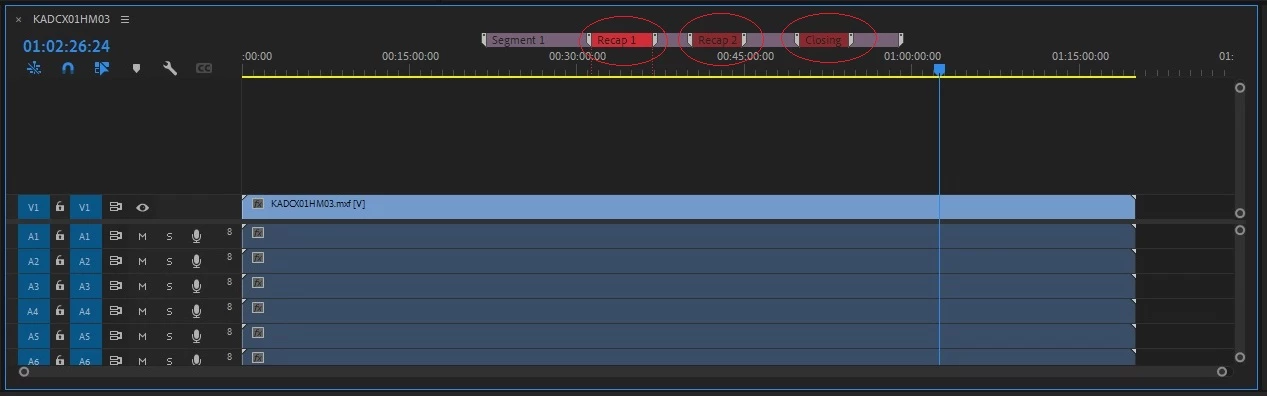
I have been adding chapter marker on top of segmentation marker to indicate my recaps and closing point in my media as circled in the image below. Recently, I have updated my Premier PRO to version 22.1.2 and version 22.2, since then I'm unable to do so. The marker indicator will go to my segmentation marker everytime I tried to add chapter marker on top of it. Is this some kind of bug in the latest version? Is there any settings I can change to overcome this? This way of adding chapter marker on top of segmentation marker working fine in older versions like 22.0 and 15.4. Would appreciate if anyone can clarify on this, thanks.
 

This topic has been closed for replies.

1 reply

Mike Dziennik
Community Expert
Community Expert
April 8, 2022

Can't say I've tried this before so not sure how it used to work, but I experience the same issue. You can however, create the chapter marker before or after the segmentation marker and then drag it on top. Not ideal but it's a workaround.

Ela6
Ela6Author
Participant
April 8, 2022

Any chance for us to escalate this to Premier PRO development team for them to look into this? Since the previous version was working fine.

Ela6
Ela6Author
Participant
April 8, 2022

We are working with quite a number of media in a day, don't think the workaround would be ideal for us to carry out in a daily basis.