
Known Participant
May 21, 2021
Answered

Unable to add video to my Premiere timeline

  • May 21, 2021
  • 2 replies
  • 552 views

I'm trying to use captured video game footage in Premiere, and the videos not only load into the Assembly tab, but if I click on the videos they play, including sound, in the preview window. But when I try to take it into the timeline, only the audio is loaded into the timeline. Nothing I do makes the video load into the timeline.
This topic has been closed for replies.
Correct answer Ann Bens

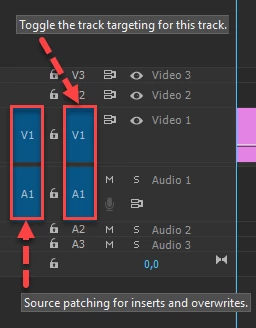
Most common user error is not source patching the track.
Solved by first opening clip in Source Monitor, set in and out point. Then drag/insert into timeline.

2 replies

Ann Bens
Community Expert
Ann BensCommunity ExpertCorrect answer
Community Expert
May 21, 2021

Most common user error is not source patching the track.
Solved by first opening clip in Source Monitor, set in and out point. Then drag/insert into timeline.

Emanuel Arano
Participant
May 21, 2021

Look down at the Track Header at the left of the Timeline. Make sure the V1 and A1 Source Patchers (blue boxes) are patched to the track you intend to drag it to. All 4 blue boxes should be enabled.