Known Participant
June 14, 2023
Answered

unable to edit block of green

  • June 14, 2023
  • 1 reply
  • 332 views

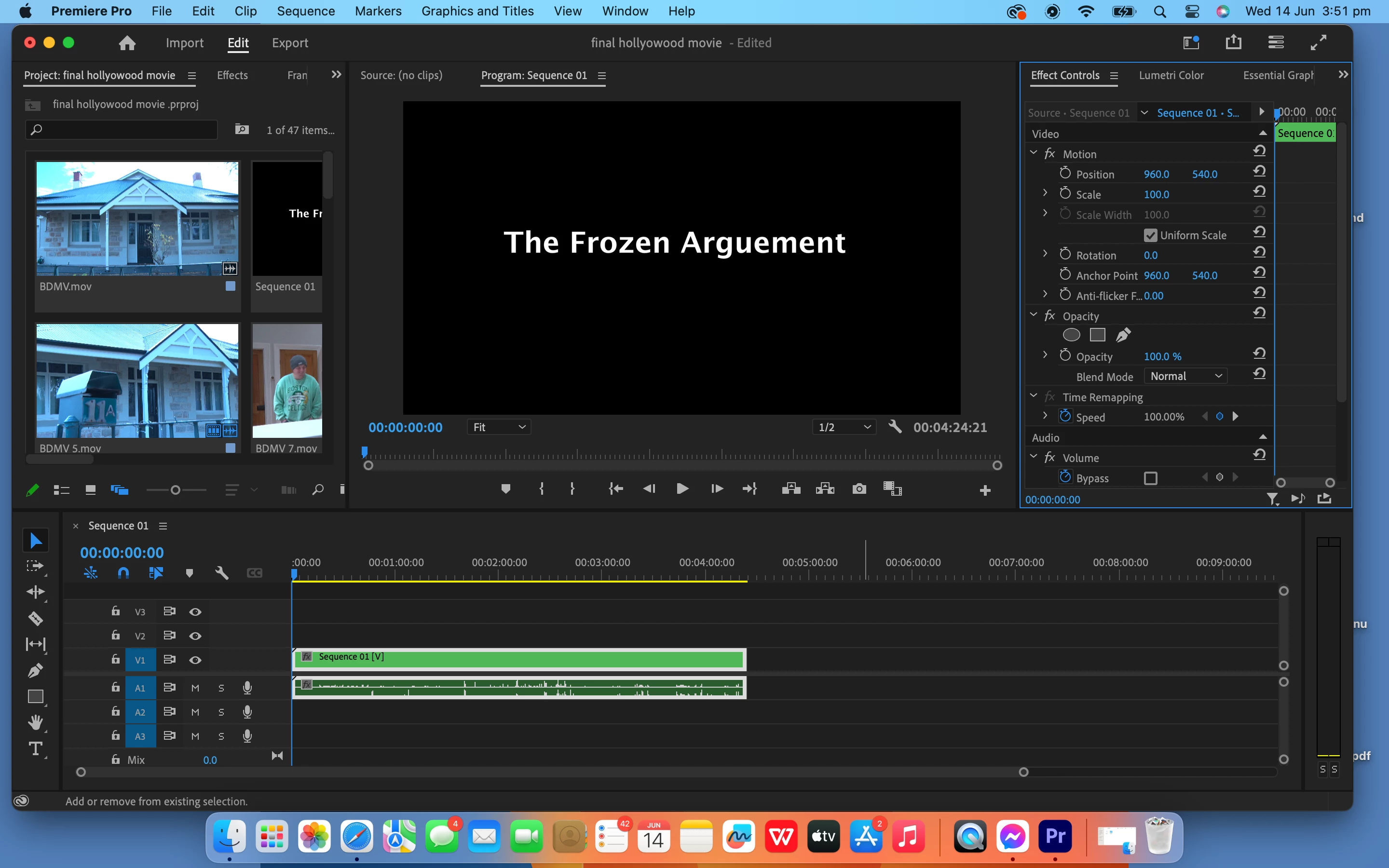
hi all, please please do help me - im unable to edit my work in premire pro as it is coming up with this block of green, and want to make some changes. ive tried restarting, relogging in and that doesnt work. i think i might have rendered it by mistake.

please help me,

kind regards elise 
This topic has been closed for replies.
Correct answer Sami Succar

How did you end up with this "block of green", as you call it. This is actually a nest, and if you don't know what that is, then you probably created it by mistake. If you double click on it, it should open in a new timeline where you can see your cuts.

1 reply

Sami SuccarCorrect answer
Inspiring
June 14, 2023

How did you end up with this "block of green", as you call it. This is actually a nest, and if you don't know what that is, then you probably created it by mistake. If you double click on it, it should open in a new timeline where you can see your cuts.

Elise5ED1Author
Known Participant
June 14, 2023

Hi, it worked. Thank you so so much i am so super grateful, you have absoulely no idea.

kind regards elise