

ck_rocks
Inspiring
October 16, 2024
Question

Unable to import preset text styles

  • October 16, 2024
  • 2 replies
  • 412 views

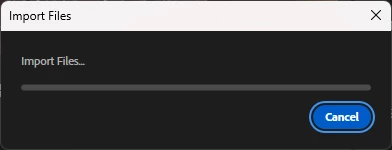
I just downloaded the new Premiere Pro today. I am unable to import any preset text styles. I've never had an issue with this before. Today it just keeps showing this window and does nothing. I've tried multiple saved preset text files and nothing. Thank you!
 

This topic has been closed for replies.

2 replies

AnnikaKoenig
Legend
October 16, 2024

Did @Ann Bens ' suggestion help?

ck_rocks
ck_rocksAuthor
Inspiring
October 16, 2024

I'm not sure how to reset the preferences in this case. I did notice that when I decided to edit the captions the old fashioned way under the Properties window, the preset I tried to upload was in there under Properties. It was a screen under Properties I've never seen before. I'm still not sure how it landed there. Super weird!

AnnikaKoenig
Legend
October 16, 2024

Post a screenshot when you get that again. To reset the prefs, close Premiere, and when you launch it hold down shift or alt/opt. That will make a dialog pop up where you can tell the app to launch with clean prefs. Heads up: this will reset your settings in the Preferences. 

Ann Bens
Community Expert
Community Expert
October 16, 2024

Try resetting preferences.