
Participant
October 4, 2025
Answered

Unable to move the timeline up to access higher video tracks (works fine for audio tracks)

  • October 4, 2025
  • 2 replies
  • 158 views

Hi all,

I'm facing an issue in Adobe Premiere Pro where I can't move the timeline view up to access higher video tracks. Normally, I could hold the left mouse button and drag the cursor upwards, which would move the timeline view itself and allow me to reach higher layers. However, this no longer works for video tracks.

The strange part is that I can still move the audio tracks up and down, and I can freely move the video clips within the timeline itself — it’s just the timeline view that’s not working as expected. You can watch video.

Has anyone encountered this issue, or does anyone have any suggestions?

Thanks for your help!
Correct answer MyerPj

I see that in the beta also. Ctrl+scrollwheel moves the timeline up and down over the video tracks.

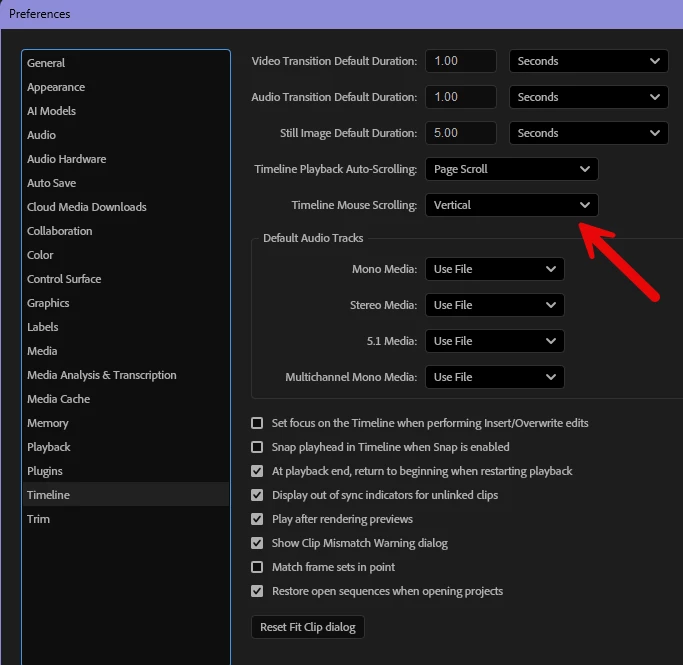
I usually have my timeline mouse scrolling pref set to Vertical, so I can move up and down with mouse wheel. I'm not used to dragging up/down as you appear to do in the video. But my beta (25.6 b88) is doing the same as yours.


2 replies

MyerPj
Community Expert
MyerPjCommunity ExpertCorrect answer
Community Expert
October 4, 2025

I see that in the beta also. Ctrl+scrollwheel moves the timeline up and down over the video tracks.

I usually have my timeline mouse scrolling pref set to Vertical, so I can move up and down with mouse wheel. I'm not used to dragging up/down as you appear to do in the video. But my beta (25.6 b88) is doing the same as yours.


Peru Bob
Community Expert
Community Expert
October 4, 2025

Ty resetting the Workspaces:
Reset a workspace
Reset the current workspace to return to its original, saved layout of panels.
1. Do one of the following:
• Click the Workspace menu icon and select Reset to Saved Layout.
• Choose Window > Workspace > Reset to Saved Layout.
from here:
https://helpx.adobe.com/premiere-pro/using/workspaces.html