



Unable to set mutliple keyframes with UXP
Currently trying out UXP in Premiere Pro 26.2.0 (BETA). I am trying to add some keyframes to a ComponentParam. I am simply getting access to the Motion Component and grabbing the Bottom Crop param. In the example below I am trying to:
- Set a keyframe with value 50% at 0 seconds
- Set another keyframe with value 40% at 5 seconds
I’ve debugged the values and they all look correct to me, but after executing this code I do not see all of the keyframes. It seems to just set the ComponentParam value as if there wasn’t multiple keyframes.
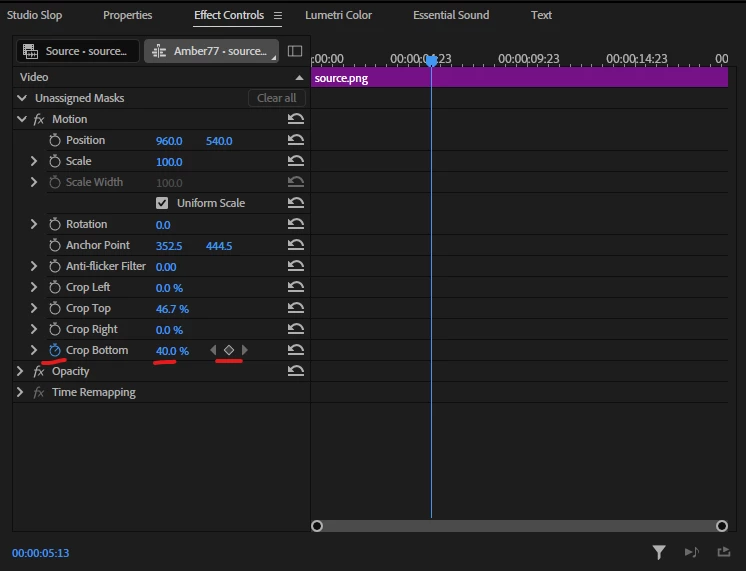
In the image below you can see that the value is set to 40% (the last keyframe I set), and it also looks like keyframing is enabled, but no keyframes actually appear on the timeline. It seems to be completeley ignoring the time I set. I tried debugging the program and the tick time objects look valid to me and report back the correct values.
This feels like a bug to me, but I may be doing something wrong...
Code Example:
let success = false;
try {
project.lockedAccess(() => {
const setTimeVaryingAction = componentParam.createSetTimeVaryingAction(value);
success = project.executeTransaction((compoundAction) => {
compoundAction.addAction(setTimeVaryingAction);
}, "SetTimeVaryingAction");
});
} catch (err) {
throw Error("Failed to change time varying");
}
project.lockedAccess(() => {
project.executeTransaction(compoundAction => {
const keyframe1 = param.createKeyframe(50);
keyframe1.position = createTickTime(0);
keyframe1.setTemporalInterpolationMode(premiere.Constants.InterpolationMode.LINEAR);
const addAction2 = param.createAddKeyframeAction(keyframe1);
compoundAction.addAction(addAction2);
const keyframe2 = param.createKeyframe(40);
keyframe2.position = createTickTime(5);
keyframe2.setTemporalInterpolationMode(premiere.Constants.InterpolationMode.LINEAR);
const addAction = param.createAddKeyframeAction(keyframe2);
compoundAction.addAction(addAction);
}, “test”);
});
 AdChoices