



KazuT_G
Inspiring
July 24, 2026
Question

uninstall beta version of premiere and media encoder

  • July 24, 2026
  • 8 replies
  • 64 views

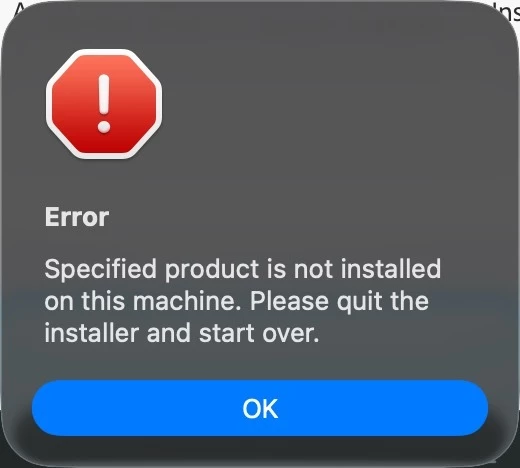
In 2023, I installed a Beta version of Premiere Pro & Media Encoder on my MacBook Pro 2023 for some reason. I’m trying to uninstall it, but when I launch the uninstaller, I get the error below. How do I uninstall these Beta versions? Thanks again :)
 

    8 replies

    Community Expert
    July 25, 2026

    did you try the cleaner tool:

    https://helpx.adobe.com/creative-cloud/apps/troubleshoot/diagnostics-repair-tools/run-creative-cloud-cleaner-tool.html

    also on mac if you move them to trash then empty the trash these apps should be removed

    caroline_edits
    Community Manager
    Community Manager
    July 27, 2026

    I'm on Mac and moved my Premiere Beta 2026 to the trash to see what would happen. I don't have the 2023 version to try it with, but this is what happened with 2026.

    1. Found it in the Applications folder in my Finder

    2. Moved the whole Beta folder to the trash

    3. Emptied trash

    4. In the Creative Cloud desktop app, under Apps > Beta it was still showing that I had Premiere Beta installed. It said "Open" next to the app I had just deleted from my Finder.

    5. Quit and restarted CC Desktop app, still said "Open."

    6. Selected the ... menu next to Premiere Beta to select "Other versions"

    7. This refreshed the CC Desktop app and now it says "Install" like it should.


    So I was able to successfully uninstall the beta from my Mac by deleting the app and emptying the trash, but it took a few different things to get the Creative Cloud desktop app to properly register that it was deleted.

    I hope this helps! If you really aren't using that version anymore, I would also recommend using the cleaner tool (linked above) or just deleting it from your Finder.


    Best,

    Caroline

    Community Expert
    July 25, 2026

    Earlier this year, I ran into a similar situation on Mac. When I went to the Apps tab in the Creative Cloud desktop app, there was no Beta apps section. I can't remember exactly how I resolved it. Either I downloaded the beta app manually and the section returned, or it was this fix: Beta apps unavailable in the Creative Cloud desktop app

    R Neil Haugen
    Legend
    July 24, 2026

    Is the program listed in the apps of the computer system, and in the Creative Cloud Desktop app? If not, maybe you have only the icon on the desktop … 

    Everyone's mileage always varies ...
    KazuT_G
    KazuT_GAuthor
    Inspiring
    July 24, 2026

    Thanks for the reply ​@R Neil Haugen. Premiere Pro Beta and Media Encoder Beta are listed in Finder in Applications. I don’t see them (or don’t know where to look) in the Creative Cloud Desktop app (I looked under Premiere Pro / Other Versions).

    Ann Bens
    Community Expert
    Community Expert
    July 24, 2026

    (I looked under Premiere Pro / Other Versions).

    The beta is listed under the beta section