
Known Participant
Jan 6, 2022 10:53 AM UTC
Answered

Unsupported compression type MOV

Hi there,

after the last 2 or 3 updates I can not import a MOV files into my project.
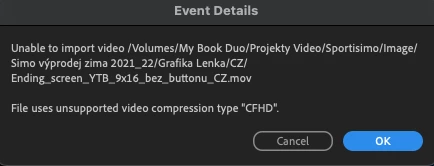
I normally used those files before, but now...I have a version 22.1.2 on Macbook Pro M1 Max. Please could you help me? Client is waiting:(

This topic is closed to new replies. Start a new post to keep the conversation going.
Kartika Rawat
Kartika RawatCorrect answer
Community Manager
Jan 6, 2022 12:14 PM UTC

Hi tomas.blaha!

Sorry about the trouble. Can you let us know the source of media files? Could you try running Premiere Pro through Rosetta mode and see if that helps? https://support.apple.com/en-us/HT211861


Let us know how it goes.

Thanks,

Kartika

6 replies

Ann Bens
Community Expert
Community Expert
Jan 6, 2022 12:31 PM UTC

Looks like an old cineform codec.

Is this an old file?

Translate
Known Participant
Jan 6, 2022 12:36 PM UTC

Hi Ann,


file was created on 20th December 2021 on a Intel Based MacBook Pro in Premiere Pro 2021.

Translate
Kartika Rawat
Community Manager
Kartika RawatCommunity ManagerCorrect answer
Community Manager
Jan 6, 2022 12:14 PM UTC

Hi tomas.blaha!

Sorry about the trouble. Can you let us know the source of media files? Could you try running Premiere Pro through Rosetta mode and see if that helps? https://support.apple.com/en-us/HT211861


Let us know how it goes.

Thanks,

Kartika

Translate
Known Participant
Jan 6, 2022 12:34 PM UTC

Hi Kartika,

thank you for your prompt reply. What i found...the trouble is only with MOVs, which were exported in GoPro Cineform Codec with and without Alpha. When i installed last update, there were a notification, that this version is curently for Apple Silicon, but i can also switch to Intel mode.

This is a source file Codec info: Timecode, Linear PCM, CFHD

I also attached a source file MOV


Tomas

Translate