

Jayson Hindle
Participant
March 13, 2023
Answered

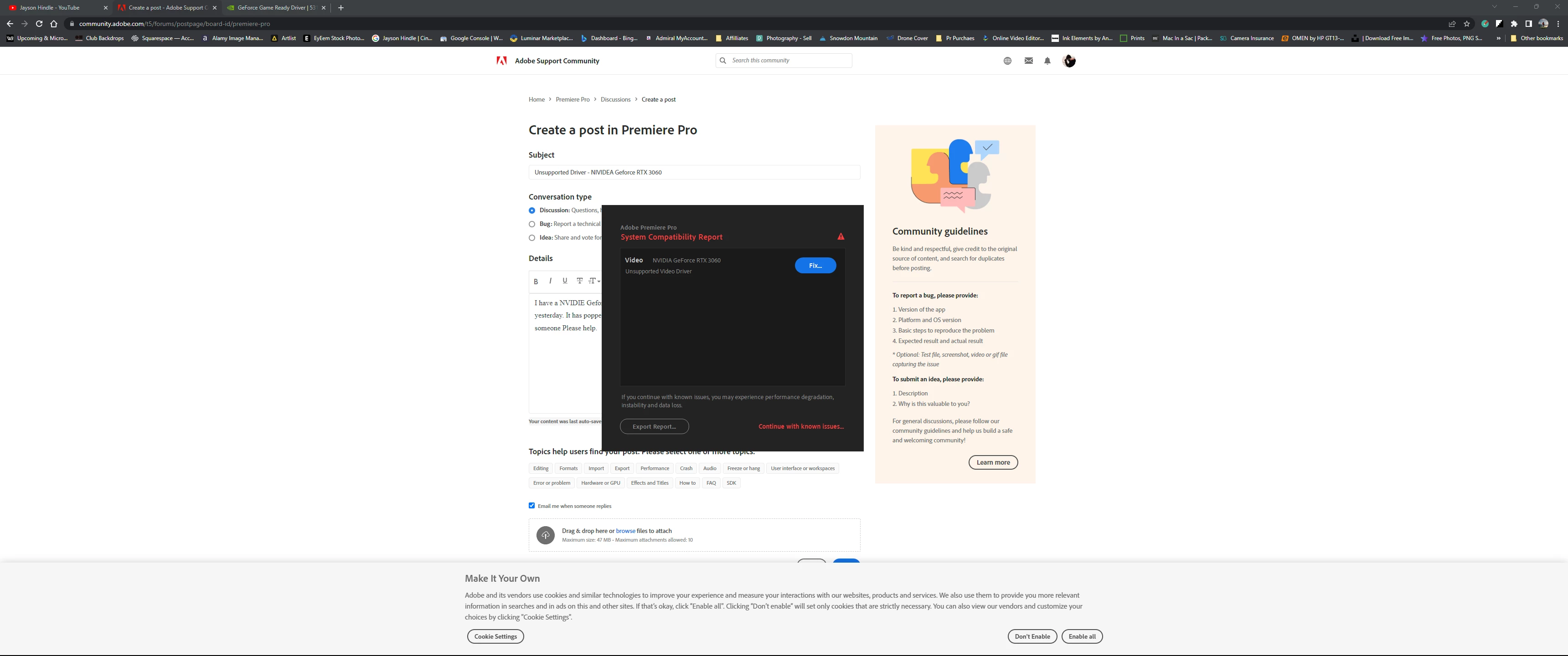
Unsupported Driver - NVIDIA Geforce RTX 3060

  • March 13, 2023
  • 5 replies
  • 9684 views

I have a NVIDIA Geforce RTX 3060. Just opened the latest version of Pr, which was working perfectly fine yesterday. It has popped up a message saying "System Compatibilty Report - Unsupported Driver" Can someone Please help.
This topic has been closed for replies.
Correct answer RjL190365

Although there has been a version 531.41 driver for the Nvidia workstation GPUs in the New Feature Branch, the latest Production Branch driver for the Nvidia workstation GPUs is now 535.98 - a jump up from the buggy 528.89 and 528.95 versions.

5 replies

Participant
June 29, 2024

I have a Ryzen 5 5600x and a RTX 3060. but it says that my specs are not good enough to download premiere pro. anyone facing this issue? (i downloaded Premiere pro before on my PC)

MyerPj
Community Expert
Community Expert
June 29, 2024

Do you have any memory, or an ssd or HD to go along witht that?

Participant
June 30, 2024

yup i have a 1TB ssd

Inspiring
May 30, 2023

Hi People,

This has just happened to group of us all using nVidia T1000 or T2000. Both relatively new devices where the current driver is in the RTX/Quadro range version 528.95 released on 25 April 2023. Tried all the good things like clean install to no avail. Guiess just have to wait for nVidia to release new driver.

Andrew

RjL190365Correct answer
Legend
June 13, 2023

Although there has been a version 531.41 driver for the Nvidia workstation GPUs in the New Feature Branch, the latest Production Branch driver for the Nvidia workstation GPUs is now 535.98 - a jump up from the buggy 528.89 and 528.95 versions.

Inspiring
June 13, 2023

I've installed 535.98 for the Quadro range and that also fixed the problem.

Participant
March 13, 2023

I've been having this issue occur intermittently without a clue why...UNTIL, today. 

(The previous issue was PR would crash upon rendering, even after updating "Game Ready Drivers" in addition to uninstalling and reinstalling. Workaround was to export to Media encoder and render.)


I've been working with PR for several hours this morning without a hitch until I opened up Adobe Creative Cloud so I could tap into the fonts library. Because PR doesn't recognize that ACC is open when running, I saved the project and shut down PR. 


When I opened PR back up seconds later, not only did I get the same message, PR froze up while loading the timeline and took my entire rig with it, therefore necessitating a hard shutdown. 


It seems to me Adobe Creative Cloud is not only the culprit of my particular scenario but likely to occur in other machines as well. Not sure if Adobe is aware of this, but the link in the PR pop-up window informing the user of this erroneous incompatibility and potential for crashing takes you to a page without a solution and or any links to workarounds. 


*Note: When running, ACC + PR will bottleneck your bandwidth, so don't expect expediency when browsing or downloading assets.


The best practice (for me at least) is going to be to use PR as a standalone, as opposed to opening PR via ACC. 


Hope this helps!

Ann Bens
Community Expert
Community Expert
March 13, 2023

I never use the desktop app, always Pr icon located in my tray.

John T Smith
Community Expert
Community Expert
March 13, 2023
Legend
March 13, 2023

Are you on the latest Game Ready driver version 531.18? If yes, then there is a known issue between that driver and Premiere Pro. Please use DDU to remove every single trace of the bad driver, then manually download the Studio Driver version 528.49 directly from the Nvidia Web site, and install that downloaded driver.