Participant
February 22, 2022
Answered

Unwanted Color on Footage in Timeline

  • February 22, 2022
  • 12 replies
  • 4603 views

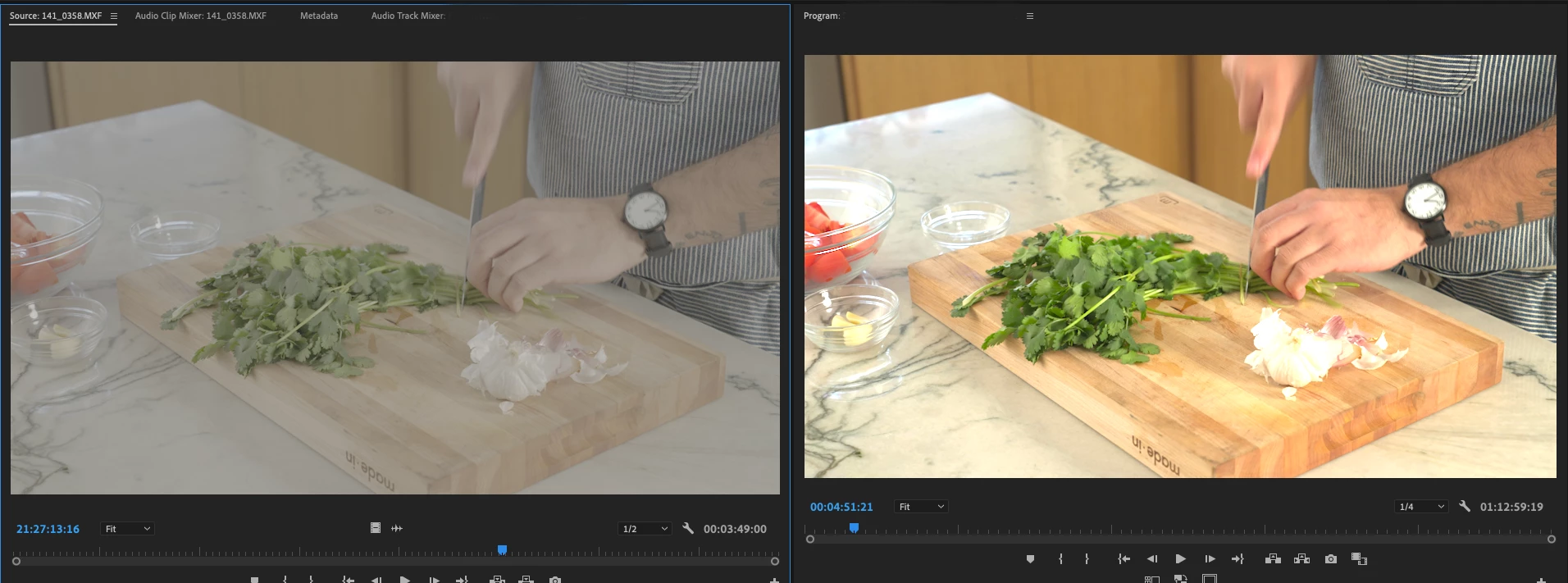
Having an issue with unwanted Color being baked into my Slog3 footage in my timeline. There are no luts or color adjustments on the footage or masters. Though when looking at the Source and The Program monitor color is not on the source, but if I pull the clip to any timeline it has the added color. Looking for help fixing these issues

This topic has been closed for replies.
Correct answer R Neil Haugen

They completely rebuilt the color system of Pr2022. It was built as a Rec.709 app "with the ability to use HLG/PQ image data as over-range Rec.709 values ... " to sorta cadge some HDR capabilities into the app.


Now ... it's color space agnostic, and everything has changed, including many default behaviors. And a few things are broken, awaiting a fix. One thing that seems an issue ... all HDR is log-encoded, versus the "integer encoding" of most SDR/Rec.709 media. But ... some Rec.709 media is also log-encoded, and somehow, some camera's Rec.709 log-encoded files are tripping up Pr2022.


Especially from certain Sony & Panny cameras. Let's see ... S-log-3, oh yea, that's Sony ... sigh.


What it seems to do with the cameras it glitches like this on ... it still sees the color space of the file as Rec.709, but displays on a sequence as if the media is HLG. With the wider color space and brighter dynamic range.


Do check the file's properties in the bin, because if it is showing as HLG, you can override to Rec.709 and get past this.


But I'm expecting you'll find it shows a color space in the bin of Rec.709, and if so ... this is a problem.


I'd love to test it here if you've got a clip you could dropbox or whatever.


Neil

12 replies

Participating Frequently
April 28, 2023

I'm having this in Premiere Pro 2023 - it thinks that the footage is rec709 but it's canon log - and changing it to canon log mucks with the picture. Pull it up in QuickTime or VLC and it's log footage though. Makes PP unusable.

Participating Frequently
April 28, 2023

As an aside - it's fine in 2022...

Known Participant
April 7, 2024

I am having the same exact issue with my Slog 3 footage having color baked into it. Is there a fix for this in 2024!?

Participant
May 6, 2022

In premiere pro my source window footage was LOG while there was some kind of grade added to the clip in the timline.  Lumetri color was off and not applied so it was coming from somewhere else.  I fixed this by right clicking the source clip in the project bin, selecting modify and then interperet footage.  At the bottom there is an option to use the original clip default color (S-LOG3) in this case, or to override it.  I overrided it with rec709 and the footage turned back into LOG within my timeline.  Not sure why this became an issue after I updated premiere but, here we are.  Hope this helps.

R Neil Haugen
Legend
May 6, 2022

All previous versions of Pr were Rec.709 based color. They had cadged on a capability to use HLG and PQ HDR files in a sort of 'extended values' thing tagged onto Rec709.


In Pr2022, they completely rebuilt the underlying color handling. I call this color space agnostic, works with either SDR or HDR data. But then, there are completely new and different user options here & there and different defaults.


And outta the box, 1) most users didn't have clue one about the changes so didn't know even that there were new settings and defaults and 2) some media from certain Sony, Canon and Panny cameras wasn't being 'seen' by Premiere as it should.


Among other things, all HDR is log-encoded, but some log-encoded media is meant to be SDR. And Premiere was pretty much sticking most log media as HDR.


They're working through the teething issues for the new 'baby' color system. Most kinks are out but not all. And the new tranform for S-log3/cine I think is still in the Public Beta version is gorgeous, blows away any normalization of that media I can do manually. And I'm not too shabby at normalization.


So ... yea, this is still a puzzle for us users.


And they NEED to give us one panel for all color managment options and defaults.


Neil


UserVoice Color Management Panel request. 

Everyone's mileage always varies ...
R Neil Haugen
R Neil HaugenCorrect answer
Legend
February 22, 2022

They completely rebuilt the color system of Pr2022. It was built as a Rec.709 app "with the ability to use HLG/PQ image data as over-range Rec.709 values ... " to sorta cadge some HDR capabilities into the app.


Now ... it's color space agnostic, and everything has changed, including many default behaviors. And a few things are broken, awaiting a fix. One thing that seems an issue ... all HDR is log-encoded, versus the "integer encoding" of most SDR/Rec.709 media. But ... some Rec.709 media is also log-encoded, and somehow, some camera's Rec.709 log-encoded files are tripping up Pr2022.


Especially from certain Sony & Panny cameras. Let's see ... S-log-3, oh yea, that's Sony ... sigh.


What it seems to do with the cameras it glitches like this on ... it still sees the color space of the file as Rec.709, but displays on a sequence as if the media is HLG. With the wider color space and brighter dynamic range.


Do check the file's properties in the bin, because if it is showing as HLG, you can override to Rec.709 and get past this.


But I'm expecting you'll find it shows a color space in the bin of Rec.709, and if so ... this is a problem.


I'd love to test it here if you've got a clip you could dropbox or whatever.


Neil
Everyone's mileage always varies ...
Ann Bens
Community Expert
Community Expert
February 22, 2022
Participant
February 22, 2022

Yea, I was aware of this, but that is not the issue. It is not adding the color to the source only in the project timeline.