Participant
December 3, 2021
Question

Unwanted gap/space at the end of timeline scrubbing head

  • December 3, 2021
  • 1 reply
  • 474 views

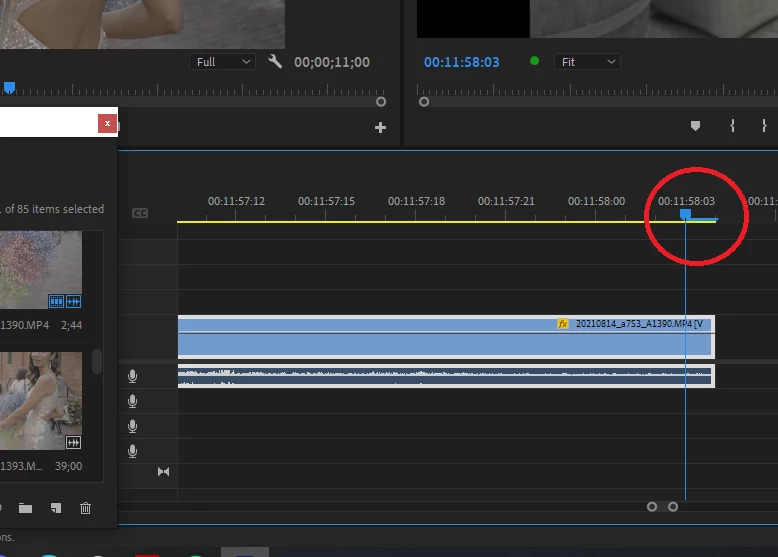
I have no idea how this came to be or how to get rid of it. But there's blue spacer behind my timeline scrubbing tool and it's always leaving a gap at the end of the video. I can't even get to the end of a clip because it always leaves a gap. So weird.


Anyone know how to disable or get rid of this??
 

This topic has been closed for replies.

1 reply

R Neil Haugen
Legend
December 3, 2021

That bar is only visible when you have a sequence way zoomed in. What that bar shows is the frame that the playhead is "on". If you're zoomed out, you won't see it because the 'width' of a single frame on the timeline is so narrow.


Neil

Everyone's mileage always varies ...
Jacky PAAuthor
Participant
December 3, 2021

Thanks for the reply, Neil!


My issue is even when I'm zoomed all the way out, when I click to go to the end of the sequence, it actually only goes to the end of the blue spacer.


The actual head itself stops short of the end of the last clip. So that blue spacer is prevent my actual timeline head from reaching the end. This has never happened to me before so I don't know what I pressed to activate the blue spacer but I can't find anything online about it from Reddit or a general Google search.

R Neil Haugen
Legend
December 3, 2021

I have only ever seen that bar what that bar is covering the specific frame the playhead is 'in front of'.


In other words, that bar is over one specific frame. I don't know what your framerate is, but ... I've never ever seen that bar other than when the timeline is so zoomed in that each frame takes a notable width of timeline.


I can easily and quickly get zoomed in to see that bar, and out where it disappears, with any timeline.


So ... there might be something else here. But if you showed your framerate and such data, we could see.


Neil

Everyone's mileage always varies ...