Known Participant
October 6, 2020
Answered

Uploading a video - just uploads audio

  • October 6, 2020
  • 3 replies
  • 503 views

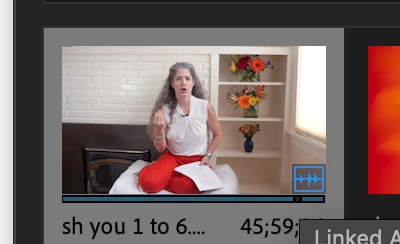
I'm trying to insert a clip and is only inserting the audio when I drag it to the editor...what is happening?  (just has the audio icon on the bottom right)


thank you for your help
This topic has been closed for replies.

3 replies

Ann Bens
Community Expert
Community Expert
October 7, 2020

Open clip in Source monitor first in order to get the track source patched.

Then drag/insert/overwrite it into the timeline.


Peru Bob
Community Expert
Peru BobCommunity ExpertCorrect answer
Community Expert
October 7, 2020
Joëlle Bh
Community Expert
Community Expert
October 7, 2020

Do you mean when you drag the video from the project panel to the timeline you're only inserting the audio?

Can you make sure that the video track is selected in the timeline?

manuelapnAuthor
Known Participant
October 7, 2020

thank you but how can I make sure the video track is selected in the timeline?

Joëlle Bh
Community Expert
Community Expert
October 7, 2020

Please check this link:

https://community.adobe.com/t5/premiere-pro/faq-why-does-audio-or-video-not-go-to-the-track-where-i-drop-it/m-p/3540610?page=1#M7099

This link is mentioned in the thread of your case and there's a picture attached also.

check the comments...it will help