eb9y
Participant
April 18, 2019
Answered

Very specific, hard to find answer to my issue. Please help.

  • April 18, 2019
  • 1 reply
  • 628 views

Hello guys.

I don't know how this happened or why, but recently when opening Premiere Pro Cs5 (going oldschool now), the sequence window at the bottom, and the source won't sync up. When I click the sequence timeline and press play, as highlighted in picture, it just scrolls along and plays audio. When I select the source window and press play at the top, both audio and video play but the sequence marker on the bottom window won't scroll.

Very confusing, and now i can't edit videos because of it. Cannot contact Adobe, as can't see any options to contact them without calling a US number etc.

Any ideas? Thanks.
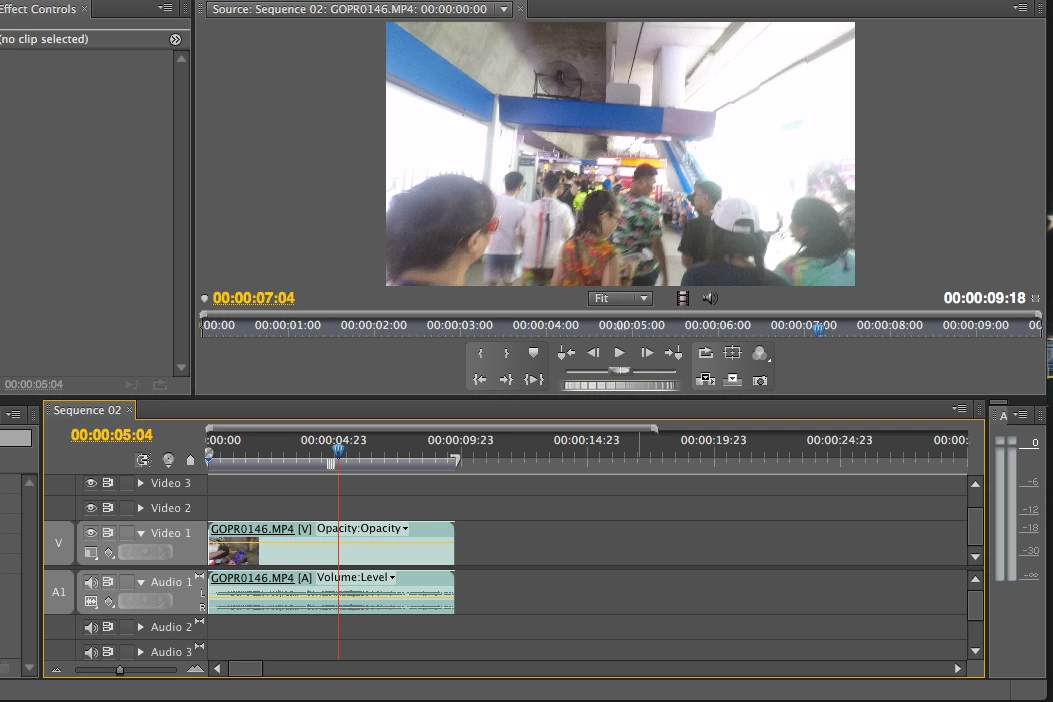
[Here is the list of all Adobe forums... https://forums.adobe.com/welcome]

[Moved from Premiere Pro NEW to Premiere Pro OLD... Mod]

    This topic has been closed for replies.
    Correct answer rodneyb56060189

    I think you should look into the following:

    a) there are 3 ( I think ) viewers ( called monitors I guess). They are source, program, and reference.

    To see what is playing in your timeline you must be viewing the PROGRAM monitor

    If you have your SOURCE monitor open and select a clip to see it in the source monitor, it is now a separate animal than what is on your timeline. It is meant as a means to view your assets and 'choose' what to bring down ( using in and out points) to the timeline.

    It does NOT 'sync' up to the timeline. It's to view source material.

    Check out those things ...

    1 reply

    rodneyb56060189Correct answer
    Legend
    April 18, 2019

    I think you should look into the following:

    a) there are 3 ( I think ) viewers ( called monitors I guess). They are source, program, and reference.

    To see what is playing in your timeline you must be viewing the PROGRAM monitor

    If you have your SOURCE monitor open and select a clip to see it in the source monitor, it is now a separate animal than what is on your timeline. It is meant as a means to view your assets and 'choose' what to bring down ( using in and out points) to the timeline.

    It does NOT 'sync' up to the timeline. It's to view source material.

    Check out those things ...

    eb9y
    eb9yAuthor
    Participant
    April 18, 2019

    Problem solved! Got the program window up and now all is fine..phew. cheers mate