
Participant
July 2, 2021
Question

Video Distortion When Exporting

  • July 2, 2021
  • 3 replies
  • 592 views

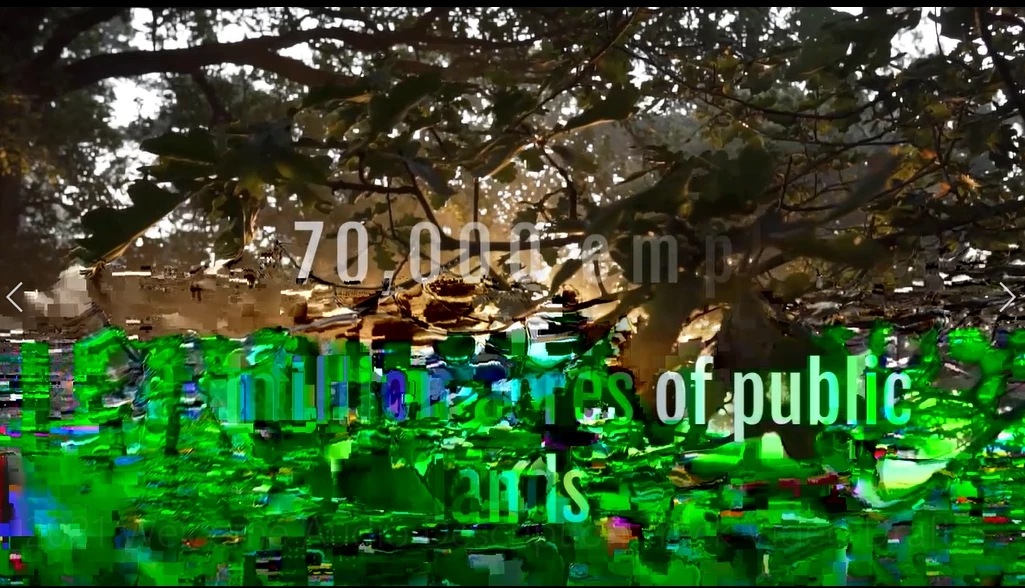
When I export my video, the output is distorted with green & black squares at the bottom of hte screen. See screen shot.


I have tried changing some of the export settings, but I can't figure out what is causing the video to export like this. Any thoughts?
This topic has been closed for replies.

3 replies

Community Expert
July 2, 2021

It does look like a GPU thing as Sumeet mentioned. You can try updating your GPU driver and if you are using an Nvidia card, try the Studio Drivers. Do a clean installation if you need to.


Other things to try: export with Software Encoding if going to H264 or try another codec entirely, like Quicktime ProRes 422.


If your source media has variable framerate like from a Phone, you can try correcting the VFR with Handbrake and see if that helps.

Community Manager
July 2, 2021

Hi Kathy5C4F,


We're sorry about this. It seems like a GPU driver issue. Please let us know the version of Premiere Pro that you are using & the system specs (OS, CPU, GPU & RAM). Also, have you tried switching the Renderer to Mercury Playback Engine Software Only & checked if it's exporting properly?


Thanks,

Sumeet

Kathy5C4FAuthor
Participant
July 2, 2021

I am using the Premiere Pro 2021 Free Trial version.
My system specs are Windows 10 Pro, Processor 11th Gen Intel(R) Core(TM) i7-1165G7 @ 2.80GHz 2.80 GHz, RAM 8.00 GB. I'm not sure how to check the GPU or the CPU.


My drive is NVMe SAMSUNG MZVLQ256HAJD-000H1


So is my system just not robust enough to handle Premiere? That is my worry.