
Participant
October 25, 2023
Answered

video doesn't start and nor displayed in the source

  • October 25, 2023
  • 2 replies
  • 307 views

Hello,

when I open a project on Premier Pro and press play, my video doesn't start. Nor is it displayed in the source.For your information, I cleared my cache and.
I installed and uninstalled Premiere Pro and it didn't change anything.
When my colleague opens it, there's no problem.
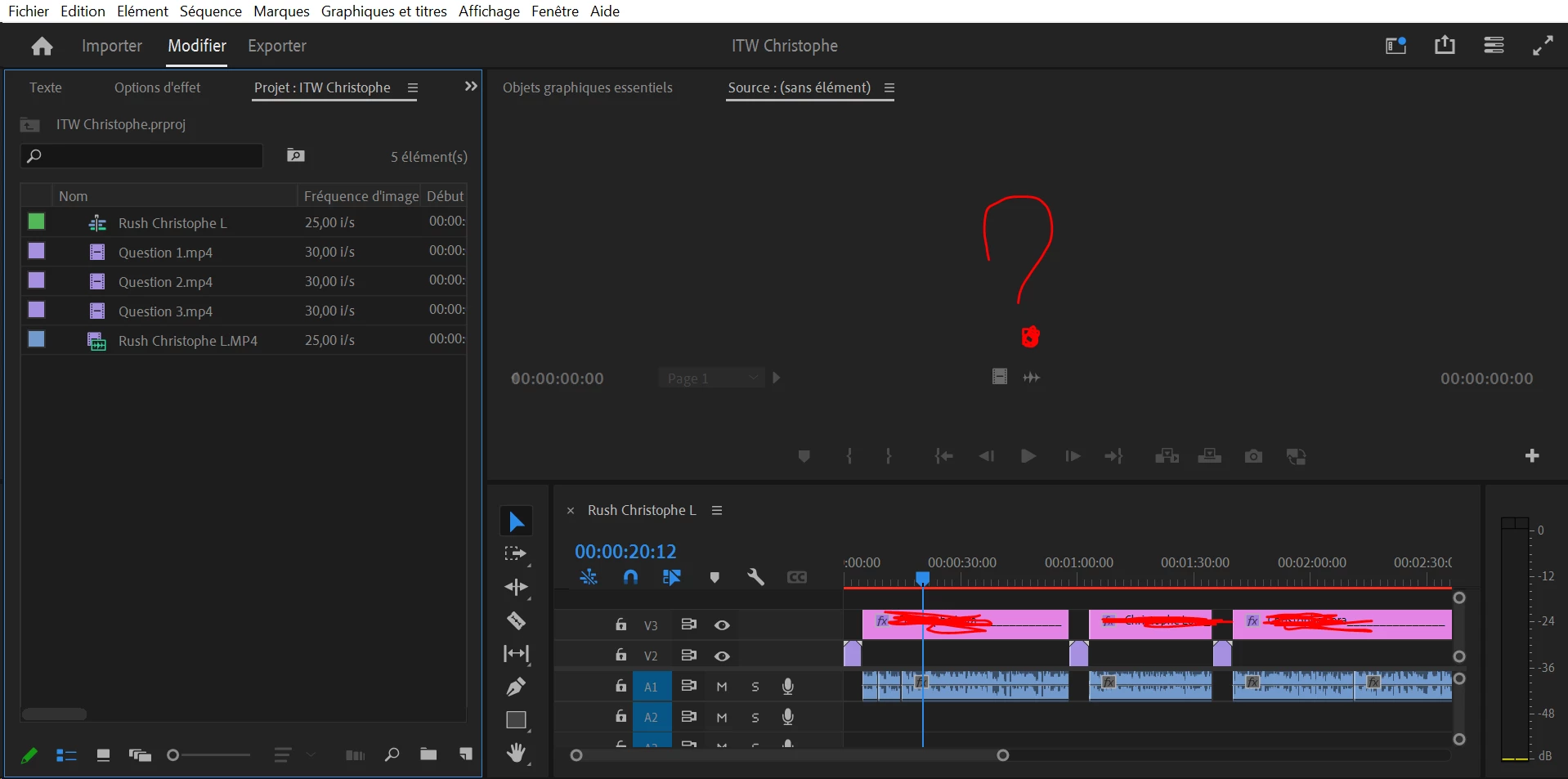
Could you help?

Thanks

This topic has been closed for replies.
Correct answer MyerPj

Try resetting your workspace back to a default one. You seem to have the 'Source' monitor open, but the timeline plays normally in the Program monitor. Click the menu WINDOW > Progam Monitor

2 replies

MyerPj
Community Expert
MyerPjCommunity ExpertCorrect answer
Community Expert
October 25, 2023

Try resetting your workspace back to a default one. You seem to have the 'Source' monitor open, but the timeline plays normally in the Program monitor. Click the menu WINDOW > Progam Monitor

Participant
October 26, 2023

Thanks 

Peru Bob
Community Expert
Community Expert
October 25, 2023

Try pressing Enter to render the timeline and turn the red line above the timeline to green.