
Participant
August 4, 2020
Pergunta

Video imported with lower audio sample rate

  • August 4, 2020
  • 2 respostas
  • 463 Visualizações

The imported video's audio stream information, as reported by VLC:
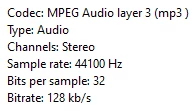
 

That same video's audio stream information after being imported, as reported by Premiere Pro:

 

Can anyone help me diagnose why this video's audio track is being automatically downgraded upon import? I've tried clearing the media cache and re-importing, but that didn't make a difference.

Este tópico foi fechado para respostas.

2 Respostas

R Neil Haugen
Legend
August 9, 2020

Screen capture ... yea, you need to be very careful of the settings used. Note, the one with trouble is an mp3, not the same format as the one that plays fine. Premeire has trouble at times with mp3 files.


Download/install the free utility app MediaInfo and after the app's icon appears on the desktop, drag/drop a file onto that app's icon. It will open ... go into the Tree view, make another screen grab, and post it back here. Do one of each file.


Neil 

Everyone's mileage always varies ...
Participant
August 10, 2020

The screen capture's audio was recorded with mp4a audio, but in a Matroska container that Premiere couldn't open. I converted it into a few other type types to see what worked best for Premiere.


Community Manager
August 4, 2020

Hi there, 


We're sorry to hear about this. Please let us know the version of Premiere Pro that you are using. Is this happening with any specific media or all the media files?  Also, what is the source of the media file (is it a screen captured media or recorded on a camera)? Let us know, we're here to help.


Thanks,

Sumeet

Participant
August 4, 2020

It's Premiere Pro version 14.3.1 (build 45).


I've noticed at least one other video clip having its audio quality noticeably reduced upon import. I'm not sure what sort of trial-and-error can tease out exactly what the specific circumstance is that triggers the change to the sample rate.


In the above example, the source of the video is an OBS-recorded screen capture, but I had a similar problem with a recording from a webcam.

I wonder if there's any significance to Premiere reducing the sample rate to specifically 1/4 of the original rate.