Participant
July 20, 2022
Answered

Video is blurry after exporting

  • July 20, 2022
  • 1 reply
  • 1386 views

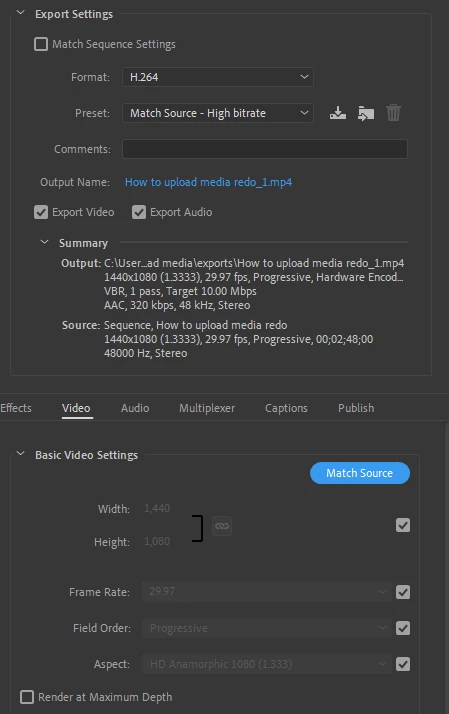
exported video and it appears blurry after export. Any ideas what I'm doing wrong? Export settings below. Thanks everyone.

 

This topic has been closed for replies.
Correct answer Averdahl
quote

Please let me know if you have any other suggestions.


By @Wilson25325606evae


One thing that sticks out is that your Sequence Settings is 1440x1080 with a Pixel Aspect Ratio of 1.333. This is the same settings as HDV that in itself are kind of obsolete today. A wild guess is that your source footage is 1920x1080 with a Pixel Aspect Ratio of 1.0.


Point being, check your source footage to make sure what resolution it is. If you have 1920x1080 with a Pixel Aspect Ratio of 1.0 make sure that your Sequence Settings match that, and make sure that your export settings match that. Any mismatch, such as placing 1920x1080 on a 1440x1080 sequence and then export it to 1440x1080 will cause the export to look blurry.


You are using hardware encoding as well. Software looks better. Using a higher bitrate can be a good idea to test as well.

1 reply

Kevin-Monahan
Community Manager
Community Manager
July 20, 2022

Hi Wilson,

Sorry about that. Your settings look OK. You can try Software Encoding in Video > Encoding Settings as a test. Let us know what happens.


Thanks,
Kevin

Kevin Monahan - Sr. Community and Engagement Strategist – Adobe Pro Video and Audio
Participant
July 21, 2022

Hi Kevin, 


Thank you for the reply. I tried using software encoding and its the same result. 


these are my setting before i export

Please let me know if you have any other suggestions.


Thanks, 


Wilson

Averdahl
Community Expert
AverdahlCommunity ExpertCorrect answer
Community Expert
July 21, 2022
quote

Please let me know if you have any other suggestions.


By @Wilson25325606evae


One thing that sticks out is that your Sequence Settings is 1440x1080 with a Pixel Aspect Ratio of 1.333. This is the same settings as HDV that in itself are kind of obsolete today. A wild guess is that your source footage is 1920x1080 with a Pixel Aspect Ratio of 1.0.


Point being, check your source footage to make sure what resolution it is. If you have 1920x1080 with a Pixel Aspect Ratio of 1.0 make sure that your Sequence Settings match that, and make sure that your export settings match that. Any mismatch, such as placing 1920x1080 on a 1440x1080 sequence and then export it to 1440x1080 will cause the export to look blurry.


You are using hardware encoding as well. Software looks better. Using a higher bitrate can be a good idea to test as well.