Participant
August 28, 2020
Question

Video is blurry when exported

  • August 28, 2020
  • 2 replies
  • 429 views

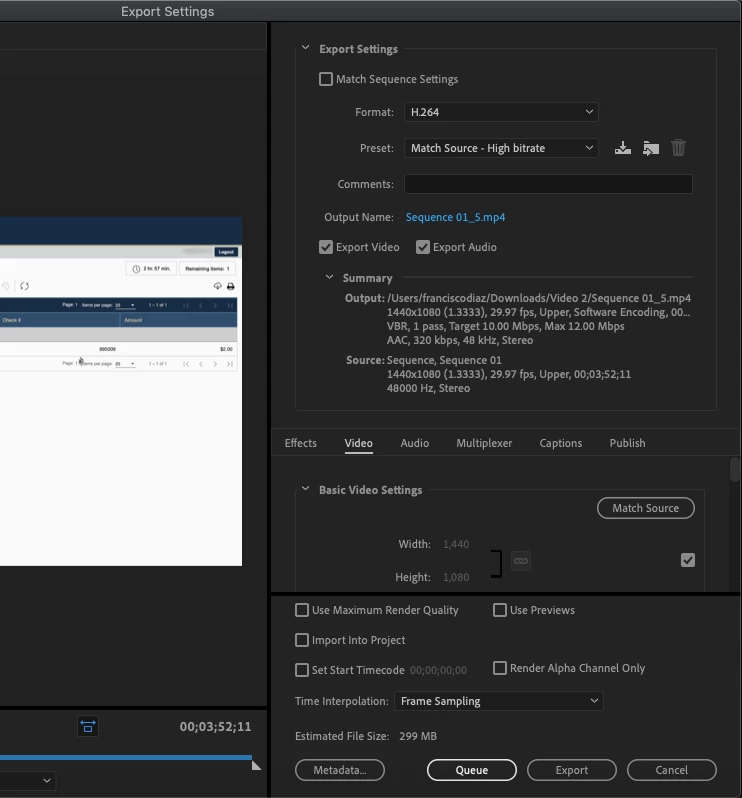
I am currently working on a video and when I export the footage is coming out blurry. I am using a macbook air and this are the settings I am using to export it.

This topic has been closed for replies.

2 replies

Participant
August 28, 2020

A video is broken into fields, so a 1920x1080 video is 1080 lines of horizontal resolution tall. A Progressive frame is 1920x1080 pixels, all shown at once. If thats 30fps, then there are 30 complete frames shown.

If its interlaced, every other horizontal line is part of one field. Each being 540 lines tall. It then takes two fields to create a single, complete image.

Interlacing is used when there is not enough bandwidth to send an entire frame at once, so you send half at a time and its assembled in one way or another on the other end.

Unless you absolutely have to for some really strange archaic reason, you should never shoot interlaced. This isnt 2002.

There are time you have to deliver interlaced still, but that depends heavily on where you are delivering and what they ask for and its very rare.

Basically, 60i is the same total complete frames as 30p, as it takes two sets of frames/fields to make one complete frame. i means interlaced, p mean progressive.


https://ghdsports.club/
Inspiring
August 28, 2020

Your sequence (and output setting) is set to upper field first - is that by design? Are you working with upper field based footage? If this is not something you planned it may be contributing to 'blurryness' on your exports.

Also you are using 1440x1080 as your sequence settings. Again is this intentional? For instance are you editing HDV video?

If not, there's no good reason not to have your sequence at 1920x1080.


A still image example of the blurryness you are seeing and also a 'before' image might help the forum users here determine what the problem might be.