Participating Frequently
July 27, 2018
Question

Video much clearer after exporting

  • July 27, 2018
  • 10 replies
  • 2961 views

Hello!

I'm making a video editing for a documentary on the war in Yemen.

I've finished the part one, and I've exported the sequence. Problem: The mp4 (on the left on the picture) is much clearer than the source (on the right.)
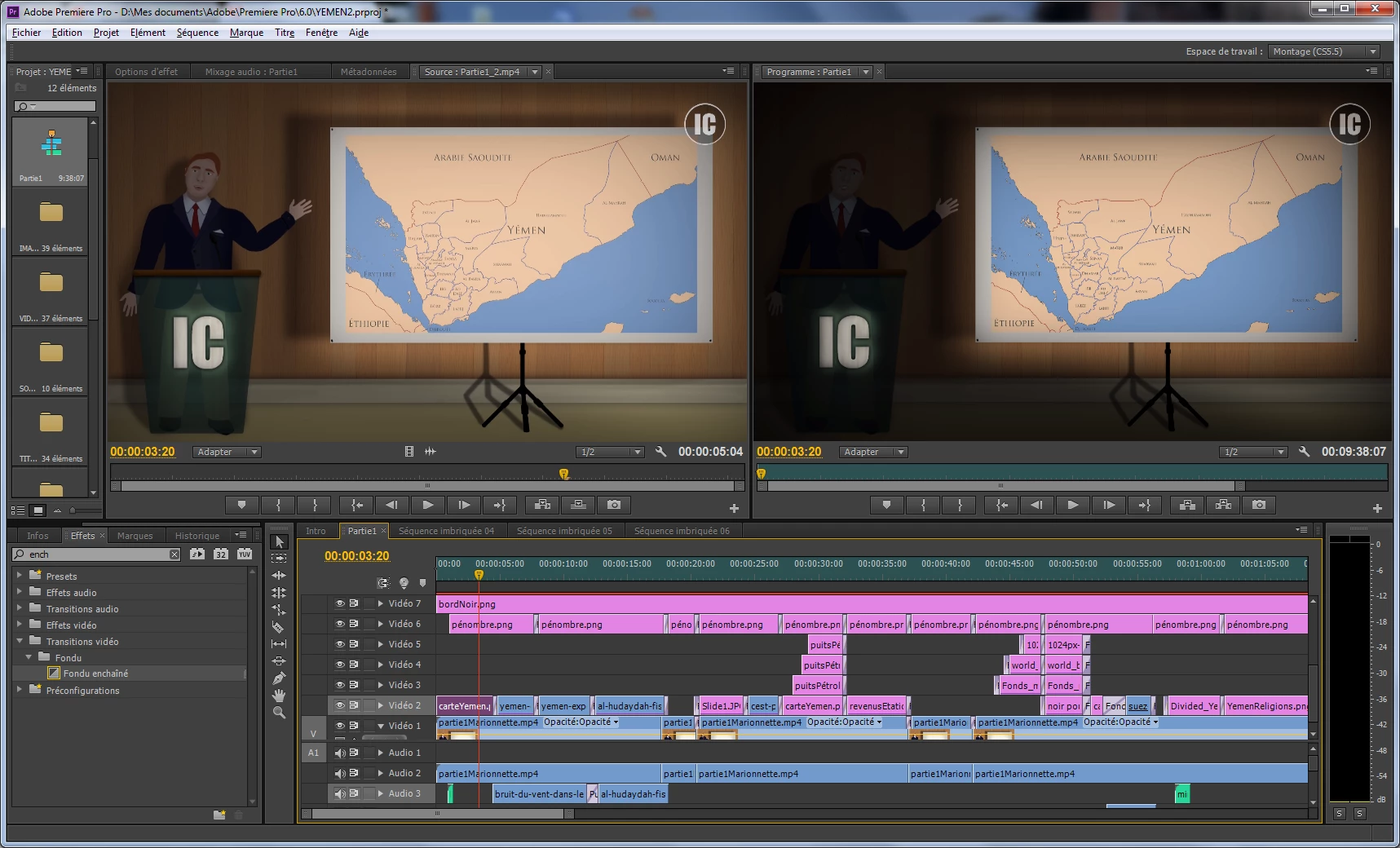
I think I understand why but I don't know how to fix it:

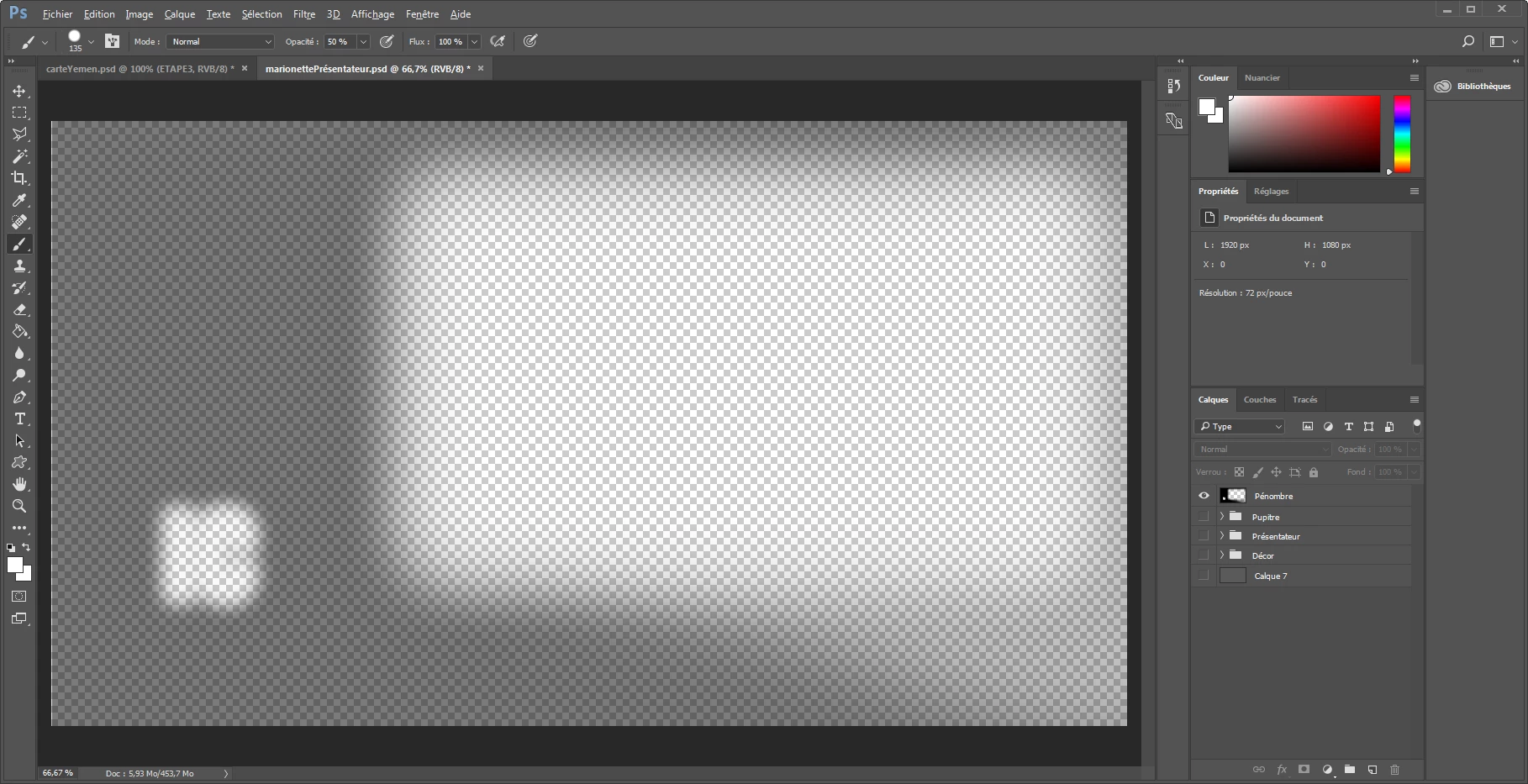
I've added in my sequence in Premiere a layer made with Photoshop. This layer is a simple black screen with an opacity of 80%. When I activate it, it adds a darkness effect. In my opinion it's precisely the rendering of the layer which is bad while exporting and therefore it makes the video clearer.

This is the layer...
Thanks for your help!

Ludovic

This topic has been closed for replies.

10 replies

Legend
July 31, 2018

was just dumb luck on my part to be helpful. I'm so happy you got it going good now !  Good luck !

Participating Frequently
October 31, 2018

hello, this is the finished video,

Thank you all for your help!

Ludovic

Yemen: Le Conflit Oublié (Partie 1/2) - YouTube

Legend
July 31, 2018

This thread helped me so much. It made me ( an old person who just does really basic editing without fancy stuff ) try to remember how to do masks, tracking masks, and all sorts of stuff I haven't done in years.

Thank you so much for making me THINK for a change !  And how cool that the solution was found too ! Despite my often crazy and stupid suggestions !

Yipeee !

Participating Frequently
July 31, 2018

No, your suggestions were very interesting!   you made me discover new things!

and it's thanks to you if I found the solution:

you were the first to export correctly in MP4. And with your presets I managed to find the source of the problem.

Thank you very much

Ludovic

Legend
July 31, 2018

when you put the psd layer that has 80% black fill into a video level, make sure your opacity setting in 'effects' panel is 100% (default settings) for that clip. 

Legend
July 31, 2018

Participating Frequently
July 31, 2018

Okay, I found the source of the problem!!

the layer "black" can be a psd, or a png (or any other type of file) with the opacity defined in premiere, or in photoshop, ...

it does not change anything, and it's normal: Adobe Premiere is of course made to be compatible with all this.

the problem is just a bug, in the end.

as long as the "Render at maximum depth" option is not used, everything is fine. But if it is, then the rendering is brighter.

Legend
July 30, 2018

Safe Harbor sounds like he has good suggestion re: version you are using.

I was thinking like only 3-4 seconds worth of your png files, not your sequence info. Not any sound. Just to see if the transparency can be done without problems (exported using h264 preset like you ). A zip file might shrink the file size a little.

I don't have your cc program so I couldn't do it. My masks are different animals.

Participating Frequently
July 30, 2018

This is the link...

https://we.tl/8rahstoKNm

Thanks Jeff for this info!

My version of premiere pro is 6.0. I don't know if the bug already existed at the time. This may be the answer to the problem.

Legend
July 30, 2018

I think I now have a better idea what's going on. Could you put ONE png file of the man standing near map ( no need to zip it ) onto that fun sharing thing you made? I have cs6 also, and am willing to make a mask to test it using h264 preset (mp4).

Basically, this is what I think your problem is IN THE TEST SAMPLES:

You made a mask in PSD ( transparent background on bottom and black on top ). You then 'saved as' PNG and apparently use THAT in your timeline. You then adjust the opacity of the PNG MASK IN PPRO ( effects controls ).

Your PSD mask "BLACK" is 100% black, and so is the PNG mask black.

What you want to do is make that black 80% IN PSD to begin with. Use eyedropper tool to sample black and change to 80% or whatever you like. Then, the way you are working,  'save as' png with alpha channel.  I personally use the PSD LAYER in my timeline as the masks I make. It's hard to explain. The masks I make may have many layers so I can position things, see white text against transparent backgrounds, and so on.  When done I just import the particular LAYER of the PSD that is the mask, to the project.  Is easy sorta.

Anyway, you could make your transparent background file in PSD (1920X1080). RENAME that layer ( from background to 'mask transparent area' or something ). Now make NEW LAYERS AS NEEDED. One would be "man with map". Now you know where you want mask to be. Make another layer, labeled 'mask shape'. Make your PATH (using path tools ) for mask, save it, make selection from path, feather it, save it. Invert selection, FILL WITH BLACK 80% or whatever.

I'm trying to do this by memory...and am hazy. If you send man with map png I can just DO IT and sorta show you better.

Somehow you move stuff in your layers to where you can merge your transparent with the layer with the shape for mask, but NOT the image of man with map or anything else. It will look like what you showed in a screenshot early in the thread.

You import that layer to project and use it without changing anything in effects in PPRO. It stays 100% in PPro, cause the opacity was already done in PSD.

: )

Legend
July 29, 2018

Yikes. You weren't kidding re: language thing. I'm in U.S. and can hardly understand my own native language.

Your info will help others a lot to help you. I know some people here are multi lingual and really smart. There is a mov wrapper that can take h264 ( and some people hate using mov but it's just a wrapper for upload or sharing ). It's very common among many cameras (using pro res, DNxHD, or h264 ).

Anyway, thanks for so much info. If you were to share a 3-5 second clip of your PNG stuff (probably zip file ? ) on drop box or some stupid sharing thing it may be that someone will load it up into PPro, make a similar mask, export it, etc.

??

Legend
July 29, 2018

by the way, just for fun, I have to say that the 'effect' you're trying to achieve ( making the map more prevalent ) is NOT such a big deal for me personally. I think the power of your presentation doesn't suffer that much from this particular effect 'not working' right now. I hope you are continuing to work on the entire project despite this setback and don't let it discourage you in any way.

Participating Frequently
July 30, 2018

Thank you very much for your encouragement and for your help!

so you propose to share my sequence and png files here so that someone can download it and see if it has the same problem?

Legend
July 29, 2018

think of yourself as the "Marie Curie" of 'Masks in PNG' that WORK !

Legend
July 29, 2018

and don't forget, you can take your png series of stills (as video) and 'nest' it ….see if THAT makes a difference with how it is happy with mask. ??

Legend
July 29, 2018

The only thing I'm suggesting is that you narrow down the problem and starting a new sequence ( call it "TEST OF MASK") based on same settings you have...put one clip of png files ( it's a bunch of still images turned into video, right ? ) and then TRY to go through the two variables you have open to you.

1) use adjustment layer to apply mask ( whatever it is, psd layer, png, I have no clue )

2) try using PSD LAYER ( the mask layer only ) saved as a psd layer to your project, and apply it directly to clip.

??? what happens ?

: )

Legend
July 29, 2018

maybe you should just start a new sequence for testing purposes. To fix your problem. Just one short clip of stuff and your mask effect thing applied to that.

That way you are just narrowing down the 'problem' and focusing on that alone.

If you therefore have nothing but png source material ( and nothing is coming from PSD saved as png ) you can apply mask ( made in whatever program you made it which may or may not be PSD) to your adjustment layer or your clip directly instead. See if it works on little short export of your choice.

You have to narrow down the variables and think of it as like a controlled experiment. Once you have that one little sample fixed, you apply it to the whole video.

: )

Participating Frequently
July 29, 2018

I don't use psd in premiere, but my png are psd converts. I'm sorry I've thought that you was thinking that I've used a psd in premiere...

Legend
July 27, 2018

I do not understand the problem at all.  Can you restate and clarify?

Participating Frequently
July 27, 2018

Jim, I believe he is saying that he has applied the black overlay to darken everything but the map to highlight the map area, but when he exports that dark overlay is not being applied to output. He calls it clearer, maybe meant brighter?

Thanks

Jeff

Legend
July 27, 2018

See, even you're not certain.  I think we need more/better data.

Mike Dziennik
Community Expert
Community Expert
July 27, 2018

What happens if you render the section on the timeline?