
jimib33389610
Participant
January 31, 2017
Answered

Video Not Going Into Timeline?

  • January 31, 2017
  • 2 replies
  • 1449 views

Recently Premiere started not including video when I try to put video files into the timeline. Any video file goes into the timeline as though it were only audio, even though I can preview the video files from the project window just fine. The video tracks are not locked. I tried reinstalling Premiere, and it worked for a time before exhibiting the same behavior, and nothing I do seems to fix it.  As it stands, I simply can't put video into the timeline despite Premiere seeming to recognize it just fine.

I'm using Premiere Pro CC, 2017.0.2 v11.0.
    This topic has been closed for replies.
    Correct answer R Neil Haugen

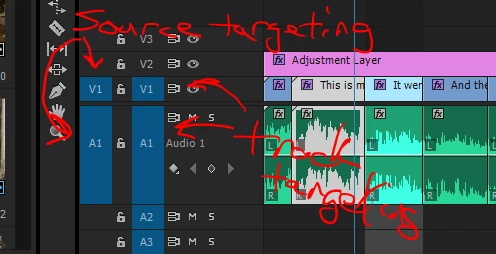
    Almost guarantee you don't have source & track targeting "on" (blue boxes to the left of the playhead controls on the timeline) or you have a sequence that is locked ... the little padlock to the left of the timeline in the controls.

    See the blue boxes? Left set is for moving things directly from the Source monitor ... click on the video or audio track you want to drop things from the Source monitor onto, it will go there. If say the one on V1 here was gray, the one on A1 in blue like this, anything I tried to move from Source monitor to timeline would only have audio.

    In-between the two sets of blue boxes, are the little padlocks. If those are closed, that track is locked and won't allow new media to be dropped on it.

    Neil

    2 replies

    Legend
    January 31, 2017
    R Neil Haugen
    R Neil HaugenCorrect answer
    Legend
    January 31, 2017

    Almost guarantee you don't have source & track targeting "on" (blue boxes to the left of the playhead controls on the timeline) or you have a sequence that is locked ... the little padlock to the left of the timeline in the controls.

    See the blue boxes? Left set is for moving things directly from the Source monitor ... click on the video or audio track you want to drop things from the Source monitor onto, it will go there. If say the one on V1 here was gray, the one on A1 in blue like this, anything I tried to move from Source monitor to timeline would only have audio.

    In-between the two sets of blue boxes, are the little padlocks. If those are closed, that track is locked and won't allow new media to be dropped on it.

    Neil

    Everyone's mileage always varies ...
    jimib33389610
    Participant
    February 2, 2017

    The locking wasn't an issue, like I said in the original post, but I hadn't been aware of the source targeting, and that fixed it! Thank you so much!

    R Neil Haugen
    Legend
    February 2, 2017

    Always glad to be helpful. And ... you wouldn't believe how many times we've had posts about this, from an experienced user ... who'd "offed" the track or source targeting without noticing it, had it "lock up" on them, posted ... and then was rather embarrassed to realize they'd just not caught this.

    Hey, life happens, you know? But we've still got work to get out ...

    Neil

    Everyone's mileage always varies ...