suresh1787
Known Participant
August 24, 2017
Question

Video quality via Export

  • August 24, 2017
  • 1 reply
  • 537 views

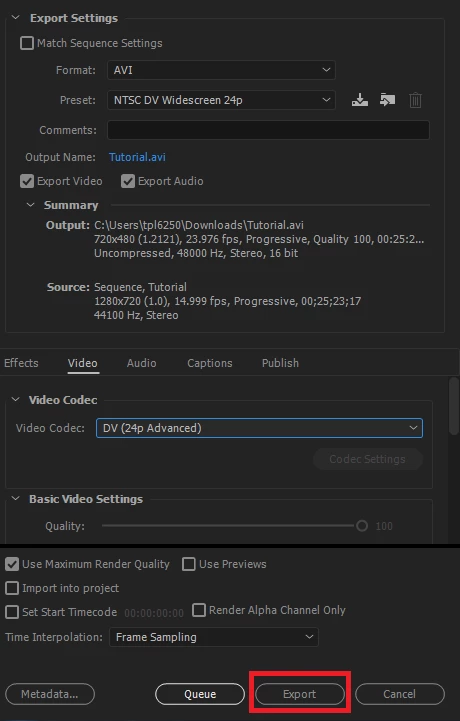
I create the video, which I have inserted in the Premiere, while exporting the quality of video is not the same which I inserted it is blurred. Below are the setting, I have also tried other formats which are available with 100% Quality. I am doing some thing wrong. I should actually get the same quality of the video which I inserted as I am not doing anything on it.
This topic has been closed for replies.

1 reply

Ann Bens
Community Expert
Community Expert
August 24, 2017

YOu are downscaling from HD to SD

Try H.264 for format and pick a Youtube preset that matches the sequence.

On a side note your sequence is 14.999 frames that usually means screencap or phone footage and variable framerate.

What is the origin of your footage?

suresh1787
Known Participant
August 24, 2017

I selected below option and video is good now but is of large size,

Ann Bens
Community Expert
Community Expert
August 24, 2017

Under format not P2 but H.264 then scroll all the way down in the codec setting for Youtube