Participant
February 4, 2018
Question

Video rendering is very fast but only at the begining

  • February 4, 2018
  • 2 replies
  • 2011 views

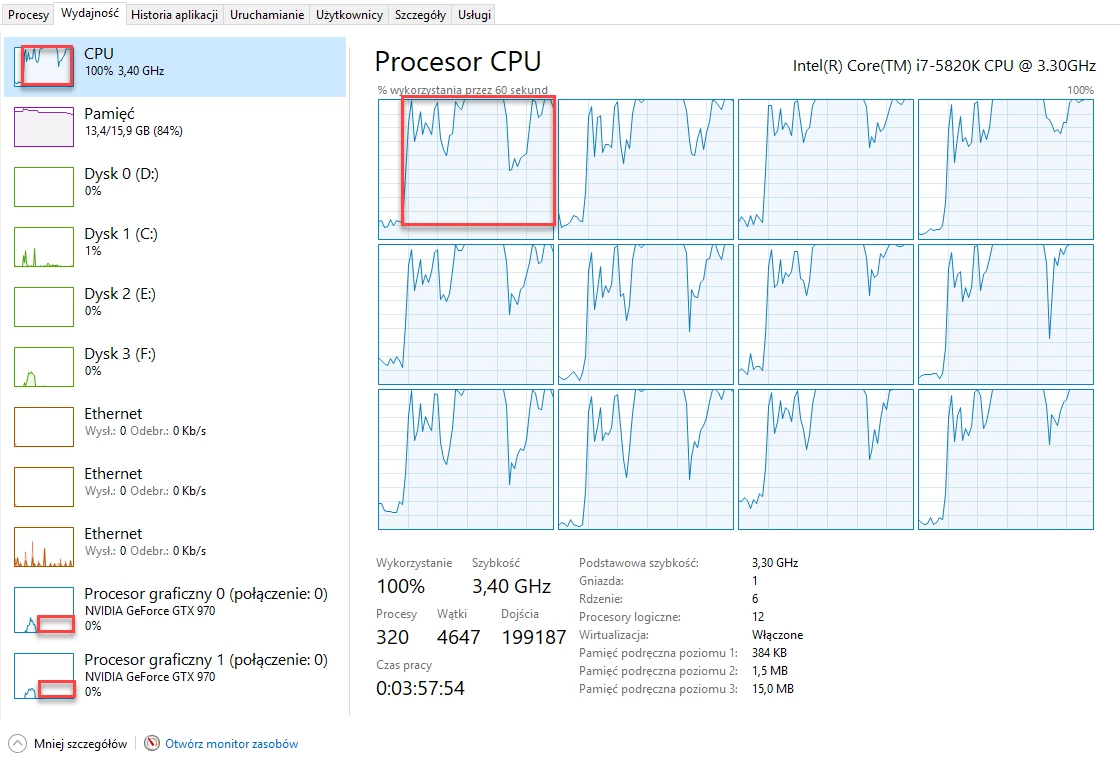
I have spherical video to render. Video has resolution 5840x2920 and I want export it to HEVC (H.265) video format. When render starts at the begining GPU is used in about 30% and processor in about 20%. Rendering works then very fast. But after over a dozen seconds GPU goes to about 0% and CPU to 100% and rendering slows down. Anyone knows what is happening? This video is a simple video without video effects, just to test the rendering. Why on the begining it works very fast (I see progress on the preview window in Media Encoder). In red border I highlight this situation after over a dozen seconds. Rendering then severely slows down.
This topic has been closed for replies.

2 replies

Known Participant
May 7, 2018

Have same problem. When exporting on default settings render is OK, but if I wanna 100Mbps high quality it renders first seconds at noraml speed and freezes after that.

For example I've 10 minutes 5.7k video,on start it shows like 1 hour remaining, rendering preview moves not fast but okay, after 10 seconds or so it stooops, slows extremely, remaining time grows - 2hrs,3,5,10.

Tried Daniel2 codec, it's fast, it's ok but no VR support. Dear Adobe, what should I do speed up 265 encoding speed? No problem with 264.

Win 10 64, last updates for Premiere and AME, ryzen 1700 + 32 Gb + 1060 6Gb rev.2 + 2xSSD

Legend
February 4, 2018

Encoding is done entirely on the CPU.  Windows Task Manager is not an accurate measure of Premiere's Pro's use of the GPU for accelerated rendering.

Participant
February 4, 2018

Ok, let's assume that rendering is made by CPU. Why then at the begining it works fast and after over a dozen seconds slows down? Is it a hardware problem (too low memory, slow processor)? Or some software configuration?

Render 10 seconds of that kind of video takes 52 minutes. At the begining, when rendering works fast, the rendering estimation is calculated to few minutes.

I am using GPU accelerated rendering [Mercury (CUDA) render mechanism].

Legend
February 4, 2018

HEVC is very processor intensive.  Those encoding times do not surprise me.