
Participant
November 4, 2018
Question

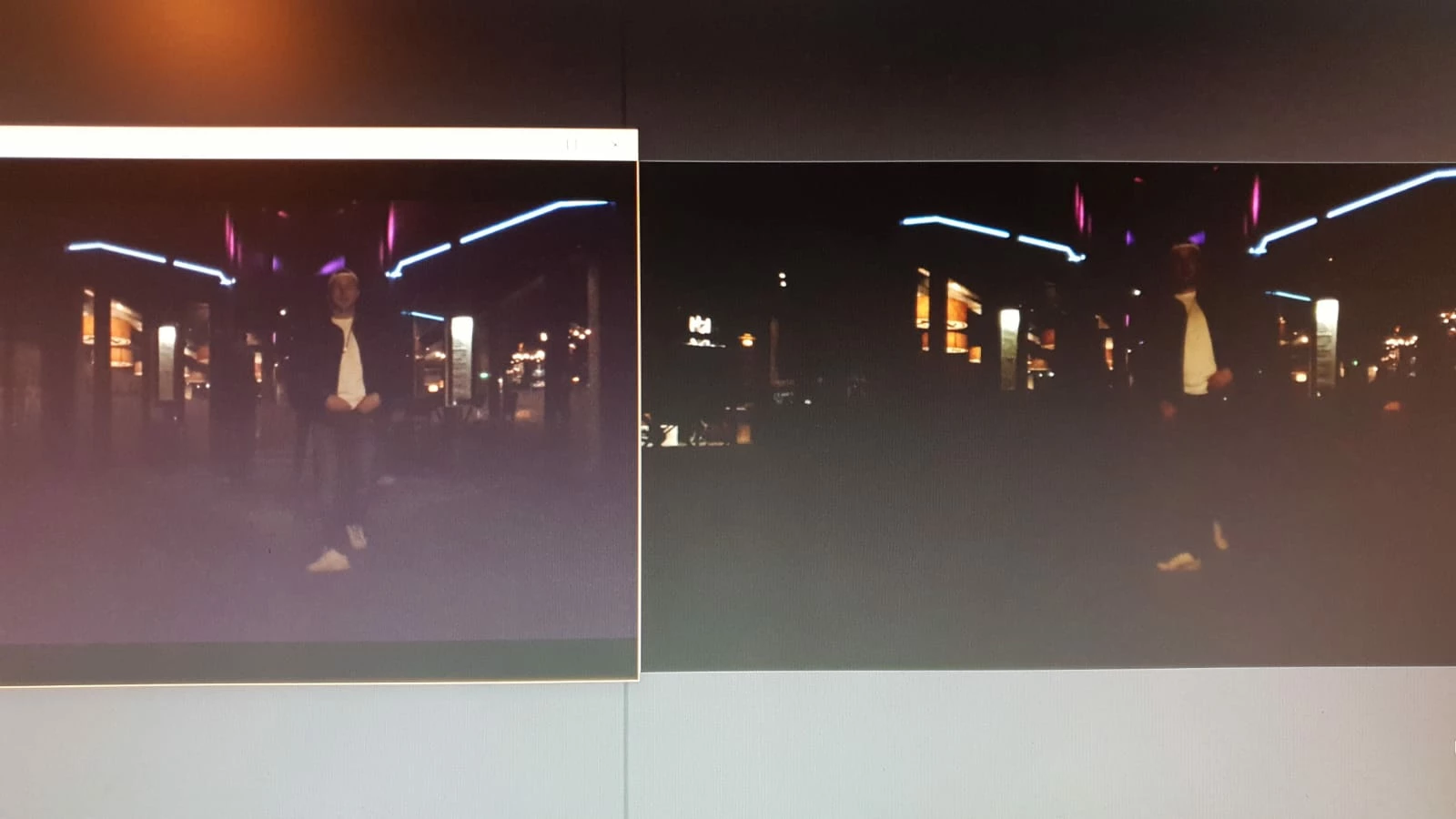
Video wird in Premiere deutlich dunkler angezeigt als das Original

  • November 4, 2018
  • 1 reply
  • 321 views

Hallo Zusammen,

wenn ich ein 4K (50 fps & 10-Bit) Video in Premiere importiere wird es deutlich dunkler dargestellt und hat Qualitätsverlust.

Woran kann das liegen? Ich hab schon die Sequenz verändert usw. Das Problem bleibt leider

Links Windows Media Player     -       Rechts Premiere Pro Vorschau
This topic has been closed for replies.

1 reply

Kevin J. Monahan Jr.
Legend
August 28, 2023

Hi @cedrickk57448528,

Thanks for the message. I see you have a color discrepancy going on between your imported footage and the footage in the timeline. Is that right? If so, I would ask you if you shot HDR or any other non-standard way of shooting footage. The footage seems to be the issue and you might not have the right settings engaged in Sequence Settings perhaps. More info from you regarding the footage and a screenshot of your Sequence Settings would help a lot. Let us know.


Thanks,
Kevin

Kevin Monahan - Sr. Community and Engagement Strategist – Adobe Pro Video and Audio