


Inspiring
January 17, 2025
解決済み

Video with clearer alpha when importing into Premiere

  • January 17, 2025
  • 返信数 2.
  • 453 ビュー

Hello everyone
I have a problem when rendering from After Effects with the Alpha channel. If I render from After Effects with the Alpha channel and I move it to Premier, in Premier I see the blacks softer, I see the image clearer. I have tried changing color profiles and it doesn't solve it. I have even tried it on other computers and it happens exactly the same. The constant is that when I render with the Alpha channel from After Effects, in Premier I see it clearer. I have also tried rendering with various codecs from Apple ProRes 444 to PNG. The same thing happens in all of them.
The only difference, or the only thing that solves it, is that in Premier, changing the color space from 709 to the other option which is 2000 and something. I click OK, of course it looks bad, but if I then go back to the 709 option and click OK, everything looks fine, that is, simply in the Premier sequence settings. If I change the color profile to another one and go back to the same one, everything is solved. In fact, if I save that Premier project and open it again, everything looks fine. It's like that render doesn't understand it well when it comes back from scratch, but when I change the color space and leave it as it was again, it interprets it well.
If I open that render in After Effects, it interprets it well.
I just tried it in DaVinci and it interprets it well. It seems that only Premiere interprets it wrong.
I don't know what solution there could be for this.
解決に役立った回答 salvalnx

In fact, what I just found out is that before it was solved when I changed the color in the sequence settings from rec 709 to 2100 HLG and then went back to rec 709. (It was absurd but it was fixed). Well, that was solved like this because when making that change and going back to rec 709 the "composite in linear color" feature is automatically deactivated.


返信数 2

R Neil Haugen
Legend
January 17, 2025

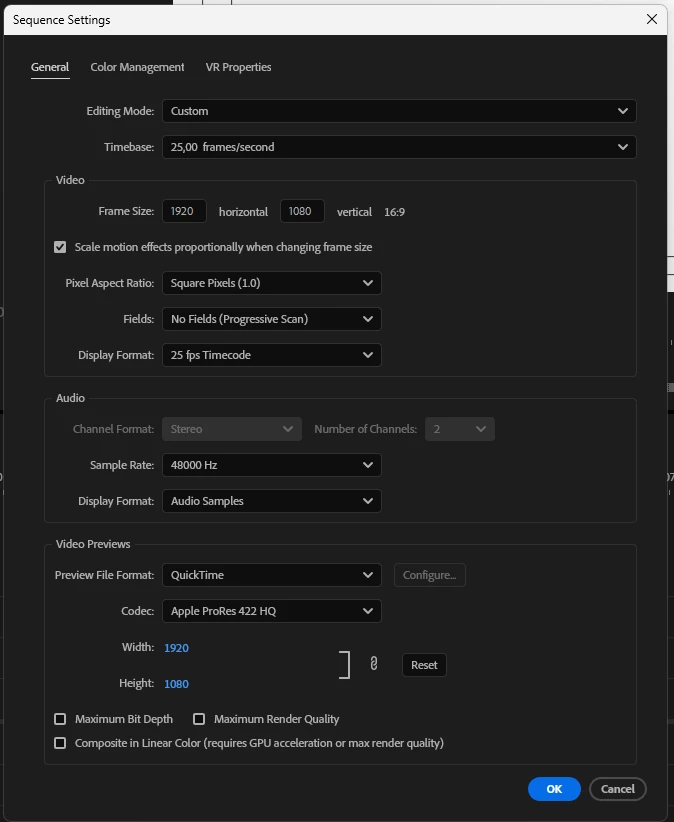
What settings are you using in Premiere's Sequence menu for depth? Max image depth, or not?

Everyone's mileage always varies ...
salvalnx作成者
Inspiring
January 18, 2025

Investigating what you told me about the sequence settings in depth, what I have found is a solution and it is deactivating "composite in linear color" of the sequence settings. When deactivating that box everything looks fine, the thing is that I lose when deactivating it. I don't know if by deactivating it or I lose some advantage when rendering or in terms of quality because it seems to take advantage of the GPU, that's the question, but what I just verified is that if I deactivate that almost everything works fine.

Thanks Neil because when he gave me the hint to change the depth (which I have tried and it didn't affect it at all) just below was the other option.

salvalnx作成者解決!
Inspiring
January 18, 2025

In fact, what I just found out is that before it was solved when I changed the color in the sequence settings from rec 709 to 2100 HLG and then went back to rec 709. (It was absurd but it was fixed). Well, that was solved like this because when making that change and going back to rec 709 the "composite in linear color" feature is automatically deactivated.


salvalnx作成者
Inspiring
January 17, 2025

Let me be more specific about the key issue: When I change the color space in the sequence settings from rec 709 to 2100HLG and click ok, I then go back to the same rec 709 and everything looks fine. If I save that project and reopen it, everything looks fine.