
Participating Frequently
August 24, 2020
Question

Vignette Effect disappears?

  • August 24, 2020
  • 4 replies
  • 1596 views

Dear Adobe-Community,

i have simply added a picture in the layer above my main video file and the vignette effect - which is attached to the main video -  disappears. There are no effects attached to the picture. Is this a possible bug?
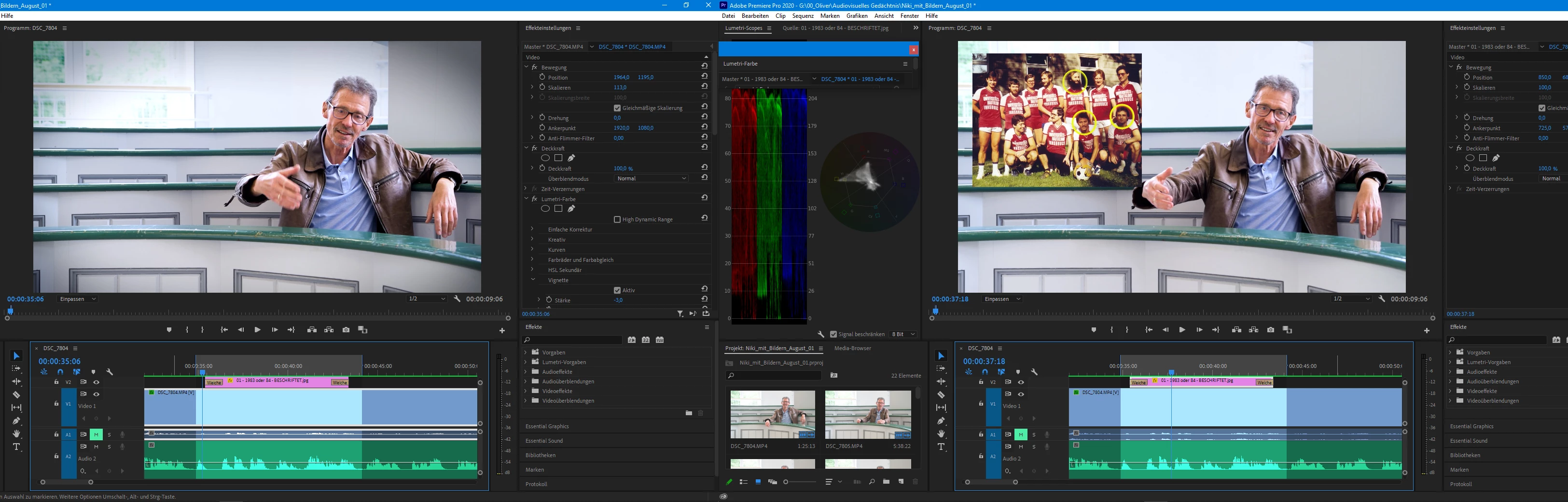
Kind regards and thanks in advance!

Oliver

This topic has been closed for replies.

4 replies

Graeme Bull
Community Expert
Community Expert
August 24, 2020

I can't confirm this either. Can you let us know what version of software you're running? Perhaps need an update? To confirm, I too simply put a picture on the layer above the video layer which had the vignette on it from the lumetri panel. Have you tried putting it on a different video layer? Make another track and put it there perhaps? Maybe Ann's advice will help too.

Participating Frequently
August 25, 2020

Thanks, i have found the (easy) solution!

Ann Bens
Community Expert
Community Expert
August 25, 2020

Which is?

Community Expert
August 24, 2020

Are you using the vignette effect from the Lumitry panel? I don't have your problem on Window 10

One thing you could try is turning off .Compsite in Linear Colour' in the sequence Settings menu

Participating Frequently
August 25, 2020

Thanks for your help! I had to activate my renderer to MERCURY PLAYBACK ENGINE GPU ACCELERATION [CUDA] again, because i deactived it probably 2 months ago due to rendering problems. Seems to work fine now.

MarekMularczyk
Community Expert
Community Expert
August 24, 2020

Which one is the buggy one since I can see a vignette in the screenshot on the left?

Adobe Community ExpertAdobe Certified Professional
Ann Bens
Community Expert
Community Expert
August 24, 2020
Participating Frequently
August 25, 2020

I have found the solution! Probably 1-2 months ago i had to deactive MERCURY PLAYBACK ENGINE GPU ACCELERATION [CUDA] (Renderer) because Premiere refused to render my files. I have reactivated it and - for the moment - it seems to work fine again! Thank you very much for your quick advice and effort!