JP2512
Inspiring
July 20, 2025
Answered

Voice over Settings Stereo

  • July 20, 2025
  • 1 reply
  • 557 views

I understand and have read many post but am still stumped. I am working on a simple project, with multiple clips, titles ,background audio and a couple of AE added. 

I have at this point 10 sequences and have started to do the voice overs for each. I had completed three and moved onto four when now my audio waveform is now only showing a single mono track of audio. Yes I can go to the Project panel and modify it to Stereo BUT I have tried everything to reset it so I can record it in Stereo. When I go to Audio channel setting it is greyed out showing Mono but if I go back to the previuos sequence it is Stereo. Am I not seeing something or still missing something. 

Correct answer Averdahl

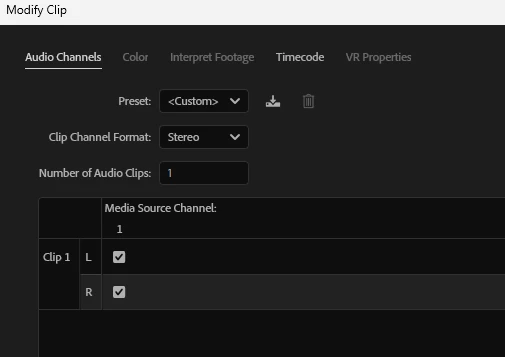
It´s easier to just use Modify > Audio Channels before you start to edit and set the clip to Stereo and check the R in Media Source Channel. If you do that, all mono clips will end up as "stereo" clips, iow with left and right filled with the same audio.


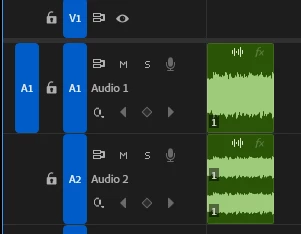
See the image below, on A1 is the original file and on A2 is the same file changed by Modify > Audio Channels.


Not as many steps, but it must be done before ju place the audio track on the timeline.


quote

...The solution was to create another sequence and than copy and paste all the media from the 'effected' sequence  into that new sequence .


By @JP2512


1 reply

Community Expert
July 20, 2025

Is there a specific reason you need the clip to be in stereo format?


Unless you're using two separate microphones to capture distinct left and right channels, you're essentially recording in mono—even if the clip is set to stereo.


A mono clip on a standard audio track functions the same way as a stereo clip with identical left and right channels: the audio is centered and played equally through both speakers. So if you're only recording with one microphone, there's no practical difference between using a mono or stereo format in terms of what you hear in the final mix.

JP2512
JP2512Author
Inspiring
July 20, 2025

Hi Paul

Thanks for the reply , I am someone who likes to see things 'correct' unfortunately, and I understand what you said , I did go back and came across a solution that worked. The solution was to create another sequence and than copy and paste all the media from the 'effected' sequence  into that new sequence . I am happy to accept the that it fixed the issue , with now showing Stereo and both L & R tracks in the waeform???

Thanks for the reply.

Ann Bens
Community Expert
Community Expert
July 20, 2025

Your new track is still not stereo but dual mono, this solution is visual for the timeline but not audible.