Participant
Dec 14, 2024 12:49 PM UTC
Answered

Want to create an overlay that's 9:16 vert with a transparent rounded square 1:1 centre

Want to create or find an overlay that is 9:16 Verticle with a transparent or cutout rounded 1:1 square in the centre (photo example below), which hopefully allows me to put selected videos in.


I've tried making one on Canva but when imported and overlayed on top, it's completely blank, only showing the selected video.


I know I can just make a 1:1 aspect ratio project, but I like the look of it being 9:16 vert.


Any solutions?

 

Ann Bens
Ann BensCorrect answer
Community Expert
Dec 15, 2024 12:30 PM UTC


7 replies

Ann Bens
Community Expert
Ann BensCommunity ExpertCorrect answer
Community Expert
Dec 15, 2024 12:30 PM UTC


Translate
Community Expert
Dec 15, 2024 1:18 AM UTC

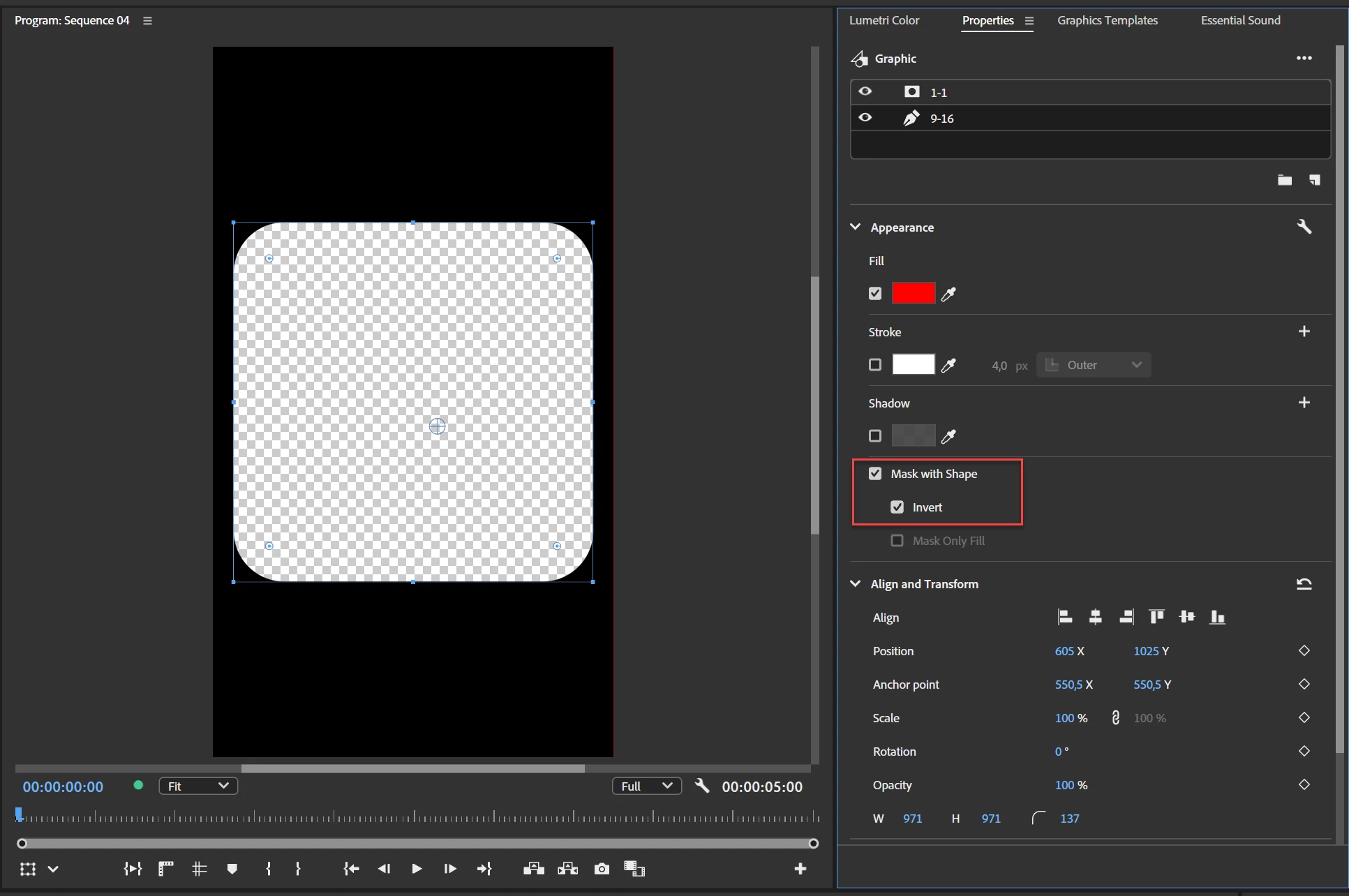
To create a 9:16 overlay with a transparent, rounded square in the center, follow these steps:

  1. Add a Rounded Square Shape:
    • Go to Graphics and Titles > New Layer > Rectangle.
    • In the Program Monitor, resize the rectangle to the desired square dimensions.
    • To round the corners, click one of the white corner circles and drag it inwards.
  2. Add a Full-Screen Rectangle:
    • Go to Graphics and Titles > New Layer > Rectangle again.
    • Stretch this rectangle to cover the entire frame.
    • Open Window > Properties.
    • Select the larger rectangle and set its color to black.
  3. Mask and Invert:
    • In the Properties Panel, drag the smaller, rounded square shape to the top of the layer list.
    • Scroll down in the Properties Panel and check the box for Mask with Shape.
    • Check Invert to create the transparent area in the center.
Translate
shayd6nAuthor
Participant
Dec 15, 2024 12:01 AM UTC

My bad, I'm using Premier pro to try an import a PNG overlay with that description, just having trouble trying to find or make my own.


Thanks

Translate
kglad
Community Expert
Community Expert
Dec 15, 2024 12:09 AM UTC

in the future, to find the best place to post your message, use the list here, https://community.adobe.com/

p.s. i don't think the adobe website, and forums in particular, are easy to navigate, so don't spend a lot of time searching that forum list. do your best and we'll move the post (like this one has already been moved) if it helps you get responses.


<"moved from using the community">
Translate
John T Smith
Community Expert
Community Expert
Dec 14, 2024 3:14 PM UTC

About shayd6n - Adobe Community - your 2 previous messages were in the Rush forum... is this a question about Rush?


If yes (you need to say so here) a Moderator will move this message

Translate
Peru Bob
Community Expert
Community Expert
Dec 14, 2024 2:42 PM UTC

This is the Using the Community forum (which is the forum for issues using the forums.

Please tell us what Adobe application you are using so that this can be moved to the proper forum for help.

Scroll down here to see a list of the forums:
https://community.adobe.com/

Translate
kglad
Community Expert
Community Expert
Dec 14, 2024 2:37 PM UTC

what app?

Translate