tonym10561194
Participant
November 11, 2022
Question

Warnings or Errors when dynamically linking from Premiere Pro to Audition

  • November 11, 2022
  • 1 reply
  • 358 views

Hello -


I wish to mix the audio of my Premiere Sequence in Audition. 

I choose Edit -> Edit in Adobe Audition ->Sequence.


I select the following parameters in the screenshot below:
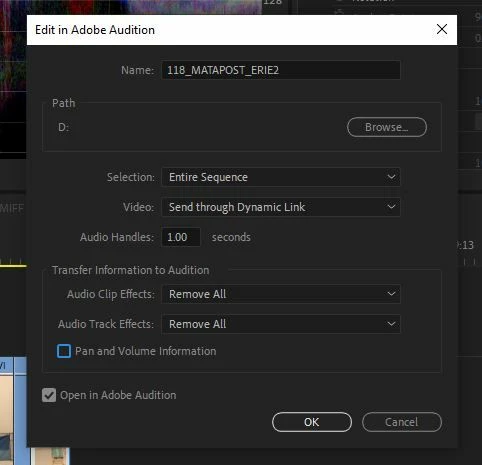


When it transfers to Audition it does seem to take a while for a sequence which is about 3:30 and then I am greeted with this message:
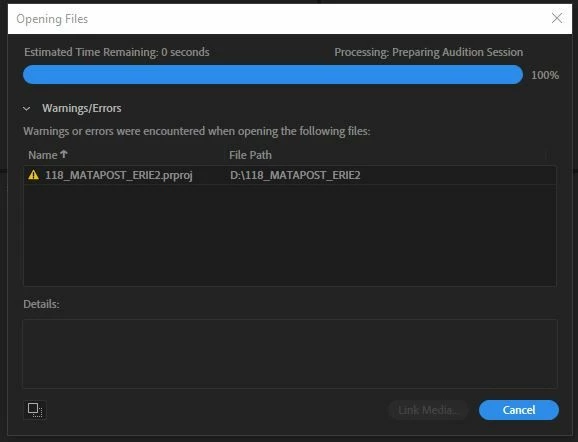


However, if I choose a clip from this same sequence and edit it in Audition everything works quickly and properly.


I have get this same warning/error with the other seqences in the project.

It does seem to be isolated to this PROJECT, however.  I don't get the error on sequences in OTHER projects. 


This topic has been closed for replies.

1 reply

R Neil Haugen
Legend
November 11, 2022

Try closing the project, dumping the cache, then reopening the project.


Neil

Everyone's mileage always varies ...
tonym10561194
Participant
November 11, 2022

Thank you Neil.  I did already try that, and also manually delete the cache folders.  But, to no avail.

R Neil Haugen
Legend
November 11, 2022

Then you can create a new project.


In the MediaBrowser in that new project, navigate to and click on the old project file.


Right-click and import the seqeunces of that project one at a time, check them out to see if they work properly.


Neil

Everyone's mileage always varies ...