
n0n0
Known Participant
May 29, 2023
Question

Watery effect on video clips

  • May 29, 2023
  • 3 replies
  • 1114 views

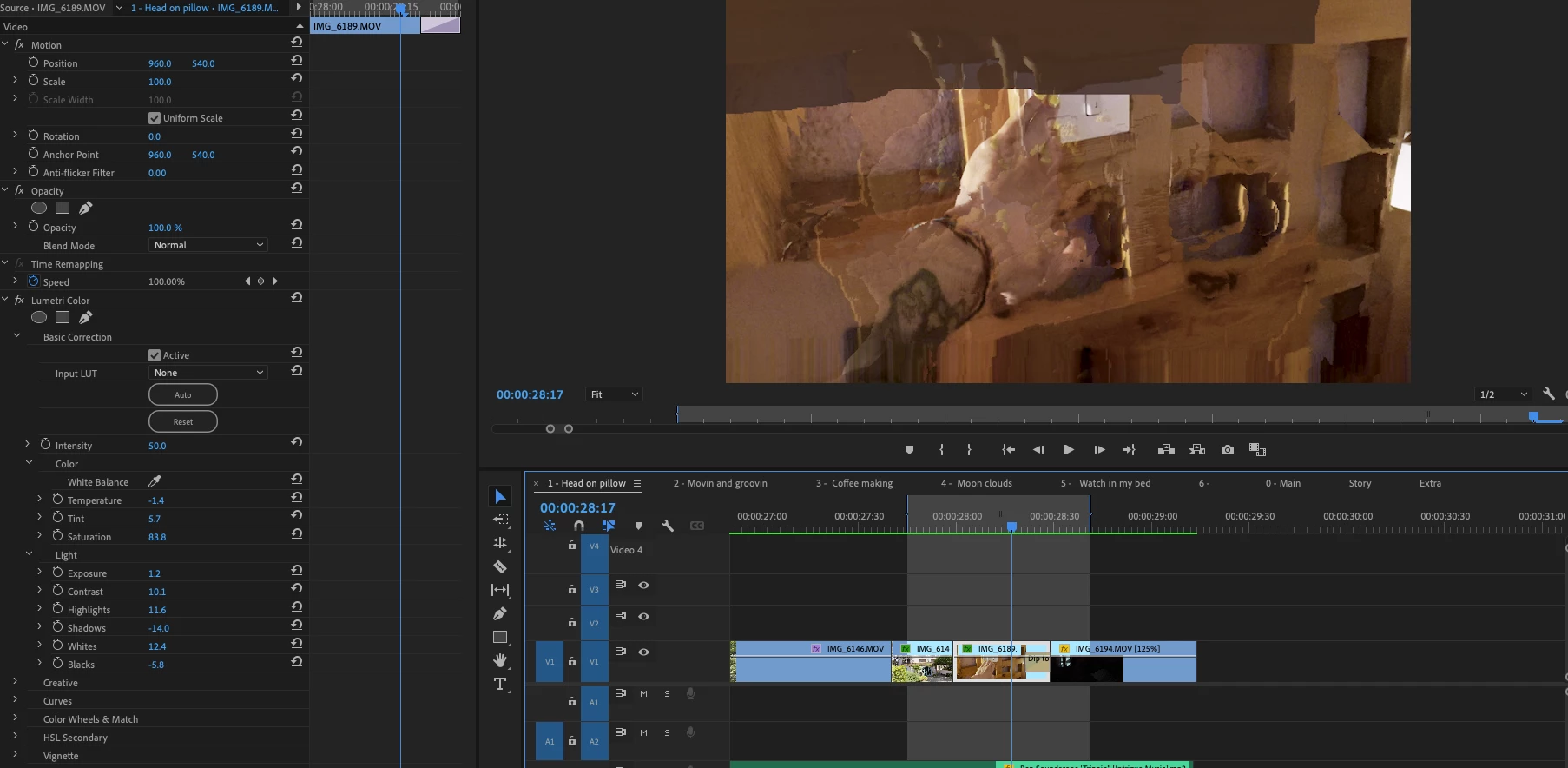
On some clips, I get this watery effect.  I thought at first it was related to the Auto Lumetri Color setting, but that doesn't appear to be the case for this one.  The original footage/clip does not have this watery effect.  It also only shows up on this one after rendering. 


Any idea of what might be causing this?

Thank you!


This topic has been closed for replies.

3 replies

Remote Index
Inspiring
June 3, 2023

@Kevin-Monahan 

@Francis-Crossman17221443 


"Premiere has issues with variable frame rate files."


Here's another example of a known issue with poor or non-existent documentation. The search in documentation looks yeilds this.


Can you point me to where variable frame rate media is addressed in Known Issues or the manual?


R.


Legend
June 3, 2023

Can't argue with that, but it's addressed frequently in this forum and gotta say this forum is an incredible resource and Adobe does an admirable job of supporting it.  I've been doing this a very long time...  I had an early avid...  their manual was enormous and you got a hard copy of it which was great...  If I remember correctly (this was a long time ago), I needed to change the frame code mode of a sequence (happy to explain exactly what this is, but it's not really germane at the moment.  For the $50,000 that the avid cost (imagine what that is in 2023 dollars) you got 2 years of 24/7 support and after that it was $2000 a year for support (again if I remember correctly)...  So I called avid.  The support guy told me exactly what page the issue was addressed in the manual.  I asked how I would find that in the 1000's of pages.  Could he point me to a relevant listing in the index....  dead silence.     What I learned was to depend on the support forum for help from other users...  Cause trust me, they were better than any manual...   When I moved to FCP 1-7, I spent a lot of time on the apple forum...  It was wonderful, but... there was NEVER any official presence from Apple.   One or 2 of the top posters had an inside track into Apple and would occasionally give Apple a heads up.     So yeah, Adobe could do a better job with documentation, but not easy to keep up with the constant updates to the program.  But...  I can't imagine anyone who's working in Premiere doesn't know how to google something.  

https://community.adobe.com/t5/premiere-pro-discussions/faq-how-to-work-with-variable-frame-rate-vfr-media-in-premiere-pro/td-p/10348229

Granted, you'd need to have a clue as to the cause of the issue, but I'm guessing that can be found with some additional googling.  The fact is Apple promotes the iphone as a professional tool...  gotta say in a lot of ways "not really."  

Remote Index
Inspiring
June 3, 2023

Michael Grenadier,


Thanks for responding.


The link you provided is good, and as it was written by an Adobe employee it seems like a good resource.


However, it raises several questions:


1. It was written in 2019. Is it still relevant to current versions? All versions?


2. It currently has 77 thousand views. It seems like it would be easy to adapt and include in official documentation.


3. ... in fact, a truncated version of this is part of the documentation. As I’ve already indicated, the “official search results” that I came up with are poor (link above). They do not include this reference that you found. But they do include “Premiere Pro supported file formats" (5th hit) and this does include a truncated version of the article you linked to “Support for Variable Frame Rate files” - but none of this relevance is apparent from title or summary.


It’s important that Adobe support their users and maintain their documentation. Forums, while an very important resource, can promote misinformation, rumours, and bad practice as well as providing useful benefits. For search to be a good resource, one must know where to search, how to search, and what to trust in the results.


"Adobe could do a better job with documentation, but not easy to keep up with the constant updates to the program. "


This is a strange statement to me. It implies that while it’s important for Adobe to properly resource updates and software design, it is less important for them to properly resource documentation.


R.


Legend
May 30, 2023

Please tell us your system specs: OS version, Premiere version, amount of RAM, Hardware specs including graphics card and the source properties and sequence settings

n0n0
n0n0Author
Known Participant
May 30, 2023
How can I find the Source Setting?
 
Please see below for the rest.  Thank you!
 
MacBook Pro

13-inch, 2020, Four Thunderbolt 3 ports

2.3 GHz Quad-Core Intel Core i7
Intel Iris Plus Graphics 1536 MB
32 GB 3733 MHz LPDDR4X
macOS: 13.3.1 (a)
 
Premiere Pro: version 23.4.0 (Build 56)
 
Properties: 
File Path: /Users/Nono/Library/Mobile Documents/iCloud Drive/Video Projects/Sun and Bass 2022/Original Footage/iCloud Photos/IMG_6189.MOV
Type: MPEG Movie
File Size: 8.11 MB
Image Size: 1920 x 1080
Frame Rate: 59.96
Source Audio Format: 44100 Hz - Compressed - Stereo
Project Audio Format: 44100 Hz - 32 bit floating point - Stereo
Total Duration: 00:00:02:50
Pixel Aspect Ratio: 1.0
Alpha: None
Color Space: Rec. 2100 HLG
Color Space Override: Rec. 709
Input LUT: None
Video Codec Type: HEVC 10 bit  4:2:0
Variable Frame Rate Detected
 
Legend
May 30, 2023

Premiere has issues with variable frame rate files.  Here's how to confirm the diagnosis and fix it


use mediainfo to determine whether your source is variable or constant frame rate
https://mediaarea.net/en/MediaInfo/Download
if it's variable use handbrake to convert to constant frame rate setting the quality slider in the video panel to maximum
https://handbrake.fr
and here's a tutorial on how to use handbrake
https://www.youtube.com/watch?time_continue=34&v=xlvxgVREX-Y

n0n0
n0n0Author
Known Participant
May 30, 2023

Here is another example.  Watery effect shows once clip is rendered.