
Participant
May 21, 2021
Question

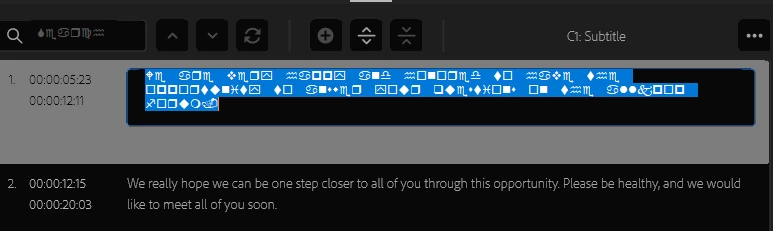
Weird characters when editing captions
  • May 21, 2021
  • 2 replies
  • 634 views

Hello all, when trying to edit captions in Premiere Pro 2021, these weird characters replace the text, so it's hard for me to edit it. When I exit the editing, the characters go back to normal text. Does anyone know how to change these characters when editing back to normal text? Thanks.

This topic has been closed for replies.

2 replies

Community Manager
June 11, 2021

Hi there,


We're sorry about the poor experience. This issue has been addressed in our latest Beta build. You may download the latest Beta build from the Creative Cloud Desktop app. Refer to this link to know more about public Beta.


Thanks,
Sumeet

Stan Jones
Community Expert
Community Expert
May 21, 2021

Known issue with no solution yet. The captions appear correctly on export and in the timeline. You can edit in the Program Monitor. See this post and upvote the bug report there:

https://community.adobe.com/t5/premiere-pro/caption-window-showing-strange-symbol-font/m-p/11974814#M341833


Stan