
Participating Frequently
February 14, 2020
Question

Weird distortion to image when using crop effect

  • February 14, 2020
  • 3 replies
  • 2000 views

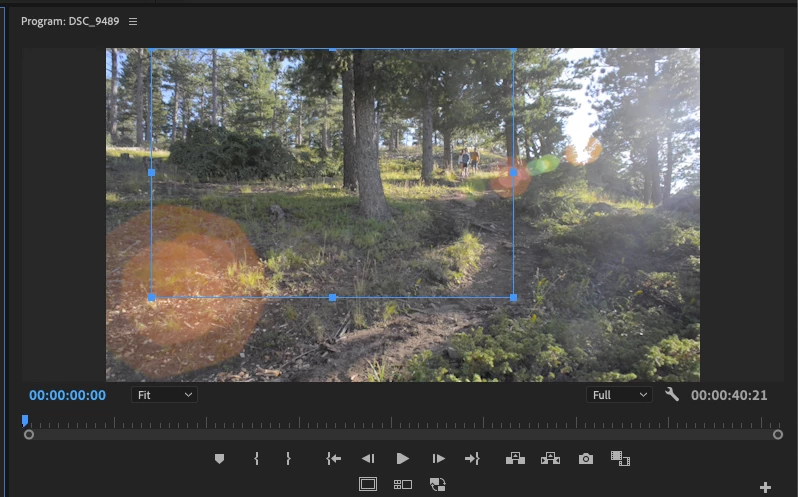
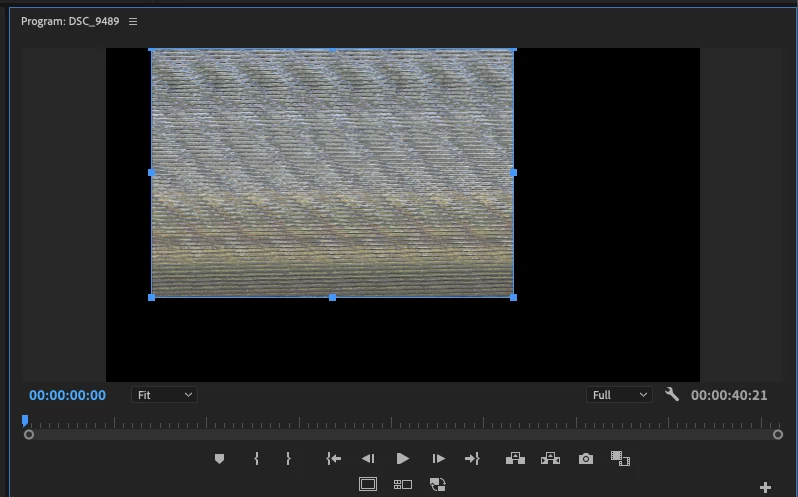
I just noticed this happening since upgrading to 2020. When I apply the crop effect which I use quite often for color correction, my video become extremly distored. Here are two images one is with the crop (and distorion) the other is with the crop effect turned off. This happen with all footage from different sources and cameras. Any ideas??
 

This topic has been closed for replies.

3 replies

jasontcox
Inspiring
February 14, 2020

If this is indeed a GPU bug like Kevin seemed to indicate, then you MIGHT find a temporary fix by temporarily disabling GPU Acceleration under File - > Project Settings -> General. Set it to Software Only and see if that helps.

Participating Frequently
February 16, 2020

I have since founf all the other threads related to to this weird issue with Metal and switching to OpenCL works for now

Kevin J. Monahan Jr.
Legend
February 14, 2020

mscalisi,

Sorry! Is this a 16" MacBook Pro by any chance? Which OS are you using? I hope we can get a fix for this soon. Please upvote this bug.


Thanks,
Kevin

Kevin Monahan - Sr. Community and Engagement Strategist – Adobe Pro Video and Audio
Participating Frequently
February 16, 2020

Yes and upvoted

Participating Frequently
February 16, 2020

OS is Catalina

Ann Bens
Community Expert
Community Expert
February 14, 2020

Either update your graphics card driver or use mask from Opacity to crop instead.