Known Participant
November 26, 2020
Question

Weird line when adding key frame to audio track

  • November 26, 2020
  • 7 replies
  • 1368 views

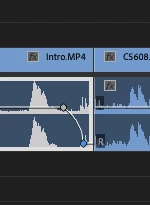
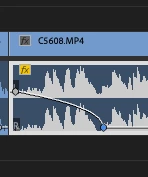
Anyone else getting this weird curved line when creating key frames within the audio track? This never happened before.. I am just adding a key frame and dragging it down to fade in or out the audio. 
This topic has been closed for replies.

7 replies

Harold Silva
Community Expert
Community Expert
October 3, 2022

Aunque es un problema conocido como dicen por aqui muchos quizas debas solo presionar click derecho sobre el keyframe y convertirlo a lineal.

 Eso deberia ser la solución.

Salu2

Harold Silva B.
Rory Skywalker
Participant
October 3, 2022

If you right click, (on a mac = Control+your mouse click) - you can change the audio back to 'Linear', rather than 'Auto Bezier' or 'Bezier' which is the 'blue' version of audio fading in and out etc. Isn't a bug, it's a feature. Hope this helps. I think you're used to editing as 'Liner' = straight lines, 'Bezier' = 'curved blue lines' / keyframes - hope this helps!

Participant
July 26, 2023

Thank you! This was driving me nuts. The blue volume curve thing is a stupid feature and should not be the default. 

Christian.Z
Community Expert
Community Expert
November 28, 2020

This looks like an auto bezier
Usually this is created when pressing command+option or ctrl+al and clicking to create a keyframe.

Ann Bens
Community Expert
Community Expert
November 26, 2020

Known issue/bug:

workaround: Save, Close and reopen project.

Known Participant
November 26, 2020

This solves it but when my PP crashes every 10-15 minutes and I have to constantly reopen, discover that I also have a keyframe/audio bug and reboot again PP. You can imagine the joy this brings me. 

Community Expert
November 26, 2020

See:

https://community.adobe.com/t5/premiere-pro/using-pen-tool-to-adjust-audio-track-volume-in-premiere-is-creating-a-curve-automatically/m-p/11620331?page=1#M312837


I have no problems with the db level being displayed. If you have the curved keyframe line problem closing and restarting the program will fix it. It seems once a clip has been 'fixed' it will stay fixed even when adding or adjusting keyframes but any new clips might well have the curved line problem. I have found that there is no problems with track volume keyframes, only clip keyframes.

Known Participant
November 26, 2020

Also: I can't see the DB in the audio track file when I move the keyframe up or down, normally it would indicate what the DB is currently set to, if you look at the screenshot the keyframe is highlighted in blue but isn't displaying the DB. Instead  have to look at the effects control panel to see what it's set too. This is slowing my workflow down nicely. 

Participating Frequently
November 26, 2020

I and I think others have noticed this and I believe it is a known fault in the latest version of Premiere Pro

Known Participant
November 26, 2020

I find it so hard to grasp how a bug like that can pass QA? Surley they would test and find something like that

oiko2k
Participant
November 28, 2020

But appreciate the fact that with only 40-60€ per month, you get the honor and privilege to beta test these things by yourself. Don't be ungrateful!