Participant
May 25, 2012
Question

Weird message in Premiere Pro CS6

  • May 25, 2012
  • 3 replies
  • 27515 views

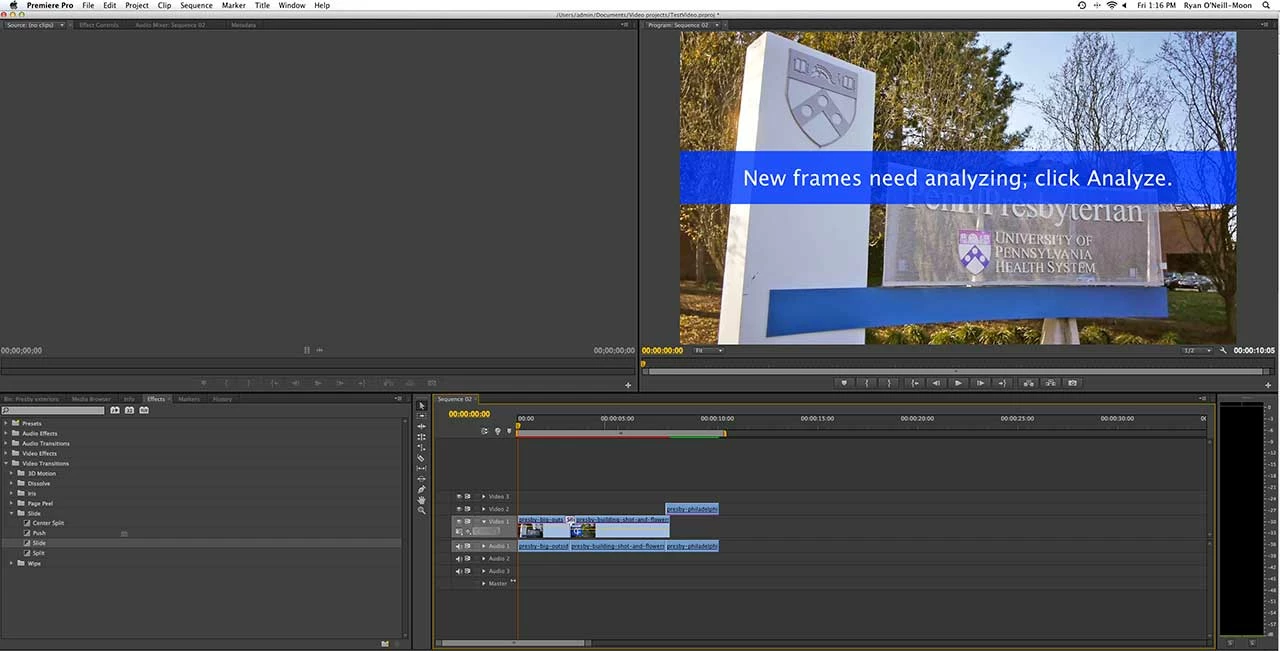
When I add any video transition, a blue band is displayed across the Program window that says "New frames need analyzing; click Analyze." So I tried rendering and it still stays there. The weirdest part is that when I export the movie, it's in the final version of the movie! I'm on Adobe Premiere Pro 6, with the latest update (6.0.1).  Mac OS X 10.7.3. The source footage is .mts clips (AVCHD codec) from a Panasonic GH2. I've googled this message, and nothing comes up about it. Everything that comes up for "analyze" and "premiere pro" has to do with voice analyzing. Does anyone have any idea what this is and how to get rid of it? Sorry if this is a newb issue, I'm migrating from Final Cut right now, so I'm a little out of my element!
This topic has been closed for replies.

3 replies

Participant
March 18, 2015

Hi there, has anyone found a solution for that error message appearing on the exported video?

I'm having the same problem with the video I'm putting together at the moment. The weird thing is, it only appears on the exported video. The error is not visible in PP, not even in the preview while exporting.

I recently moved from MC to Premiere Pro and don't really have any troubleshooting experience, yet.

Help! Thanks!

Participant
April 28, 2015

Okay...i found it under the effects control.

1) Click on the file.

2) Go to window (between Title and Help drop downs)

3) Go to "effects control" - NOT "effects"

4) Analyze is under Warp Stabilizer. Below it is a cancel button

Hope this helps

Participant
August 10, 2016

TNX!!!!

From Belgium.

Ann Bens
Community Expert
Community Expert
May 25, 2012

Just do what the message says; hit the Analyze button within the Warp effect in the Effect Controls.

Participant
June 6, 2013

Where is "Warp Effect"?

Inspiring
June 6, 2013

This thread is discussing the Warp Stabilizer effect (CS6)

http://helpx.adobe.com/premiere-pro/using/stabilize-motion-warp-stabilizer-effect.html

the_wine_snob
Inspiring
May 25, 2012

Welcome to the forum.

Though it might have no meaning, regarding your message, let's get this one out of the way first. Do you have adequate Handles on the two Clips (the Tail of the first, and Head of the following one), where you are adding the Transition? If not, then PrPro will need to create those, with duplicates of the last Frame of the first Clip, and the first Frame of the following Clip. This ARTICLE goes into more detail on Handles, if you need it.

Good luck, and maybe others will know exactly what is happening with your Transitions.

Hunt