Inspiring
February 28, 2023
Answered

weird video issues

  • February 28, 2023
  • 3 replies
  • 3040 views

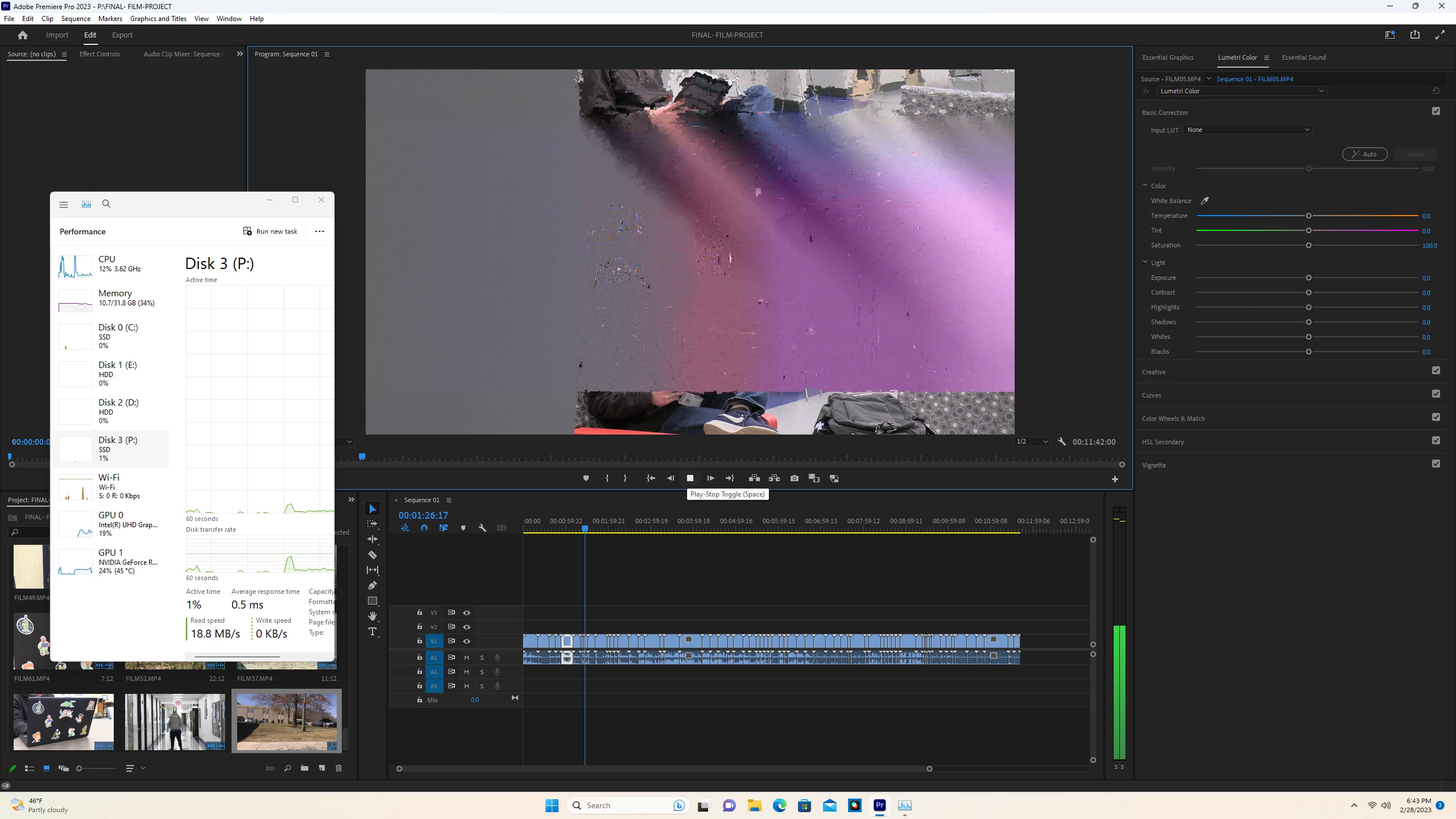
I am having some issues with my videos looking like this. even when i export the project they are still ther. they do not show up before importing to premire pro. anyone know how to fix this?

This topic has been closed for replies.
Correct answer Isaac28643614qony

Thank you all for the help. I did get rid of the problem by updating the intel graphics driver, mine kept saying it was up to date when it really was not through the device manager. To anyone that may have this issue in the future, download the automatic intel driver and support assistant tool to get the correct drivers, and to keep them up to date if needed. Hope this helps someone in the Future. 

3 replies

Isaac28643614qonyAuthorCorrect answer
Inspiring
March 2, 2023

Thank you all for the help. I did get rid of the problem by updating the intel graphics driver, mine kept saying it was up to date when it really was not through the device manager. To anyone that may have this issue in the future, download the automatic intel driver and support assistant tool to get the correct drivers, and to keep them up to date if needed. Hope this helps someone in the Future. 

Kevin-Monahan
Community Manager
Community Manager
March 1, 2023

What is the GPU driver you are using, Isaac?


Thanks,
Kevin

Kevin Monahan - Sr. Community & Engagement Strategist – Pro Video and Audio
Inspiring
March 1, 2023

I am using the latest, 531.18 nvidia driver. I did try the studio driver with no luck. Also only these set of files are causing this issue. My other files are not affected which is odd, because neither are corrupted and work fine when opening elsewhere. This sucks because the files I need to use is for a project. Additionally both sets of files are same properties, so why one would work and another not is quite odd. 

Kevin-Monahan
Community Manager
Community Manager
March 2, 2023

Isaac,

Sorry to report that the latest drivers are very problematic. Try rolling back to 528.49. Let us know if that helps.


Thanks,
Kevin

Kevin Monahan - Sr. Community & Engagement Strategist – Pro Video and Audio
Peru Bob
Community Expert
Community Expert
March 1, 2023

If NVIDIA graphics, make sure to use the latest Studio Driver from NVIDIA (NOT the Game Driver).

Inspiring
March 1, 2023

After, installation of studio driver, I relaunched premiere pro, and still having the issue. I'm stumped, never seen it do this before.

Ishan Y
Community Manager
Community Manager
March 1, 2023

Sorry to hear about this. Do you see this issue with specific types of source files? Please share your source file properties (Right-click on the clip on Timeline > Properties). For testing purposes, go to File > Project Settings > General, set the Renderer to Mercury Playback Engine Software Only, and let us know if you still see the issue.