
Participant
February 6, 2013
Question

What are the correct iphone 5 H.264 export settings?

  • February 6, 2013
  • 2 replies
  • 19060 views

I have scoured the internet for help trying to find the correct way in which to make a proper H.264 mp4 video file that will play on the iPhone 5. I am using Adobe Premiere CS 6. There exist presets for the iphone 4, but not the iphone 5. I tried the iphone 4 presets but they will not play on the iphone 5.

I tried checking Apple's iphone 5 video specs to make sure I am not over spec: https://www.apple.com/iphone/specs.html, which says: Video formats supported: H.264 video up to 1080p, 30 frames per second, High Profile level 4.1 with AAC-LC audio up to 160 Kbps, 48kHz, stereo audio in .m4v, .mp4, and .mov file formats;

Here is how I have my video export settings set up in Adobe Media Exporter and the multiplexer is set to iPod:
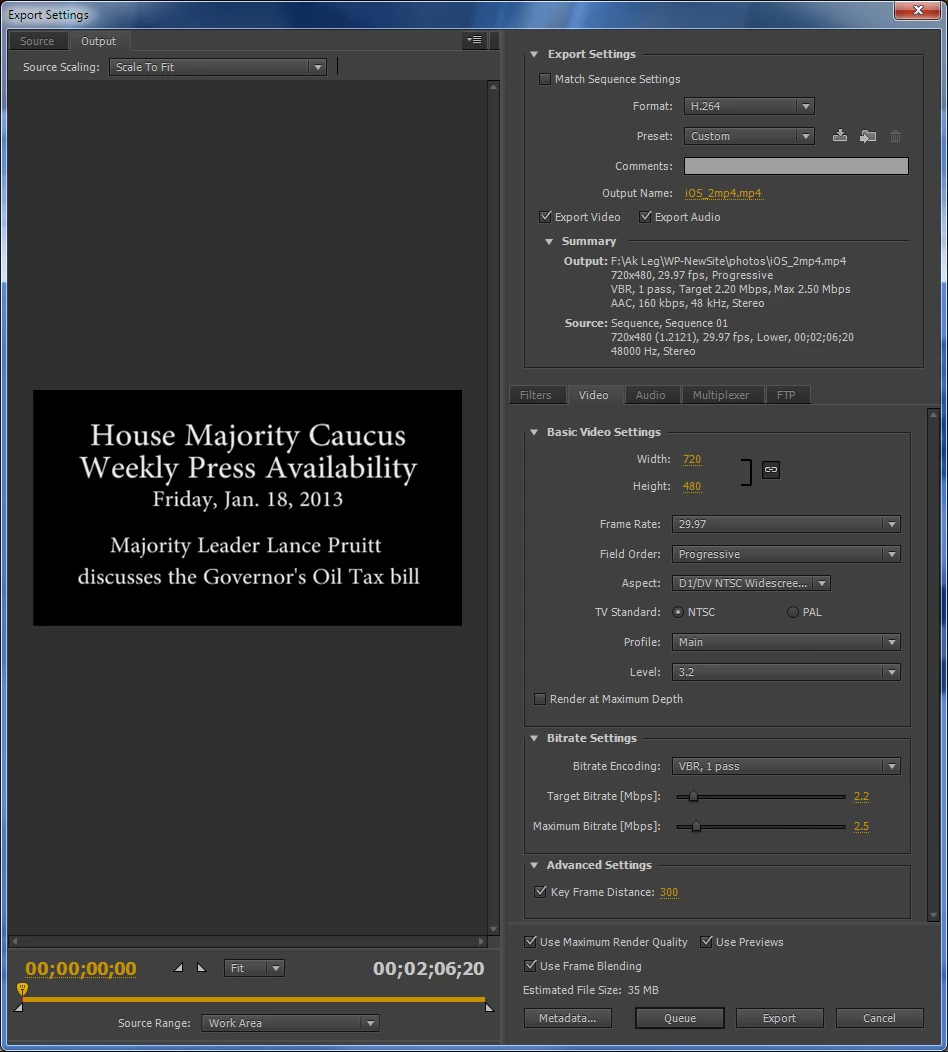
I've tried other slight variations, but nothing will play. I am hosting these videos on a site and just trying to access them from the URL bar such as: http://harbourak.us/videos/iOS_mp4.mp4. I cannot use m4v or mov formats because of the flash script that is used on other flash supporting browsers that can convert the mp4 quickly on the fly.

If anyone has any suggestions for how to get this to work I would be greatly appreciative! Thank you!

This topic has been closed for replies.

2 replies

Participant
September 2, 2013

these settings work great for me and my clients. i simply send (if the file is small enough) the MP4 as an email attachment and it plays right on the iPhone/iPad and can be saved to the Camera Roll, forwarded, etc.:

VIDEO

  • H.264
  • NTSC
  • 568 x 320 pixels
  • 24 or 30 fps (i usually work in 24, and the file size will be a bit smaller)
  • Field Order: None (Progressive)
  • Square Pixels
  • Profile: Main
  • Level: 3.1
  • Bitrate Encoding: VBR, 1 Pass
  • Target Bitrate: 1
  • Max. Bitrate: 1.4
  • Key Frame: 30

AUDIO

  • AAC
  • Stereo
  • 44.1 kHz
  • Audio Quality: High
  • Bitrate: 128
Jeff Bellune
Legend
February 6, 2013

So to be clear: these videos are not to be downloaded to an iPhone 5 and played from the phone's memory, but instead will be viewed in the Safari browser (or another browser that works on the iPhone) using a URL similar to the link you gave?

If so, then you are approaching the export incorrectly.  You need to export to a format that is friendly to the web site and browser being used. 

Jeff

BudmaniakAuthor
Participant
February 6, 2013

Ok, so what are the settings to make an H.264 mp4 that will play in Safari or Chrome on a iphone 5? Nothing I've tried so far has allowed me to get it to work, although I could play mp4s from the web previously with my iphone 3GS. It seems to me that if it can play in your video library on your phone then it's the same thing as downloading it to stream from the browser, because it's the same format.

Jeff Bellune
Legend
February 6, 2013

It seems to me that if it can play in your video library on your phone then it's the same thing as downloading it to stream from the browser, because it's the same format.

Nope.  On the one hand, the browser is the player, and on the other hand the phone's native built-in player is used.

As for settings, find one that works in a browser on your computer, and see if the iPhone 5 will play it from Safari or Chrome.  You can increase your chance of success if those browsers are also installed on your computer.

I've got a 4S, so if you can PM me a link to an uploaded video (with necessary username and password), I will see if it will play on my phone.

Jeff