
Inspiring
September 21, 2025
Question

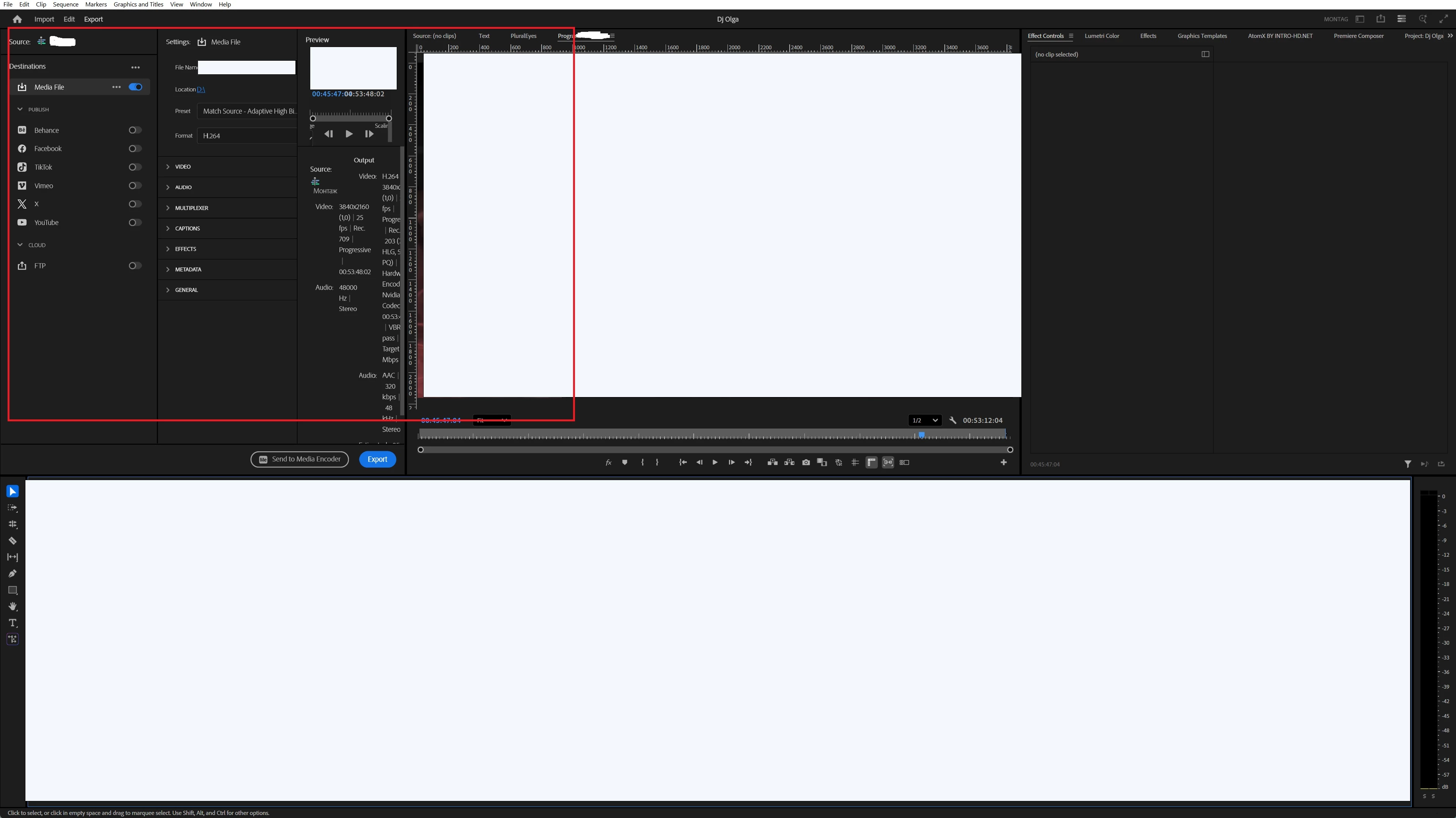
What did you do with the export window again?
  • September 21, 2025
  • 4 replies
  • 422 views

Do you take money for such a terrible design? In different versions I see this, I reset the workspace settings.  It doesn't work. What should I do? I need normal work and not chaos on the desktop

4 replies

Stan Jones
Community Expert
Community Expert
October 20, 2025

@Paul_Gringo,


That is a seriously messed up Workspace! Sorry for the frustration, but troubleshooting requires steps to sort the problems. I liked Sumeet's suggestion for testing basic workspace functions in a new, test project. I'd also suggest looking at whether PR plugins/extensions play any role. They can mess up basic functions, sometimes even if they are not open as panels.


I see 3 plugin panels open in your screenshot, one of which is no longer supported. I'd certainly try the startup option to see if it will give you a quick test of not loading those. I don't recall if you are Mac or PC; on PC, hold Shift down as you start PR.


Stan

Screenshot from Win 11 PR 25.5.0:


Community Manager
September 22, 2025

Hi Paul,

Sorry to hear about the workspace issue. Could you please confirm if it's happening with any specific project or all the projects? Please try these steps & check if it's working properly.
- Create a new project & navigate to Window > Workspaces > Editing. 

- Navigate to Window > Workspaces > Reset to Saved Layout.

- Window > Workspaces > uncheck Import Workspace from Projects.

- Navigate to File > Import and import the project file you are working with.

Once imported, check if the workspace is looking correct.

Let us know if it helps.


Thanks,

Sumeet

Inspiring
September 23, 2025

in all the projects. I have already tried your advice and wrote about it.  In different versions I see this, I reset the workspace settings. It doesn't work. What should I do? I need normal work and not chaos on the desktop

Peru Bob
Community Expert
Community Expert
September 23, 2025

Please provide the requested information so that we might be able to help you fix this.

Peru Bob
Community Expert
Community Expert
September 21, 2025
R Neil Haugen
Legend
September 21, 2025

Something is off in your system. So OS/CPU/GPU/RAM, as always , and have you done the normal troubleshooting first steps of dumping cache files and trashing preferences?

Everyone's mileage always varies ...
Inspiring
September 21, 2025

RAM?) You give strange advice. Sorry

R Neil Haugen
Legend
September 21, 2025

Basic troubleshooting 101, for any app. Especially Premiere. You want help, which many here will be happy to give, please help by answering questions.


And those are not random questions. 

Everyone's mileage always varies ...