This topic has been closed for replies.
Correct answer Richard M Knight

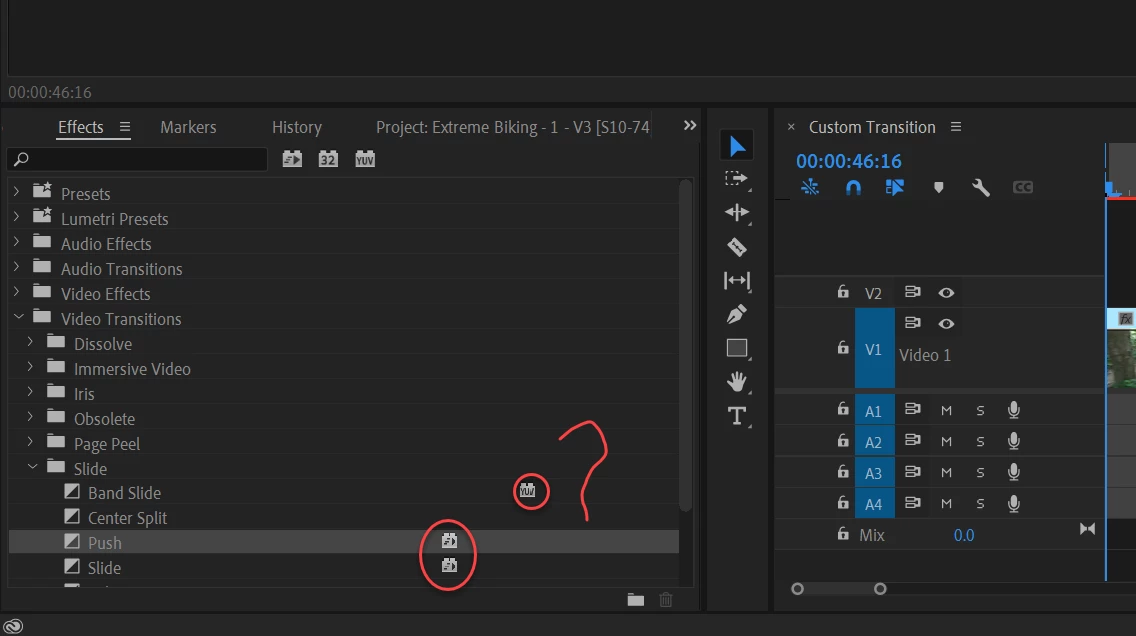
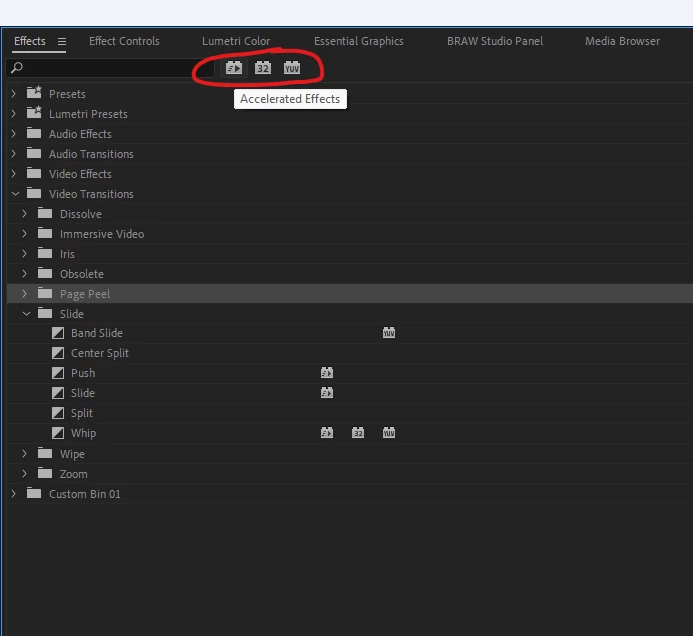
It tells you if the effect is hardware accelerated, 32 bit colour or yuv. If you hover over the icons at the top the tool tips will tell you.
2 replies

Richard M KnightCommunity ExpertCorrect answer
Community Expert
July 21, 2022

It tells you if the effect is hardware accelerated, 32 bit colour or yuv. If you hover over the icons at the top the tool tips will tell you.

MahaB82A
MahaB82AAuthor
July 21, 2022

Thanks.

Ann Bens
Community Expert
Community Expert
July 21, 2022

Might want to hit F1 once in a while.

Premiere generates loads of tool tips.

Hover over the top icons and type in the text in the Help.

Instead of us having to provide you with a link.

If you dont understand what it means after reading the help, then ask the question.

I dont want to sound unpleasant but you need to learn to do some legwork yourself first.

Participant
October 26, 2023

It's just a question.  Don't be a condesending ass.  If you don't like quesitons, don't read the forum.