What frame rate is this clip, in Premiere Pro ?
Hello...
The camera was a DVX100a and these clips were shot in 24p advanced. Standard Digital (old school)
The clips were captured from the camera, to the computer, in 23.976 fps. for the "film look."
Now, when the clip is on my desktop the properties read 29.97 fps. (using MediaInfo)
When the clip is imported into PPro, it reads 23.976 in the project panel.
When the clip is in the PPro timeline, (I right click on the clip in the timelinet0 it reads 29.97.
The clip properties in the project panel read this: "29.97 (24p)"
here is a pic of that:
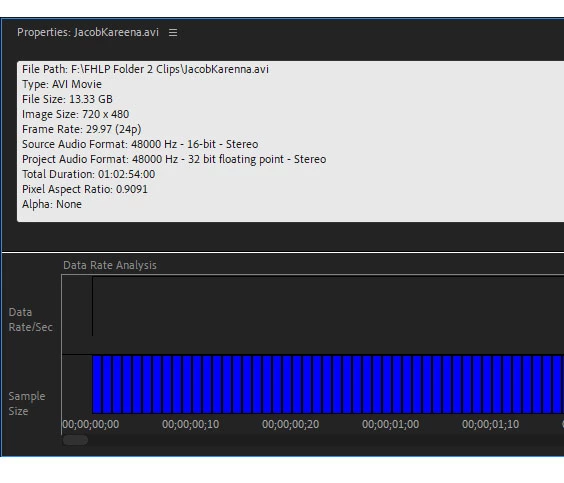
also note, when I export/link the clip to AE, the clip reads as 29.97 in AE.
Sooooo..... what is 29.97 (24p) ? (a mysterious conflicting fps)
I'm guessing it's a 24p fps clip that was installed into a 29.97 container? (just a guess)
IF that is true, should I treat the cliip in the sequence as if it were 23.976 fps OR should I treat it as a 29.97 fps clip and that would match up nicely with AE as well. And if it is a 29.97 clip, I should match the preset to that fps for exporting and burning to a disc?
The avi properties of 29.97 (24p) is killing me! I've been all over Google and can't find a thing on it.
Thanks for your input!!
Letty
 AdChoices