


Participant
Jul 26, 2024 7:52 AM UTC
Question

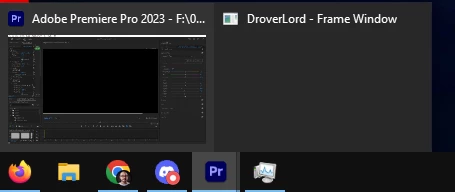
What is DroverLord - Frame Window?

Hey everyone,

I was just working on a project in Premiere Pro 2023 (on a PC running Windows 10 64 bit), when I noticed that the Premiere Pro icon on the taskbar shows two windows stacked on top of each other. When hovering over it I see a transparent window called "DroverLord - Frame Window". Based on the minimal info there is regarding this I gather that it's related to some sort of error reporting for Premiere Pro. I haven't had any issues all night while editing so I'm wondering why I'm seeing this. Can anyone shed some light as to what this is about?


Thanks!
 

5 replies

Participating Frequently
Aug 4, 2025 6:57 PM UTC

My issue is that my project crash and when I opened it, my timeline stopped populating. When I close the sequence this DroverLord - Frame Window appears.


Translate
caroline_edits
Community Manager
Community Manager
Aug 8, 2025 7:25 PM UTC

Hey there,

Sorry for the crash issue. I'll ask around about the specifics of what "DroverLord" indicates, but I think it indicates a section of our base code.


Did you ever resolve the issue with your timeline? Did you try resetting the app? This thread is pretty old, feel free to create a new one in the Premiere community board.


Caroline

Translate
Participating Frequently
Aug 18, 2025 12:57 PM UTC

Had the same issue, the way I could recover my project was by exporting de project to Final Cut XML format and open the XML in a new project!
I couldn't find any other topic in the community, hope this help!

Translate
Nick Lear
Inspiring
Nov 11, 2024 12:31 PM UTC

Also wondering this today!

Translate
Nick Lear
Inspiring
Nov 11, 2024 12:52 PM UTC

Remembered it's part of the code base to do with windows. eg https://www.autohotkey.com/boards/viewtopic.php?t=127754

Translate