


Participating Frequently
June 23, 2025
Answered

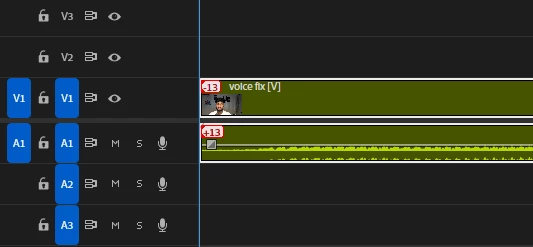
What is this +13 and -13
  • June 23, 2025
  • 2 replies
  • 388 views

I was just nesting around stuff later I saw this when I link both media it shows this +13 and -13 mine audio level is set to zero 
There was one main clip then I nested it and again nested that to fix my client video voice.So do anyone know what is this +13 and -13 
Version-25.3.0

Correct answer Sumeet_Kumar_Choubey

Hi Sahil Tank,


Welcome to the community! These are out of sync indicators for unlinked clips. To sync the video & audio, you may right-click on the indicators & select Move to sync. Display out of sync indicators for unlinked clips can be configured under Premiere Pro > Preferences > Timeline. Here is a link to learn more about Premiere Pro preferences. Hope it helps.


Thanks,

Sumeet

2 replies

Sumeet_Kumar_ChoubeyCommunity ManagerCorrect answer
Community Manager
June 23, 2025

Hi Sahil Tank,


Welcome to the community! These are out of sync indicators for unlinked clips. To sync the video & audio, you may right-click on the indicators & select Move to sync. Display out of sync indicators for unlinked clips can be configured under Premiere Pro > Preferences > Timeline. Here is a link to learn more about Premiere Pro preferences. Hope it helps.


Thanks,

Sumeet

Participating Frequently
June 24, 2025

Thanks it helped me 

R Neil Haugen
Legend
June 23, 2025

Premiere thinks your audio and tracks are offset from each other by that amount. If you've shifted that intentiionally, it's wrong, of course. But check it. It might be right.

Everyone's mileage always varies ...
Participating Frequently
June 24, 2025

Thanks it helped me yeah i wanted to fix a lag for a video thats why I did that thing.