

Inspiring
Nov 17, 2025 4:16 PM UTC
Question

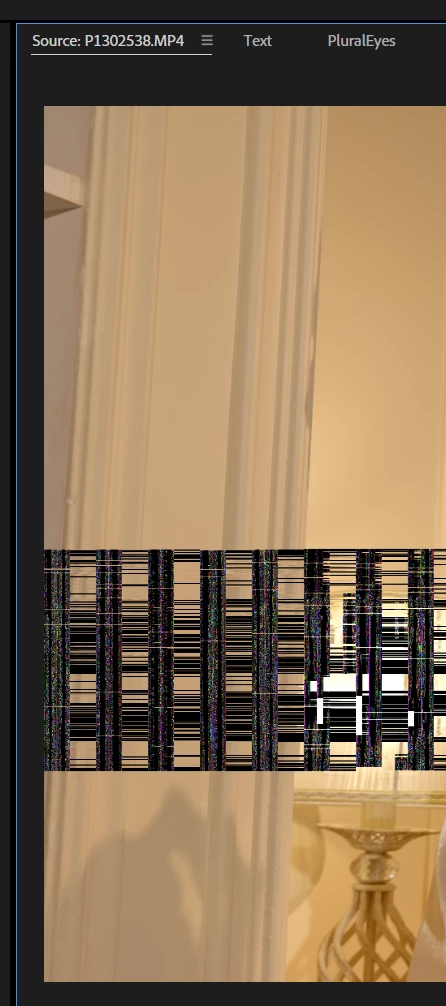
What is this?

Sometimes it appears and disappears after a few seconds. We exclude the videocard and drivers.


6 replies

R Neil Haugen
Legend
Nov 17, 2025 4:56 PM UTC

That is nearly always a GPU card or driver issue, so unless I know how you decided to exclude the GPU, it's useless to even suggest something.

Translate
Everyone's mileage always varies ...
Inspiring
Nov 17, 2025 8:07 PM UTC

I have experience with a faulty video card. And the problem is only in Premiere, which means the problem is in the software. If the video card is faulty, artifacts will be present everywhere, even on the desktop. So we can rule out the video card and drivers. Any other options?

Translate
Intel Core i7-14700K 3.4GHz/33MB s1700 BOX MSI MAG Z790 Tomahawk Max Kingston Fury DDR5-6400 65536MB PC5-51200 be quiet! MSI PCI-Ex GeForce RTX 5070 Ti Gaming Trio OC 16GB GDDR7 SSD Samsung 990 Pro 2TB M.2 PCIe 4.0 x4 NVMe 2.0 V-NAND 3bit MLC SSD Samsung 990 Pro 1TB M.2 PCIe 4.0 x4 NVMe 2.0 V-NAND 3bit MLC Toshiba MG Series Enterprise 20TB 7200rpm 512MB MG10ACA20TE 3.5 SATA III Windows 11 Pro 25H2
R Neil Haugen
Legend
Nov 17, 2025 8:20 PM UTC

I've been helping troubleshoot a long time in both Premiere and actually in Resolve also. I've seen this image before, and it was always a driver issue. So that is all I can advise, I've never seen this not be a driver issue. And whether it happens in one app or all seems to be immateriel ... it is fixed with driver changes. Either updating, going to Studio from gaming (if Nvidia card), or at times even going back a driver or two.


Each to our own devices, of course.

Translate
Everyone's mileage always varies ...
John T Smith
Community Expert
Community Expert
Nov 17, 2025 4:50 PM UTC

>We exclude the videocard and drivers


How did you do that?

What is your video card and driver?


Do not count on Windows to be fully up to date when it comes to device drivers
Go to the vendor site to be sure you have an updated driver for your graphic adapter

Also check (copied link) https://www.tomshardware.com/reviews/gpu-hierarchy,4388.html
.
https://helpx.adobe.com/premiere-pro/kb/gpu-and-gpu-driver-requirements-for-premiere-pro.html
.
nVidia Driver Downloads https://www.nvidia.com/Download/index.aspx?lang=en-us
-for all Adobe programs use the STUDIO driver, not the GAMING driver
-To achieve the highest level of reliability, Studio Drivers undergo extensive
-testing against multi-app creator workflows and multiple revisions of the top
-creative applications from Adobe to Autodesk and beyond
.
If you have a laptop you MAY also need to check for a laptop specific nVidia driver
-SOME laptops require an approved driver from the laptop company, not nVidia
.
AMD/ATI Driver https://www.amd.com/en/support
.
Intel https://downloadcenter.intel.com/product/211969/Intel-HD-Graphics-Family
https://www.askwoody.com/newsletter/free-edition-working-with-the-intel-driver-support-assistant/

Translate
Inspiring
Nov 17, 2025 8:09 PM UTC

I don't need to update anything. I noticed this problem a long time ago, and it disappears almost immediately. Something in the program needs to be changed, but what? The drivers are different, the Adobe versions are different.

Translate
Intel Core i7-14700K 3.4GHz/33MB s1700 BOX MSI MAG Z790 Tomahawk Max Kingston Fury DDR5-6400 65536MB PC5-51200 be quiet! MSI PCI-Ex GeForce RTX 5070 Ti Gaming Trio OC 16GB GDDR7 SSD Samsung 990 Pro 2TB M.2 PCIe 4.0 x4 NVMe 2.0 V-NAND 3bit MLC SSD Samsung 990 Pro 1TB M.2 PCIe 4.0 x4 NVMe 2.0 V-NAND 3bit MLC Toshiba MG Series Enterprise 20TB 7200rpm 512MB MG10ACA20TE 3.5 SATA III Windows 11 Pro 25H2
