


gewanbrown
Participating Frequently
June 10, 2026
Answered

What's the easiest and fastest way to do a garbage matte in Premiere 2026? The new tools are not intuitive and or not working. I just want to mask out a small section of a video that I am overlaying on another.

  • June 10, 2026
  • 1 reply
  • 19 views

What's the easiest and fastest way to do a garbage matte in Premiere 2026? The new tools are not intuitive and or not working. I just want to mask out a small section of a video that I am overlaying on another
    Correct answer Kevin-Monahan

    Hi gewanbrown,

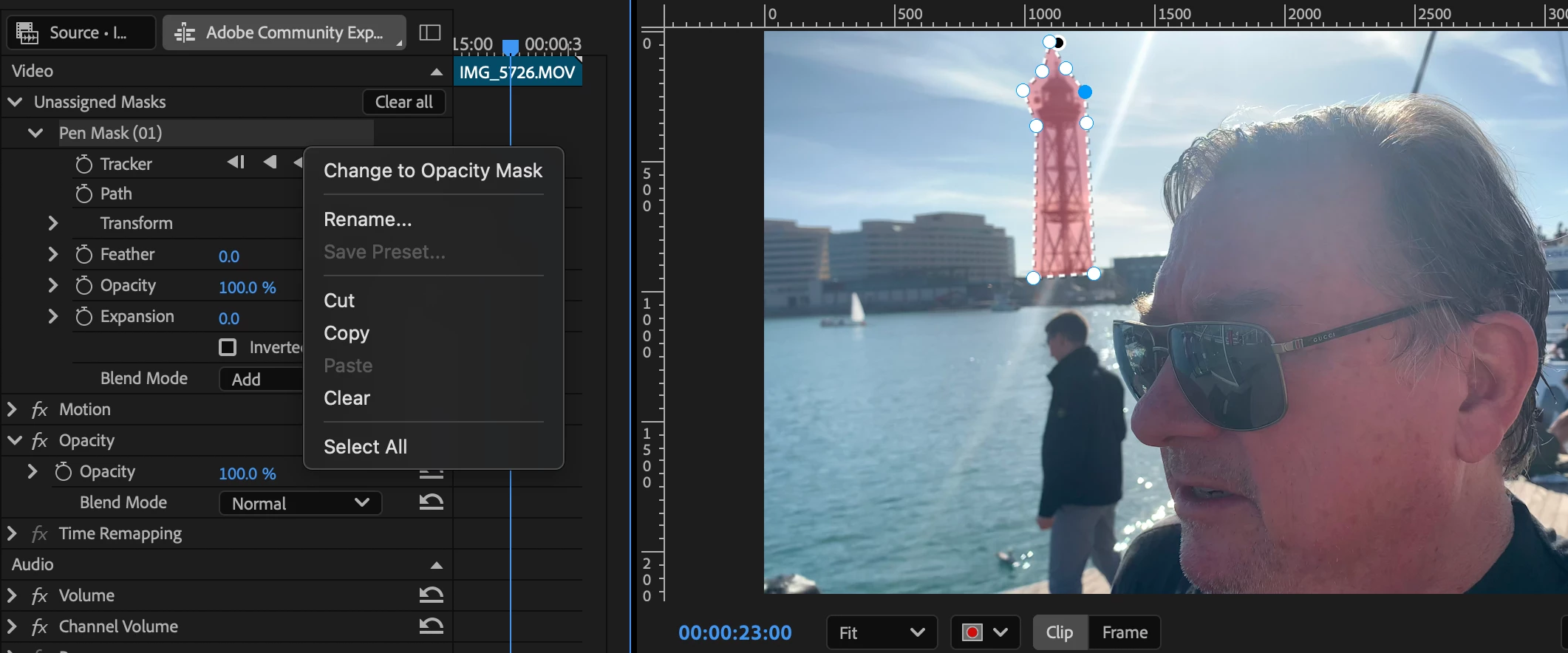
    Thanks for the post. I usually use the Pen Mask tool for quick garbage mattes. Have you tried that? The trick is to right-click on the mask name in the Effect Controls panel and change it to an opacity mask. Does that work for you? Let me know.

    Here are more resources for you: https://adobe.ly/4eaVlb3

    Feel free to come back with any questions.

    Thanks,
    Kevin

    1 reply

    Kevin-MonahanCommunity ManagerCorrect answer
    Community Manager
    June 11, 2026

    Hi gewanbrown,

    Thanks for the post. I usually use the Pen Mask tool for quick garbage mattes. Have you tried that? The trick is to right-click on the mask name in the Effect Controls panel and change it to an opacity mask. Does that work for you? Let me know.

    Here are more resources for you: https://adobe.ly/4eaVlb3

    Feel free to come back with any questions.

    Thanks,
    Kevin

    gewanbrown
    Participating Frequently
    June 11, 2026

    Thanks Kevin!  Had not known or seen about right-clicking to select the mask type.  I’ve always believed mattes and masks are about transparency to begin with.  🤙🏼

    Community Manager
    June 12, 2026

    Right on. Glad the advice helped. A little shot of me in Barcelona to visualize! lol. Cheers.


    Take Care,

    Kevin