


Participating Frequently
April 9, 2026
Question

When exporting using Media Encoder, video looks washed out. MY answer:

  • April 9, 2026
  • 2 replies
  • 26 views

This is not really a question, but an answer. My answer, anyway. (Dammit - Had an even longer explanation of all this but Adobe wiped it all out when I went to “edit” it. Grrrr. So here goes a shorter statement...) When exporting using Media Encoder video looks washed out. When NOT using Media Encoder, video looks the same (as what you see in your Program Monitor.) This problem IS real. It’s subtle but clear and often UNACCEPTABLE. And there is no “fix”. It is very apparent when using QT for playback, and, more critically, for me, as videos show/play on Vimeo. I had for a time applied a Gamma Correction LUT on export to restore some of the contrast which had been lost (adding it under EFFECTS in the export settings.) I didn't like it, but it seemed to fix the problem. But what was it doing to everything else? I don’t know, but it probably wasn't good. I stopped using it over time, thinking, I guess, “Adobe must have fixed this problem by now.” But no...) After many hours / days / months of researching, I can tell you: There IS NO FIX (other than applying a LUT to restore contrast. If I’m wrong here, someone please prove it.) So what should you do? Stop using Media Encoder to export (if you don’t need it.). There is no technical downside to PICTURE. Yes, you can’t use all the other export settings, but it does not effect picture. (So I have read and confirm with my eyes.) So that’s it. I attach some pictures which demonstrate the loss of contrast when using Media Encoder. Hope they come out clear enough to be of use. I’m aware there are many, many additional variables involved, but I can’t spend any more time tracing them all out. This works for me. Cheers.

QUICKTIME 

VIMEO
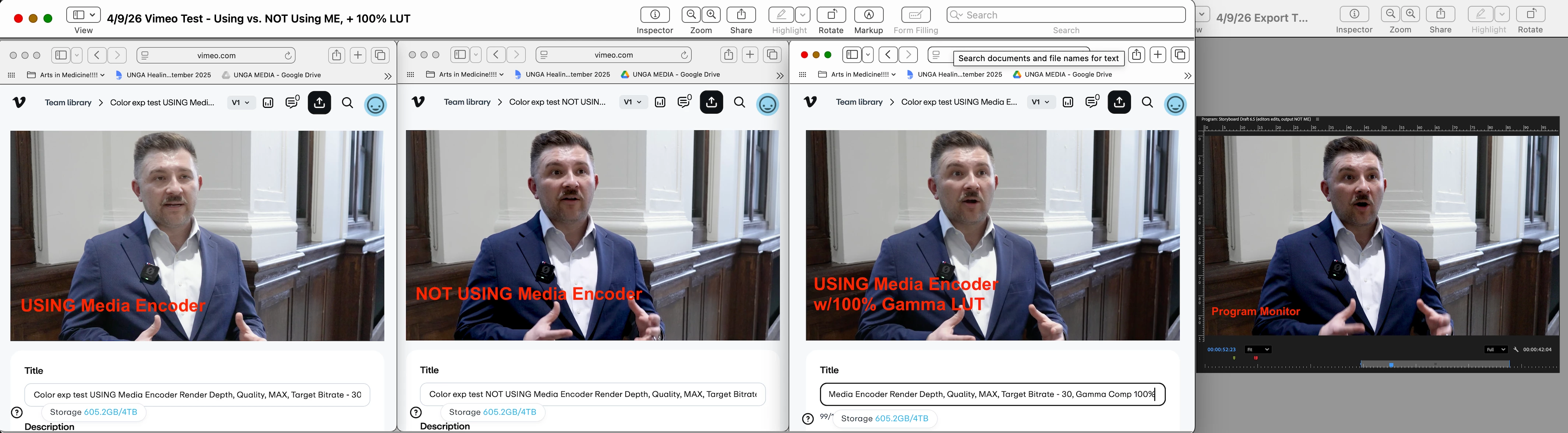
 

    2 replies

    R Neil Haugen
    Legend
    April 9, 2026

    First, understand that I work for, with, and teach pro colorists, who must always pass the dreaded QC machines for broadcast streaming services with their exports, and are nearly all total Mac geeks.


    They are furious with Apple. And have been for years.


    Because yes, there is an unsolvable problem … that Apple chose to use a non-standard and totally unique to their ‘ecosystem’ display transform for Rec.709/SDR media. Rec.709 clearly specifies a display transform of (essentially) gamma 2.4.


    Apple chose to set their in-house ColorSync Cm utility to use a display transform for Rec.709 video playback of (essentially) gamma 1.96.


    You cannot get the same visual image displaying media at two different display gamma transforms.


    So you had been using the ancient “gamma correction LUT” … right? 


    That was only a band-aid useful .. on Macs. But even on Macs, it was useful only on those without Reference modes set to HDTV … because those Macs also use the correct gamma 2.4 display transform!


    Understand … only Macs without Reference modes set to HDTV … see the same thing you do when playing media in QuickTime player on your Mac.


    All PCs, most Androids, all broadcast compliant video systems, most TVs, and of course, those Macs with Reference modes set to HDTV, will show the darker image.


    And you’re right, there isn’t a true fix for this. BlackMagic has tried both a change of the NCLC tag in the file header to get Macs to use the correct transform, and now they’ve tried a different tack to get that correct transform on those affected Macs. Which, like the NCLC tag option, works some of the time on some Macs.


    In Premiere, you can set the viewer gamma option to gamma 1.96, and then do your grading. On export, played back in Qt player on your Mac, you should get a pretty close match.


    Of course, on my PC, that same file would be too dark and oversaturated. As it would be on everything but Macs without Reference modes set to HDTV.


    Yea, that’s a right mess.


    For an example, try viewing a Rec.709 video on your Mac in QuickTime player, then in VLC or Potplayer. Qt Player will allow ColorSync to set the display transform to 1.96. While VLC and Potplayer typically control CM themselves, and apply the correct gamma 2.4 display transform.


    As to the difference between Pr and Me exports, that apparently does exist, as some others have posted about it. But it might be a Mac only thing, as I can’t replicate on my Pc.

    Everyone's mileage always varies ...
    DAVID 640Author
    Participating Frequently
    April 9, 2026

    Wow - Thanking for jumping in on this question, Neil. Been reading you for years and am always amazed at how much you give to the video editing community. Kudos and Thanks! BTW, I may have learned that “ancient” “gamma correction LUT” band-aid from you. Or, if not from you, then likely in one of the lively discussions you participated in or even led. And thanks also for re-re-reconfirming that I’m not crazy on this point. It’s a real pain! Cheers.

    R Neil Haugen
    Legend
    April 9, 2026

    Some of the colorists I know are such long deep Mac geeks, they even know a few people “in Cupercino” … and have had epic arguments with them about this. To (sadly) no avail.


    As one of them talked in a podcast recently, he had a HUGE HUGE HUGE hope back in 2019 when the first real HDR grading monitors came out that within a couple years we’d basically all transition everything to HDR and the Rec.709 gamma mess would just … go away.


    Yet seven years later, it’s still here. Because HDR is still such a freaking mess all on its own. Oft referred to by colorists as the “Wild Wild West of Color”.

    Everyone's mileage always varies ...
    John T Smith
    Community Expert
    Community Expert
    April 9, 2026

    >Adobe wiped it all out 


    Nope… Adobe rents this forum software from a company named Gainsight


    We are all figuring out the ‘finer points’ of using Gainsight
