

randall_7409
Participant
January 28, 2026
Question

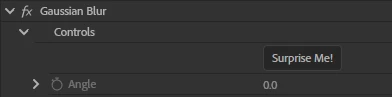
When I go to use an effect in effect controls, the rectangle tool, the oval tool and the pen tool icons do not show up below each effect. How can I correct this?
  • January 28, 2026
  • 2 replies
  • 40 views

When I go to use an effect in effect controls, the rectangle tool, the oval tool and the pen tool icons do not show up below each effect. How can I correct this?


    2 replies

    Stan Jones
    Community Expert
    Community Expert
    January 28, 2026

    @randall_7409,


    As Neil says, the new masking tools and procedures have changed a lot, and there is a learning curve.

    Start with the helpx page called “Redesigned Rectangle, Ellipse, and Pen tools,” and work down in the index to the left.

    https://helpx.adobe.com/premiere/desktop/add-video-effects/create-masks-and-composites/rectangle-ellipse-and-pen-masks.html

    As of today, 1/28/26, the helpx pages contain some old content regarding masks. The ones  that are clearly active have a “Last updated” date of Jan 21, 2026 or newer.

    Stan


    R Neil Haugen
    Legend
    January 28, 2026

    Check their online Help files about masking in 26.x ... I’m not sure as this is so new for all of us, but that might need to use a mask you create with the new masking tool options.

    Everyone's mileage always varies ...