
Participant
April 8, 2017
Question

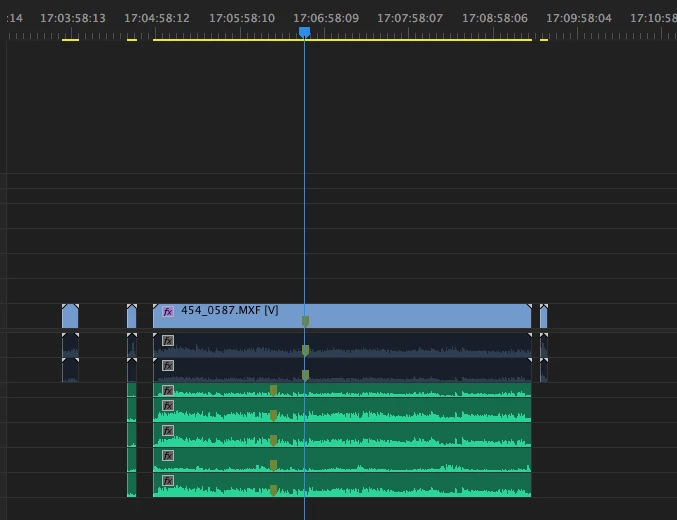
when I put a marker on a clip in the timeline, this create a double marker on the audio, but not in the same place

  • April 8, 2017
  • 2 replies
  • 1035 views

Hi, I'm on Premiere CC 2017 and when I put a marker on a clip in the timeline, this create a double marker on the audio but in an other place! Do you know why and how to fix this and have my marker on the same line for audio and video.
This topic has been closed for replies.

2 replies

Participant
September 5, 2017

This issue happen to me when I create a multi-camera clip and dessync this multiclip on a sequence and add a marker.

I guess this happens because the clip marker is based on the timecode of the source clip. If your multi-cam clip is out of sync (in relation with the source clip) on the sequence and you put a clip marker on the image (i.e. 3:45:30 of the source clip timecode), the same clip markers will appear in the audio (on the same source clip timecode 3:45:30).

Try to "Open in timeline" the multi-cam clip. If you need to ressync, ressync there, not direct on sequence, this mess up the markers.

I'm having issues on using multiclip files on Premiere (newbie), so this is only a observation, I don't know if it is just a configuration, a limitation or a bug.

(By the way, if somebody knows how to correct this: adding clip markers generates two same markers on the Markers panel (the image and the audio marker, even more if you have more audio tracks). This happens only on certain sequences. It is a bug?)

Legend
April 10, 2017

The marker on the green clips was created at the same time as the other markers?  A single keystroke created all 8 markers?