
Participant
November 29, 2023
Question

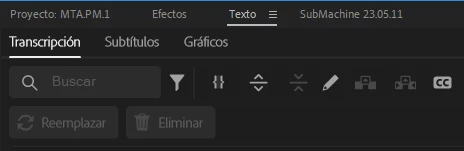
When I try to delete the spaces using the transcription it does not allow me to click the option
  • November 29, 2023
  • 2 replies
  • 291 views

When I try to delete the spaces using the transcription it does not let me click on the option, the button is grayed out and does not let me access the option, is there anything else I have to press for the function to work correctly and actually delete what I need it to delete?

This topic has been closed for replies.

2 replies

Participant
August 30, 2024

Hi @naztius @Kevin-Monahan 
I have encountered the same problem, is there now a solution for it?
BR
Stefan

Kevin J. Monahan Jr.
Community Manager
Community Manager
November 29, 2023

Hi @naztius,

Thanks for the question. You say you want to delete pauses but you have a word entered into the search bar. That seems odd. Is your filter menu (looks like a funnel) set correctly? In the overflow menu (three dots), does your Transcript View Options have "pauses" enabled? I hope we can help.


Thanks,
Kevin

Kevin Monahan - Sr. Community and Engagement Strategist – Adobe Pro Video and Audio
naztiusAuthor
Participant
November 30, 2023

I have everything selected as it should be, are there any extra settings to make it work correctly?

Kevin J. Monahan Jr.
Community Manager
Community Manager
December 1, 2023

Hi,

In Preferences > Transcription, is everything set up there as you would expect? Sorry for the frustration!


Thanks,
Kevin


Kevin Monahan - Sr. Community and Engagement Strategist – Adobe Pro Video and Audio