nickl62547381
Participant
March 13, 2018
Answered

Whenever I'm editing a video an error pops up that video and audio got out of sync

  • March 13, 2018
  • 2 replies
  • 281 views

So I'm very frustrated right now after researching this I still have not found a solution to this out of sync issue. I tried changing the names of my mp4 files to mov, I tried speeding the video up nothing works. Whenever I'm editing a small yellow box pops op on the screen and tells me that: "Audio and video clock out-of-synch at xxx" and I can't do anything about it. Do you guys have a solution for this problem ?
This topic has been closed for replies.
Correct answer R Neil Haugen

Ok, phone video. Which is both long-GOP interframe and variable frame-rate (VFR), the latter meaning it has a varying number of frames per second based on how few the phone thought would look adequate. The audio however is recorded at a constant rate.

PrPro 2018 can work with most VFR media adequately, but 2017 needs to work only with CFR ... constant frame-rate. If you have VFR in 2017 or a VFR clip in 2018 that doesn't keep sync, you need to download the free conversion app Handbrake, and convert the clips to CFR. You can do so in batches, of course. If you've got a bunch of clips, running them overnight makes sense.

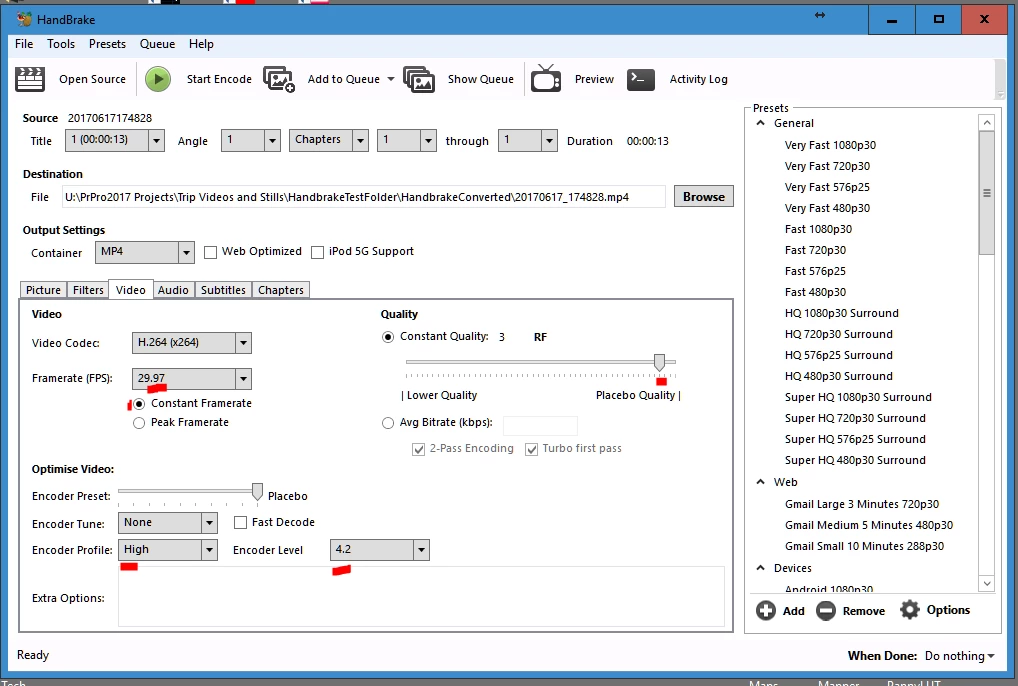
I show my preset below ... note the red-spotted areas. You need to set a specific number frame-rate AND click the Constant Framerate button. I also recommend settting the Encoder Profile to High, and level to at least 4.2, along with "Placebo Quality" so it doesn't shrink the media further in re-compression.

Neil

2 replies

nickl62547381
Participant
March 14, 2018

what do you mean ? they were recorded on a phone. oh wait I think I know a fix but if you know please tell me

R Neil Haugen
R Neil HaugenCorrect answer
Legend
March 14, 2018

Ok, phone video. Which is both long-GOP interframe and variable frame-rate (VFR), the latter meaning it has a varying number of frames per second based on how few the phone thought would look adequate. The audio however is recorded at a constant rate.

PrPro 2018 can work with most VFR media adequately, but 2017 needs to work only with CFR ... constant frame-rate. If you have VFR in 2017 or a VFR clip in 2018 that doesn't keep sync, you need to download the free conversion app Handbrake, and convert the clips to CFR. You can do so in batches, of course. If you've got a bunch of clips, running them overnight makes sense.

I show my preset below ... note the red-spotted areas. You need to set a specific number frame-rate AND click the Constant Framerate button. I also recommend settting the Encoder Profile to High, and level to at least 4.2, along with "Placebo Quality" so it doesn't shrink the media further in re-compression.

Neil

Everyone's mileage always varies ...
R Neil Haugen
Legend
March 13, 2018

How are those mp4 files created?

Neil

Everyone's mileage always varies ...